

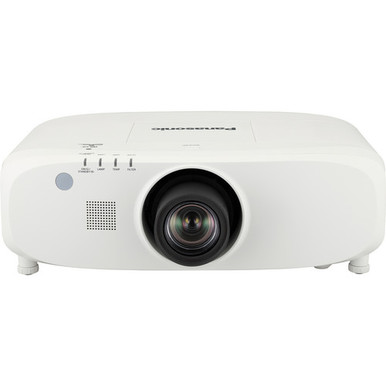
Panasonic PT-EX800ZU vs PT-JW130HBU: Which Projector Should You Choose? has no honest one-line answer based on model names alone. The supplied facts establish two useful differences. The Panasonic PT-EX800ZU is rated at 7,500 lumens with XGA resolution, while the Panasonic PT-JW130HBU has WXGA resolution. Brightness and several installation details are not supplied for the PT-JW130HBU.
That evidence points to a requirements-first decision. Churches, schools, conference room teams, and installers need to match resolution and documented brightness to the room, content, screen plan, and existing AV standard. They also need verified placement, signal, control, and procurement details before approving a bill of materials. This comparison explains where each projector fits, which facts remain open, how to judge price-to-performance, and when two supplied WUXGA short-throw alternatives deserve consideration.
Products at a Glance
- Option 1: Panasonic PT-EX800ZU XGA LCD Projector with Speaker
- For buyers whose approved display requirement calls f…: Panasonic PT-JW130HBU WXGA 1000-Lumen Space Player DLP Track-Mount Type Projector
- For projects that specify WUXGA, a 5,200-lumen rating…: Panasonic PT-CMZ50 WUXGA Ultra-Short Throw Laser Projector – Professional Golf Simulator Display
- For layouts that call for a documented 8,000-lumen fi…: Panasonic PT-VMZ6STBU8 8,000 Lumens WUXGA Laser Golf Simulator Projector – Short Throw, 4K Input, Black
Quick Comparison Table
| Feature | Panasonic PT-EX800ZU XGA LCD Projector with Speaker | Panasonic PT-JW130HBU WXGA 1000-Lumen Space Player DLP Track-Mount Type Projector | Panasonic PT-CMZ50 WUXGA Ultra-Short Throw Laser Projector – Professional Golf Simulator Display | Panasonic PT-VMZ6STBU8 8,000 Lumens WUXGA Laser Golf Simulator Projector – Short Throw, 4K Input, Black |
|---|---|---|---|---|
| Brightness | 7500 lumens | 5200 lumens | 8,000 Lumens | |
| Resolution | XGA | WXGA | WUXGA | WUXGA |
| Best For | Projects with a documented 7,500-lumen target and an XGA content workflow. | Buyers whose approved display requirement calls for WXGA and who can verify the remaining room and installation details. | Projects that specify WUXGA, a 5,200-lumen rating, and ultra-short-throw placement. | Layouts that call for a documented 8,000-lumen figure, WUXGA resolution, and short throw. |
| Throw Type | Ultra short throw | Short throw | ||
| Recommended Buyer | Projects with a documented 7,500-lumen target and an XGA content workflow. | Buyers whose approved display requirement calls for WXGA and who can verify the remaining room and installation details. | Projects that specify WUXGA, a 5,200-lumen rating, and ultra-short-throw placement. | Layouts that call for a documented 8,000-lumen figure, WUXGA resolution, and short throw. |
Product Images
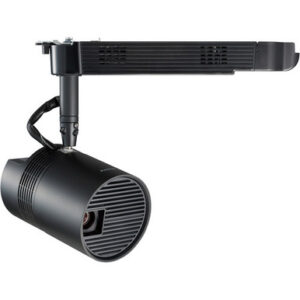

Projector Options from AudioVideoNation
1. Panasonic PT-EX800ZU XGA LCD Projector with Speaker
Who should compare it: Projects with a documented 7,500-lumen target and an XGA content workflow.
Why it belongs here: It is one of the two comparison models and has a confirmed pairing of 7,500 lumens and XGA resolution. Those facts give buyers a concrete basis for checking it against a written AV requirement.
SKU: PT-EX800ZU
Key Features
- 7,500-lumen brightness rating
- XGA resolution
- Exact PT-EX800ZU SKU for bid and purchase-order identification
Things to Consider
Confirm that XGA matches the planned sources and content. Throw geometry, mounting, connections, control, and audio details also need verification before the projector is specified.
2. Panasonic PT-JW130HBU WXGA 1000-Lumen Space Player DLP Track-Mount Type Projector
Who should compare it: Buyers whose approved display requirement calls for WXGA and who can verify the remaining room and installation details.
Why it belongs here: It is the second comparison model and provides a WXGA option for projects written around that resolution class. Its limited supplied facts also make pre-purchase documentation especially important.
SKU: PT-JW130HBU
Key Features
- WXGA resolution
- A different confirmed resolution class from the XGA PT-EX800ZU
- Exact PT-JW130HBU SKU for documentation and quote requests
Things to Consider
The supplied facts do not establish brightness or throw type. Verify image geometry, mounting, signal connections, control, audio design, and current commerce details through the linked page before ordering.
3. Panasonic PT-CMZ50 WUXGA Ultra-Short Throw Laser Projector – Professional Golf Simulator Display
Who should compare it: Projects that specify WUXGA, a 5,200-lumen rating, and ultra-short-throw placement.
Why it belongs here: It gives buyers a supplied WUXGA, 5,200-lumen, ultra-short-throw alternative when neither main comparison model matches the required resolution or placement approach.
SKU: PT-CMZ50U
Key Features
- 5,200-lumen brightness rating
- WUXGA resolution
- Ultra-short-throw classification
Things to Consider
Verify the exact image size and distance, mounting plan, source connections, control requirements, and every required accessory before treating it as a substitute for either comparison model.
4. Panasonic PT-VMZ6STBU8 8,000 Lumens WUXGA Laser Golf Simulator Projector – Short Throw, 4K Input, Black
Who should compare it: Layouts that call for a documented 8,000-lumen figure, WUXGA resolution, and short throw.
Why it belongs here: It broadens the shortlist for buyers whose requirements move to WUXGA and short throw. The supplied 8,000-lumen figure also supports comparison with a documented brightness target.
SKU: PT-VMZ82BU8
Key Features
- 8,000-lumen brightness rating
- WUXGA resolution
- Short-throw classification
Things to Consider
Confirm the exact model designation shown on the linked page before adding it to a purchase order. Mounting, geometry, signal, control, and accessory details also need verification.
Panasonic PT-EX800ZU XGA LCD Projector with Speaker vs Panasonic PT-JW130HBU WXGA 1000-Lumen Space Player DLP Track-Mount Type Projector: Main Differences
- Choose Panasonic PT-EX800ZU XGA LCD Projector with Speaker if Projects with a documented 7,500-lumen target and an XGA content workflow..
- Choose Panasonic PT-JW130HBU WXGA 1000-Lumen Space Player DLP Track-Mount Type Projector if Buyers whose approved display requirement calls for WXGA and who can verify the remaining room and installation details..
- Choose Panasonic PT-CMZ50 WUXGA Ultra-Short Throw Laser Projector – Professional Golf Simulator Display if Projects that specify WUXGA, a 5,200-lumen rating, and ultra-short-throw placement..
- Choose Panasonic PT-VMZ6STBU8 8,000 Lumens WUXGA Laser Golf Simulator Projector – Short Throw, 4K Input, Black if Layouts that call for a documented 8,000-lumen figure, WUXGA resolution, and short throw..
Fast answer: match the projector to the written requirement
Choose the PT-EX800ZU for a project that calls for a documented 7,500-lumen figure and accepts XGA resolution. Those are the two confirmed performance facts supplied for it. That makes the projector straightforward to place on a requirements sheet built around the same brightness and resolution targets.
Keep the PT-JW130HBU on the shortlist when WXGA is the required resolution class. Pause before approval, though. Its supplied facts do not establish brightness or throw type, so the project team still needs enough documentation to validate room geometry and light-output requirements. Missing data should trigger a verification step, not an assumption.
Neither choice can be declared universally superior. One has a confirmed brightness-and-resolution pairing. The other addresses a different resolution requirement but needs more specification work. If the project calls for WUXGA plus short or ultra-short throw, the supplied PT-CMZ50U and PT-VMZ82BU8 are more relevant alternatives to investigate.
Panasonic XGA vs WXGA projector specifications
The PT-EX800ZU combines XGA resolution with a supplied brightness rating of 7,500 lumens. That figure can be checked directly against a bid requirement, design target, or room standard. XGA must also match the planned sources and content. A brightness match does not resolve a format mismatch.
The PT-JW130HBU is confirmed as WXGA. That may align with a project already standardized on WXGA, but the resolution label answers only one part of the design. The supplied facts do not document its brightness, so they cannot support a responsible lumen comparison against the PT-EX800ZU. Unknown is not the same as lower. It is a procurement question that must be closed.
Resolution labels also do not establish input support, scaling behavior, throw geometry, mounting requirements, control options, or the audio path. Verify those items against the actual sources, screen plan, and control system. Do not infer them from the product family.
Use exact SKUs in requests for documentation and quotes. PT-EX800ZU and PT-JW130HBU are close enough in naming to invite avoidable ordering errors, yet they represent different resolution classes and different levels of documented detail.
PT-EX800ZU and PT-JW130HBU deployment fit
Church teams should begin with screen dimensions, sightlines, room light during services, and the mix of lyrics, presentation slides, and video. If the approved brief specifies 7,500 lumens and XGA, the PT-EX800ZU matches those known values. If WXGA is required, the PT-JW130HBU fits that resolution criterion, but its brightness and placement details still need confirmation.
Schools should check classroom or auditorium standards before choosing. Record the expected source resolution, mounting position, control method, and support practices across the fleet. The PT-EX800ZU can stay on a list written around XGA and 7,500 lumens. The PT-JW130HBU belongs in a WXGA evaluation. Neither supplied record proves compatibility with a district's devices or control platform.
Conference room teams should pay close attention to the source canvas used for presentations and conferencing layouts. Resolution is relevant, but room lighting, screen size, viewing distance, input routing, and control requirements can change the decision. Those installation facts need separate verification for both projectors.
Installers should treat the model selection as the start of engineering, not the finished design. Request the mounting, optical, signal, control, power, and service-access information needed to produce drawings. Confirm every required accessory by exact part number. A projector can match the requested resolution and still fail the placement plan.
Projector installation needs to verify before ordering
Neither main projector has a supplied throw type, so the available facts are not enough to create a placement drawing. Close the following gaps before approving either model:
- Confirm the required image dimensions, projector-to-screen distance, and acceptable mounting location.
- Verify throw data and any lens requirements against the exact projector SKU. Do not assume that a separate Panasonic lens fits either projector.
- Match the source formats and physical connections to the projector's documented inputs. Include any required signal extension or conversion in the design.
- Confirm the control method needed by the room system, including every command or status function the operator depends on.
- Design the audio path independently until documented audio details establish what the projector can support.
- Check power, mounting hardware, ventilation clearances, cable access, and service access for the final location.
Run this review against the complete room plan. For a multi-room rollout, validate one repeatable design before duplicating mounts, cabling, or control programming across the site.
Price-to-performance, stock, and availability checks
Measure price-to-performance against installed requirements. Start by visiting each linked product page for current commerce details, then obtain a dated quote when the project has a fixed quantity or schedule. Confirm the quantity needed, procurement timing, and any fulfillment details that affect the installation date. No current price or inventory state is asserted here.
Next, compare total installed cost. Include verified mounting hardware, lenses or optical accessories, cabling, signal transport, conversion equipment, control work, electrical work, installation labor, and any content changes required by the selected resolution. An attractive projector price can lose its advantage if the design needs costly corrections. A higher brightness figure also creates little value when the resolution or placement plan is wrong.
Use one worksheet for every candidate. Record confirmed brightness, resolution fit, verified image geometry, source and control requirements, total installed cost, and procurement timing. Mark evidence gaps for follow-up instead of filling them with assumptions. This keeps the PT-EX800ZU and PT-JW130HBU comparison accountable even when their supplied product records contain different levels of detail.
WUXGA short-throw alternatives from Panasonic
The PT-CMZ50U is supplied with WUXGA resolution, 5,200 lumens, and an ultra-short-throw classification. Consider it when all three facts align with the room brief, especially if the design calls for ultra-short-throw placement. Exact image geometry, mounting, signal, and control details still need verification.
The PT-VMZ82BU8 is supplied with WUXGA resolution, 8,000 lumens, and short throw. It belongs on a shortlist written around that combination. Confirm the exact model designation on the linked page before adding it to a purchase order, then validate the remaining installation requirements.
These projectors should not be inserted as automatic upgrades. WUXGA changes the resolution requirement, and short or ultra-short throw changes the placement plan. Compare them with the same requirements worksheet used for the PT-EX800ZU and PT-JW130HBU. The right alternative is the one that satisfies the documented room design without unresolved assumptions.
Final decision workflow for AV buyers and installers
Freeze the requirements first. State the resolution class, required brightness, image size, placement limits, source connections, control needs, audio design, schedule, and installed-cost target.
The PT-EX800ZU has the clearer documented case when the brief calls for 7,500 lumens and XGA. The PT-JW130HBU has a clear entry point when WXGA is required, but its missing brightness and placement facts must be verified before approval. If WUXGA and constrained throw distance are part of the brief, evaluate the PT-CMZ50U or PT-VMZ82BU8 instead.
Finish with a SKU-level check of the product page, supporting documentation, quote, accessories, and room drawings. Then release the bill of materials. That sequence protects the project from a costly truth: a projector can look suitable in a short comparison and still be wrong for the installed system.
Related AudioVideoNation Links
- Browse Projector at AudioVideoNation
- View the Panasonic PT-EX800ZU
- View the Panasonic PT-JW130HBU
- Explore the Panasonic PT-CMZ50U
- Explore the Panasonic PT-VMZ82BU8
Product Information Sources
- Panasonic PT-EX800ZU XGA LCD Projector with Speaker product information
- Panasonic PT-JW130HBU WXGA 1000-Lumen Space Player DLP Track-Mount Type Projector product information
- Panasonic PT-CMZ50 WUXGA Ultra-Short Throw Laser Projector – Professional Golf Simulator Display product information
- Panasonic PT-VMZ6STBU8 8,000 Lumens WUXGA Laser Golf Simulator Projector – Short Throw, 4K Input, Black product information
FAQ
What is the main difference between the Panasonic PT-EX800ZU and PT-JW130HBU?
The supplied data identifies the PT-EX800ZU as a 7,500-lumen XGA projector and the PT-JW130HBU as a WXGA projector without a confirmed brightness figure. Buyers should base the next step on the required resolution, then verify the missing optical and installation details.
Is the PT-EX800ZU brighter than the PT-JW130HBU?
A supported brightness comparison cannot be made because only the PT-EX800ZU has a supplied brightness figure, which is 7,500 lumens. Confirm the PT-JW130HBU brightness through its linked product page and supporting documentation before comparing light output.
Which projector is better for a church, school, or conference room?
Neither projector can be named the better choice for every church, school, or conference room from the supplied facts alone. Choose the PT-EX800ZU when 7,500 lumens and XGA match the brief, or evaluate the PT-JW130HBU when WXGA is required and its remaining specifications have been verified.
Does WXGA automatically make the PT-JW130HBU better than the XGA PT-EX800ZU?
No, WXGA does not automatically make the PT-JW130HBU the better projector for a specific deployment. Resolution must match the sources, content, and room standard, while brightness, geometry, signal, and control requirements also need to be satisfied.
Where should buyers check current price, stock, and availability?
Buyers should use the linked AudioVideoNation product pages for current price and availability details. Projects with fixed quantities or deadlines should also obtain a dated quote and confirm procurement timing before scheduling installation.
What Panasonic alternatives are available if WUXGA or short throw is required?
The PT-CMZ50U is the supplied WUXGA ultra-short-throw option, while the PT-VMZ82BU8 is supplied as WUXGA short throw. Their documented brightness figures are 5,200 and 8,000 lumens respectively, but all remaining installation details should be verified for the planned room.
Conclusion
Use this Panasonic PT-EX800ZU vs PT-JW130HBU: Which Projector Should You Choose? comparison to match documented specifications to the room and installation requirements. Review the linked product pages for current purchase details before ordering.
Products Used
| SKU | Product Name | URL |
|---|---|---|
| PT-EX800ZU | Panasonic PT-EX800ZU XGA LCD Projector with Speaker | View product |
| PT-JW130HBU | Panasonic PT-JW130HBU WXGA 1000-Lumen Space Player DLP Track-Mount Type Projector | View product |
| PT-CMZ50U | Panasonic PT-CMZ50 WUXGA Ultra-Short Throw Laser Projector – Professional Golf Simulator Display | View product |
| PT-VMZ82BU8 | Panasonic PT-VMZ6STBU8 8,000 Lumens WUXGA Laser Golf Simulator Projector – Short Throw, 4K Input, Black | View product |