

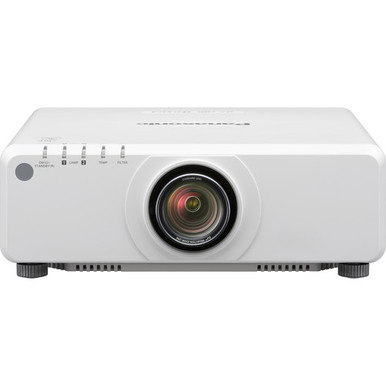
This Panasonic PT-DZ780WU Setup Guide and Buying Considerations article tackles a common purchasing problem: brightness and resolution can look right on paper while placement, signal routing, mounting, or sourcing details remain unresolved. The Panasonic PT-DZ780WU is listed at 7,000 lumens with WUXGA resolution, giving buyers two concrete specifications around which to build a room plan.
Those figures are the starting point. Churches need readable presentation content and dependable operating procedures. Schools have to account for different sources and users. Conference room teams may need the projector to fit an existing switching and control design. Installers must reconcile all of that with the physical room.
This guide explains how to scope the PT-DZ780WU installation, identify details that need confirmation, and compare four other Panasonic WUXGA projectors from the supplied product selection. It also covers availability checks and price-to-performance without relying on stale commerce information. Use the linked product pages for current purchasing details before approving the order.
Products at a Glance
- Option 1: Panasonic PT-DZ780WU WUXGA 1080p DLP Projector
- For buyers browsing the provided golf simulator categ…: Panasonic PT-FRZ50BU7 5200 Lumen WUXGA Laser Projector for Golf Simulators [USED]
- For projects designed around an ultra-short-throw lay…: Panasonic PT-CMZ50 WUXGA Ultra-Short Throw Laser Projector – Professional Golf Simulator Display
- For buyers comparing Panasonic WUXGA choices near the…: Panasonic PT-VMZ72BU8 7,300 Lumens WUXGA Laser Golf Simulator Projector – High-Brightness, Vivid Green Mode
- For buyers comparing 5,200-lumen WUXGA products who w…: Panasonic PT-VMZ51 5200-Lumen WUXGA Laser 3LCD Projector
Quick Comparison Table
| Feature | Panasonic PT-DZ780WU WUXGA 1080p DLP Projector | Panasonic PT-FRZ50BU7 5200 Lumen WUXGA Laser Projector for Golf Simulators [USED] | Panasonic PT-CMZ50 WUXGA Ultra-Short Throw Laser Projector – Professional Golf Simulator Display | Panasonic PT-VMZ72BU8 7,300 Lumens WUXGA Laser Golf Simulator Projector – High-Brightness, Vivid Green Mode | Panasonic PT-VMZ51 5200-Lumen WUXGA Laser 3LCD Projector |
|---|---|---|---|---|---|
| Brightness | 7000 lumens | 5200 Lumen | 5200 lumens | 7,300 Lumens | 5200 lumens |
| Resolution | WUXGA | WUXGA | WUXGA | WUXGA | WUXGA |
| Best For | Teams evaluating a 7,000-lumen WUXGA projector after validating room geometry, signal connections, mounting, and control requirements. | Buyers browsing the provided golf simulator category who are open to a used listing and will verify condition and project requirements before purchase. | Projects designed around an ultra-short-throw layout after measured image geometry and mounting requirements have been confirmed. | Buyers comparing Panasonic WUXGA choices near the PT-DZ780WU’s listed brightness while independently validating installation requirements. | Buyers comparing 5,200-lumen WUXGA products who will confirm that the exact listing fits their room and purchasing brief. |
| Throw Type | Ultra short throw | ||||
| Recommended Buyer | Teams evaluating a 7,000-lumen WUXGA projector after validating room geometry, signal connections, mounting, and control requirements. | Buyers browsing the provided golf simulator category who are open to a used listing and will verify condition and project requirements before purchase. | Projects designed around an ultra-short-throw layout after measured image geometry and mounting requirements have been confirmed. | Buyers comparing Panasonic WUXGA choices near the PT-DZ780WU’s listed brightness while independently validating installation requirements. | Buyers comparing 5,200-lumen WUXGA products who will confirm that the exact listing fits their room and purchasing brief. |
Product Images
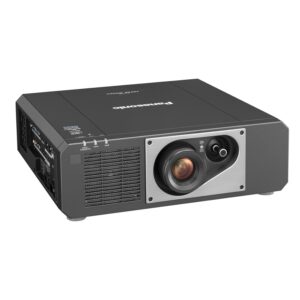

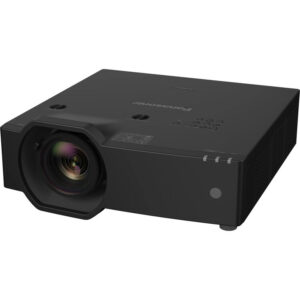
Projector Options from AudioVideoNation
1. Panasonic PT-DZ780WU WUXGA 1080p DLP Projector
Who should compare it: Teams evaluating a 7,000-lumen WUXGA projector after validating room geometry, signal connections, mounting, and control requirements.
Why it belongs here: The PT-DZ780WU is the focus of this guide and is listed at 7,000 lumens with WUXGA resolution. Those confirmed facts make it the reference point for the setup plan and product comparison.
SKU: PT-DZ780WU
Key Features
- Listed brightness: 7,000 lumens
- Listed resolution: WUXGA
- Product categories include Multimedia Projectors, Projectors, and Video
- Exact model and SKU: PT-DZ780WU
Things to Consider
Confirm throw geometry, lens requirements, connections, mounting details, included items, and current commerce terms before finalizing the design.
2. Panasonic PT-FRZ50BU7 5200 Lumen WUXGA Laser Projector for Golf Simulators [USED]
Who should compare it: Buyers browsing the provided golf simulator category who are open to a used listing and will verify condition and project requirements before purchase.
Why it belongs here: This supplied Panasonic alternative is listed at 5,200 lumens with WUXGA resolution. Its golf simulator category and used designation give buyers a distinct listing context to assess.
SKU: PT-FRZ50BU7-USED
Key Features
- Listed brightness: 5,200 lumens
- Listed resolution: WUXGA
- Placed in the Golf Simulator Projectors and Projectors categories
- The supplied product name identifies the listing as used
Things to Consider
Review the linked page for current condition details, included items, placement requirements, connections, and commerce terms. Do not assume it is a direct PT-DZ780WU replacement.
3. Panasonic PT-CMZ50 WUXGA Ultra-Short Throw Laser Projector – Professional Golf Simulator Display
Who should compare it: Projects designed around an ultra-short-throw layout after measured image geometry and mounting requirements have been confirmed.
Why it belongs here: The PT-CMZ50 is listed at 5,200 lumens with WUXGA resolution and is the supplied option explicitly identified as ultra short throw. It provides a placement-led comparison with the PT-DZ780WU.
SKU: PT-CMZ50U
Key Features
- Listed brightness: 5,200 lumens
- Listed resolution: WUXGA
- Listed throw type: Ultra short throw
- Categories include Golf Simulator Projectors and Install Projectors 5000 Lumen+
Things to Consider
Ultra-short-throw placement still requires exact room measurements. Verify image geometry, mounting, connections, included items, and current commerce details on the linked page.
4. Panasonic PT-VMZ72BU8 7,300 Lumens WUXGA Laser Golf Simulator Projector – High-Brightness, Vivid Green Mode
Who should compare it: Buyers comparing Panasonic WUXGA choices near the PT-DZ780WU’s listed brightness while independently validating installation requirements.
Why it belongs here: This Panasonic alternative is listed at 7,300 lumens with WUXGA resolution, placing its stated brightness close to the PT-DZ780WU’s 7,000-lumen figure.
SKU: PT-VMZ72BU8
Key Features
- Listed brightness: 7,300 lumens
- Listed resolution: WUXGA
- Placed in the Golf Simulator Projectors and Projectors categories
- Exact supplied SKU: PT-VMZ72BU8
Things to Consider
A 7,300-lumen rating does not establish room fit by itself. Verify throw geometry, connections, mounting, included items, and current commerce details before selection.
5. Panasonic PT-VMZ51 5200-Lumen WUXGA Laser 3LCD Projector
Who should compare it: Buyers comparing 5,200-lumen WUXGA products who will confirm that the exact listing fits their room and purchasing brief.
Why it belongs here: The PT-VMZ51 adds another listed 5,200-lumen WUXGA choice from Panasonic. Its Home Theater Projectors category provides a different shopping context from the install and golf simulator listings.
SKU: PT-VMZ51
Key Features
- Listed brightness: 5,200 lumens
- Listed resolution: WUXGA
- Placed in the Home Theater Projectors category
- Exact model and SKU: PT-VMZ51
Things to Consider
Verify room geometry, connections, mounting requirements, included items, and current commerce details. Its category label should not replace a site-specific design review.
Panasonic PT-DZ780WU WUXGA 1080p DLP Projector vs Panasonic PT-FRZ50BU7 5200 Lumen WUXGA Laser Projector for Golf Simulators [USED]: Main Differences
- Choose Panasonic PT-DZ780WU WUXGA 1080p DLP Projector if Teams evaluating a 7,000-lumen WUXGA projector after validating room geometry, signal connections, mounting, and control requirements..
- Choose Panasonic PT-FRZ50BU7 5200 Lumen WUXGA Laser Projector for Golf Simulators [USED] if Buyers browsing the provided golf simulator category who are open to a used listing and will verify condition and project requirements before purchase..
- Choose Panasonic PT-CMZ50 WUXGA Ultra-Short Throw Laser Projector – Professional Golf Simulator Display if Projects designed around an ultra-short-throw layout after measured image geometry and mounting requirements have been confirmed..
- Choose Panasonic PT-VMZ72BU8 7,300 Lumens WUXGA Laser Golf Simulator Projector – High-Brightness, Vivid Green Mode if Buyers comparing Panasonic WUXGA choices near the PT-DZ780WU’s listed brightness while independently validating installation requirements..
- Choose Panasonic PT-VMZ51 5200-Lumen WUXGA Laser 3LCD Projector if Buyers comparing 5,200-lumen WUXGA products who will confirm that the exact listing fits their room and purchasing brief..
Panasonic PT-DZ780WU setup starts with the room
Begin with a written room brief. Record the intended image dimensions, viewing positions, mounting area, ambient-light conditions, and the content people will display. A church may switch between lyrics, presentation slides, and video. A school might connect several staff devices over the course of a day. A conference room could depend on a fixed source and switching system. Those workflows shape the installation even when the projector specification stays the same.
The PT-DZ780WU’s listed 7,000-lumen brightness gives you a clear reference point, but a lumen figure cannot determine room fit by itself. Image size, surface, ambient light, and viewing expectations all affect the decision. Define an acceptable result before ordering. That might include readable small text from the farthest seat, consistent presentation operation, or an image that remains usable under the room’s planned lighting.
WUXGA is the supplied resolution specification. Inventory the resolutions and aspect ratios used by computers, media players, switchers, and conferencing systems, then decide how the complete signal chain will handle the WUXGA display target. Test important content rather than relying on a desktop image alone. Spreadsheets, worship slides, detailed diagrams, and video expose different weaknesses.
Finish the room brief with measurable acceptance criteria. Name the sources that must work, the seats from which content must be readable, and the lighting states that will be used during sign-off. This turns setup into a testable project instead of a series of visual guesses.
Confirm throw geometry before choosing hardware
Placement is the first major item to validate because it affects the mount, cable paths, image dimensions, and service access. Measure the proposed projection distance, the image area, ceiling height, possible obstructions, and the relationship between the mounting point and screen. Confirm the PT-DZ780WU’s required throw and lens configuration against those measurements before hardware is ordered or holes are drilled.
Do not assume that a mount position used by another projector will produce the intended image with this one. Model families can require different placement plans. Verify the exact PT-DZ780WU configuration being purchased, including any lens or mounting components the design depends on. Check the load rating and attachment method of the selected mount against the actual equipment rather than estimating from appearance.
The Panasonic PT-CMZ50 is the only supplied alternative explicitly identified as ultra short throw. That makes it relevant when the project brief specifically calls for an ultra-short-throw layout. It still needs a measured installation plan. Screen dimensions, projector position, obstructions, mounting approach, and adjustment access must all be resolved before purchase.
Leave the service and clearance allowances required by current product documentation. Also plan how an installer will reach connections and mounting adjustments after the projector is secured. A location that works geometrically but blocks routine access creates avoidable labor later.
Document the approved measurements on the installation drawing. Include the reference point used for distance calculations so the installer, project manager, and buyer are working from the same geometry.
Plan the signal path, power, and control
Draw the complete signal path before selecting cables or distribution hardware. Start at every source, pass through any switcher, extender, wall plate, or conferencing system, and finish at the projector. The supplied PT-DZ780WU facts do not establish the required interfaces, so confirm its connections against every endpoint in that drawing.
Source resolution matters too. Where the source and signal chain support it, test output that matches the projector’s listed WUXGA resolution. Use the actual cable path and the real switching equipment during validation. A short bench cable cannot prove that the installed route will behave the same way. Long runs and intermediate devices should be tested as one system before ceilings or walls are closed.
Confirm power requirements from current documentation and follow the electrical practices that apply to the site. Keep power, signal, and control routes clearly identified on the plan. Label both ends of installed cables. Short labels save substantial troubleshooting time when another technician returns months later.
If the project requires centralized control, scheduled operation, monitoring, or integration with a room system, verify the exact supported control method before promising it in the scope. Network and serial assumptions should never substitute for connector and command confirmation. Record addresses, source names, and tested commands during commissioning when those functions are part of the approved design.
Build a fallback operating procedure as well. A school teacher, church volunteer, or meeting host should know how to select the correct source and recover from a basic input mistake without changing installation settings.
Commission the 7,000-lumen WUXGA projector carefully
Commissioning should begin with a temporary alignment check whenever the site allows it. Project a known grid or alignment image, verify the physical centerline, and correct the mount position before depending on electronic image correction. If the design requires particular geometry controls, confirm that the PT-DZ780WU supplies them before installation.
Next, test every approved source through the complete signal route. Check presentation text, fine lines, color slides, motion content, and any material central to the room’s purpose. Confirm that switching works in the same sequence users will follow. Repeat the test under each lighting state defined in the room brief.
The 7,000-lumen specification does not prescribe one image setting for every space. Choose settings against the agreed viewing conditions and content, then have the stakeholder approve the result. Avoid changing several variables at once. A controlled sequence makes it easier to identify whether an issue comes from physical alignment, the source, the signal path, or an image setting.
Record the final source configuration, cable labels, mounting measurements, control details, and user-facing operating steps. Photographing labeled connections can help the site team identify the intended arrangement later. Keep sensitive network details in the organization’s approved documentation system.
Complete sign-off with the people who will operate the room. Ask them to start the system, choose each common source, display representative material, and shut it down using the documented procedure. Training is complete when users can follow the workflow without an installer guiding every step.
Compare Panasonic WUXGA alternatives by deployment fit
Use the PT-DZ780WU’s listed 7,000 lumens and WUXGA resolution as the comparison baseline. The Panasonic PT-VMZ72BU8 is listed at 7,300 lumens with WUXGA resolution. That creates a close numerical brightness comparison, but the 300-lumen difference cannot settle placement, connectivity, mounting, or room suitability. Validate each projector as a separate design candidate.
Three supplied alternatives are listed at 5,200 lumens with WUXGA resolution: the Panasonic PT-FRZ50BU7, Panasonic PT-CMZ50, and Panasonic PT-VMZ51. Their listing contexts differ. The PT-FRZ50BU7 product name identifies it as a used listing in the golf simulator category. The PT-CMZ50 is also associated with golf simulator installations and has the explicit ultra-short-throw specification. The PT-VMZ51 appears in the Home Theater Projectors category.
Those differences help narrow the first round of evaluation. A design that requires ultra-short-throw placement has a clear reason to examine the PT-CMZ50. A buyer open to used equipment can review the PT-FRZ50BU7 listing, with condition and included items confirmed before purchase. Buyers comparing listed brightness can place the 7,300-lumen PT-VMZ72BU8 beside the 7,000-lumen PT-DZ780WU. The PT-VMZ51 supplies another 5,200-lumen WUXGA option from the provided selection.
Apply the same five questions to every candidate. Does its listed brightness align with the room study? Does WUXGA match the planned content and signal workflow? Can the required image be produced from the approved mounting area? Are the necessary connections and controls confirmed? Does the exact listing meet the project’s procurement rules?
Do not treat category labels as compatibility guarantees. They are useful shopping signals, but measured geometry and verified interfaces must drive the final design.
Check stock and availability, then judge price-to-performance
Use each linked AudioVideoNation product page for live commerce details. Availability can change between design, approval, and installation, so check it again before scheduling labor or committing to a completion date. Confirm the exact SKU, any condition designation, included items, and the purchasing details that affect your project timeline.
Keep model identities precise. The main listing uses SKU PT-DZ780WU. The used alternative uses PT-FRZ50BU7-USED, while the other supplied options use PT-CMZ50U, PT-VMZ72BU8, and PT-VMZ51. A shortened name in a project email can lead to the wrong assumption about which listing was approved. Put the exact SKU on quotes, drawings, purchase requests, and commissioning records.
Judge projector price-to-performance against the installation brief after reviewing live pricing. The useful comparison is the cost of meeting the approved room requirements, not a brightness number viewed alone. Account for verified mounting hardware, required signal distribution, cabling, installation labor, and any model-specific component the final design needs. Confirm each item before adding it to the project budget.
The PT-VMZ72BU8’s 7,300-lumen rating should not win a comparison automatically over the PT-DZ780WU’s 7,000-lumen rating. Likewise, a 5,200-lumen option should not be rejected without checking the room requirement. Placement can be decisive when an ultra-short-throw layout is needed, while a used listing adds condition and included-item checks to the purchasing decision.
Set a final purchase gate. Approve the order only after the team has verified the exact model and SKU, brightness and resolution targets, throw geometry, required connections, mounting plan, operating workflow, and current commerce details. That checklist protects the schedule and makes every cost easier to defend.
Related AudioVideoNation Links
- Browse Projector at AudioVideoNation
- View the Panasonic PT-DZ780WU product page
- Review the used Panasonic PT-FRZ50BU7 listing
- Explore the Panasonic PT-CMZ50 ultra-short-throw projector
- View the Panasonic PT-VMZ72BU8 product page
Product Information Sources
- Panasonic PT-DZ780WU WUXGA 1080p DLP Projector product information
- Panasonic PT-FRZ50BU7 5200 Lumen WUXGA Laser Projector for Golf Simulators [USED] product information
- Panasonic PT-CMZ50 WUXGA Ultra-Short Throw Laser Projector – Professional Golf Simulator Display product information
- Panasonic PT-VMZ72BU8 7,300 Lumens WUXGA Laser Golf Simulator Projector – High-Brightness, Vivid Green Mode product information
- Panasonic PT-VMZ51 5200-Lumen WUXGA Laser 3LCD Projector product information
FAQ
What brightness and resolution are confirmed for the Panasonic PT-DZ780WU?
The Panasonic PT-DZ780WU is listed at 7,000 lumens with WUXGA resolution. Use those figures as planning inputs, then evaluate image size, ambient light, viewing needs, and the complete signal chain.
What should be confirmed before installing the PT-DZ780WU?
Confirm the PT-DZ780WU’s throw geometry, lens requirements, connections, mount, power plan, control needs, and included items before installation. Test every approved source through the planned signal path and document measurable sign-off criteria.
Is the PT-DZ780WU confirmed as an ultra-short-throw projector?
Do not treat the PT-DZ780WU as an ultra-short-throw choice without confirming its throw configuration for the planned image and mounting distance. The supplied selection explicitly identifies the Panasonic PT-CMZ50 as ultra short throw.
Which supplied Panasonic projector has the highest listed brightness?
The Panasonic PT-VMZ72BU8 has the highest listed brightness in the supplied selection at 7,300 lumens. The PT-DZ780WU is listed at 7,000 lumens, while the PT-FRZ50BU7, PT-CMZ50, and PT-VMZ51 are each listed at 5,200 lumens.
Is there a used Panasonic WUXGA option in the supplied selection?
Yes, the Panasonic PT-FRZ50BU7 listing is identified as used and is listed at 5,200 lumens with WUXGA resolution. Review its linked product page for condition details, included items, placement requirements, and current commerce information.
How should buyers check PT-DZ780WU price and availability?
Buyers should use the linked PT-DZ780WU product page for live price and availability details before approving an order or scheduling installation. Recheck the exact SKU and commerce terms when the project moves from design to purchasing.
Conclusion
Use this Panasonic PT-DZ780WU Setup Guide and Buying Considerations comparison to match documented specifications to the room and installation requirements. Review the linked product pages for current purchase details before ordering.
Products Used
| SKU | Product Name | URL |
|---|---|---|
| PT-DZ780WU | Panasonic PT-DZ780WU WUXGA 1080p DLP Projector | View product |
| PT-FRZ50BU7-USED | Panasonic PT-FRZ50BU7 5200 Lumen WUXGA Laser Projector for Golf Simulators [USED] | View product |
| PT-CMZ50U | Panasonic PT-CMZ50 WUXGA Ultra-Short Throw Laser Projector – Professional Golf Simulator Display | View product |
| PT-VMZ72BU8 | Panasonic PT-VMZ72BU8 7,300 Lumens WUXGA Laser Golf Simulator Projector – High-Brightness, Vivid Green Mode | View product |
| PT-VMZ51 | Panasonic PT-VMZ51 5200-Lumen WUXGA Laser 3LCD Projector | View product |