

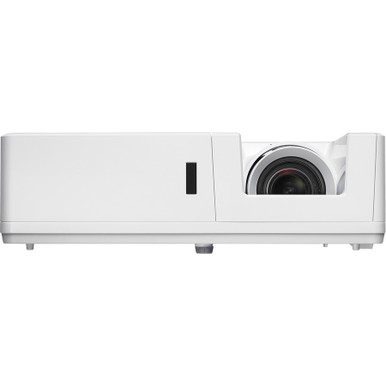
Use this AV ZU606T-WH Setup Guide and Buying Considerations resource to solve a practical problem: a projector can match the brightness and resolution brief yet still miss the room requirements if placement, signal routing, mounting, or procurement details remain unresolved. The Optoma ZU606T-WH is identified at 6000 ANSI Lumens and WUXGA. Two related choices, ZU606TST-BL and ZU606TST-WH, are each identified at 6,000 ANSI lumens, WUXGA, and short throw.
Those facts establish a useful starting point. They do not settle screen size, mounting distance, source connections, control needs, or installed cost. This guide turns the known specifications into a deployment process for churches, schools, conference rooms, and professional installation teams. It covers room fit, setup sequencing, short-throw alternatives, stock and availability planning, and price-to-performance evaluation. Use the linked product pages for live commerce details, and confirm every project-critical requirement before issuing a purchase order.
Products at a Glance
- Option 1: Optoma ZU606T-W 3D WUXGA 1080p DLP Projector 6000 ANSI Lumens
- For rooms where the design calls for a short-throw WU…: Optoma ZU606T-B WUXGA Professional Installation Laser Projector
- For installation teams that require short-throw geome…: Optoma ZU606TST-W WUXGA Short Throw Laser Projector
Quick Comparison Table
| Feature | Optoma ZU606T-W 3D WUXGA 1080p DLP Projector 6000 ANSI Lumens | Optoma ZU606T-B WUXGA Professional Installation Laser Projector | Optoma ZU606TST-W WUXGA Short Throw Laser Projector |
|---|---|---|---|
| Brightness | 6000 ANSI Lumens | 6,000 ANSI lumens | 6,000 ANSI lumens |
| Resolution | WUXGA | WUXGA | WUXGA |
| Best For | Teams whose approved design or procurement documents call for ZU606T-WH and whose room survey confirms the required placement and integration details. | Rooms where the design calls for a short-throw WUXGA projector and the procurement documents specify ZU606TST-BL. | Installation teams that require short-throw geometry and have approved ZU606TST-WH as the exact purchasing reference. |
| Throw Type | Short throw | Short throw | |
| Recommended Buyer | Teams whose approved design or procurement documents call for ZU606T-WH and whose room survey confirms the required placement and integration details. | Rooms where the design calls for a short-throw WUXGA projector and the procurement documents specify ZU606TST-BL. | Installation teams that require short-throw geometry and have approved ZU606TST-WH as the exact purchasing reference. |
Product Images
Projector Options from AudioVideoNation
1. Optoma ZU606T-W 3D WUXGA 1080p DLP Projector 6000 ANSI Lumens
Who should compare it: Teams whose approved design or procurement documents call for ZU606T-WH and whose room survey confirms the required placement and integration details.
Why it belongs here: This is the direct purchasing reference for a guide centered on SKU ZU606T-WH. Its documented 6000-ANSI-lumen brightness and WUXGA resolution give planners firm starting points for the room survey.
SKU: ZU606T-WH
Key Features
- Brightness specification: 6000 ANSI Lumens
- Resolution specification: WUXGA
- Exact purchasing reference: SKU ZU606T-WH
Things to Consider
Confirm throw geometry, connector and control options, audio routing, physical requirements, mounting hardware, and exact product identity before approving the bill of materials. Check the linked page for live commerce details.
2. Optoma ZU606T-B WUXGA Professional Installation Laser Projector
Who should compare it: Rooms where the design calls for a short-throw WUXGA projector and the procurement documents specify ZU606TST-BL.
Why it belongs here: This option provides a documented short-throw path while retaining the supplied WUXGA resolution and 6,000-ANSI-lumen brightness baseline.
SKU: ZU606TST-BL
Key Features
- Brightness specification: 6,000 ANSI lumens
- Resolution specification: WUXGA
- Throw classification: Short throw
- Exact purchasing reference: SKU ZU606TST-BL
Things to Consider
Do not estimate mounting distance from the short-throw label alone. Confirm the exact geometry, image-size range, connections, control requirements, mounting details, and requested product identity before ordering.
3. Optoma ZU606TST-W WUXGA Short Throw Laser Projector
Who should compare it: Installation teams that require short-throw geometry and have approved ZU606TST-WH as the exact purchasing reference.
Why it belongs here: This is another documented short-throw choice with WUXGA resolution and 6,000 ANSI lumens. It lets buyers evaluate a second exact SKU against the same room plan.
SKU: ZU606TST-WH
Key Features
- Brightness specification: 6,000 ANSI lumens
- Resolution specification: WUXGA
- Throw classification: Short throw
- Exact purchasing reference: SKU ZU606TST-WH
Things to Consider
Verify throw geometry, image size, signal connections, controls, audio routing, mounting requirements, and exact product identity. Do not treat it as interchangeable with ZU606TST-BL without completing the same design review.
Optoma ZU606T-W 3D WUXGA 1080p DLP Projector 6000 ANSI Lumens vs Optoma ZU606T-B WUXGA Professional Installation Laser Projector: Main Differences
- Choose Optoma ZU606T-W 3D WUXGA 1080p DLP Projector 6000 ANSI Lumens if Teams whose approved design or procurement documents call for ZU606T-WH and whose room survey confirms the required placement and integration details..
- Choose Optoma ZU606T-B WUXGA Professional Installation Laser Projector if Rooms where the design calls for a short-throw WUXGA projector and the procurement documents specify ZU606TST-BL..
- Choose Optoma ZU606TST-W WUXGA Short Throw Laser Projector if Installation teams that require short-throw geometry and have approved ZU606TST-WH as the exact purchasing reference..
Match the 6,000-lumen WUXGA projector to the room
All three projectors are identified at WUXGA resolution and 6,000 ANSI lumens. That common baseline makes the room survey decisive. Record the intended image size, screen location, possible mounting zones, audience distance, ambient-light patterns, and any physical obstructions. Include the content that people will view most often. Small spreadsheet text presents a different acceptance test from large presentation slides or worship lyrics.
Do not treat the brightness figure as a promise for every environment. Image size, screen characteristics, room lighting, and viewing distance all affect the result. Establish the lighting scenes that will be used during presentations, then define a legibility test for each important seating area.
WUXGA also needs context. Confirm that the planned sources, switching equipment, signal transport, and content workflow can deliver an appropriate signal to the selected projector. Avoid approving a design from resolution and brightness alone. Deployment fit exists only when the optical layout, infrastructure, content, and operating conditions work together.
Build the Optoma ZU606T-WH setup plan before ordering
Start with a dimensioned room drawing. Fix the screen position and intended image area, then mark every viable mounting location. Measure the straight-line distance to the screen and record horizontal and vertical offsets. For the ZU606T-WH, obtain the exact throw data for the required image size before marking a final mount point. Room length alone is not enough.
Next, create an infrastructure plan. Identify where power, source equipment, signal pathways, and control equipment will sit. Confirm the exact connector and control options for SKU ZU606T-WH before selecting cables, extenders, adapters, or automation hardware. If the room needs audio, document that as a separate requirement and verify how sound will be routed. Do not assume the projector will cover it.
Mounting hardware should be selected only after confirming the projector's physical and structural requirements. Preserve access for cable service, adjustment, and routine maintenance. Before installation day, compare the final drawing, bill of materials, and purchase order. Each should identify the same SKU.
Consider a short throw WUXGA projector for tight layouts
The ZU606TST-BL and ZU606TST-WH give planners two documented short-throw choices. Both are identified at WUXGA and 6,000 ANSI lumens. Consider them when the approved mounting zone must sit relatively close to the screen, but do not turn the short-throw label into an exact distance estimate. Obtain the throw ratio and image-size guidance for the specific SKU.
The two short-throw entries share the same supplied brightness, resolution, and throw classification. No provided fact establishes a performance advantage between them. Their names and SKUs differ, so the purchase order must use the exact reference approved during design. Confirm the requested product identity and project-specific details with the seller before ordering.
Do not assume ZU606T-WH has the same geometry as either short-throw option. Validate each candidate independently against the room drawing. A substitute is acceptable only after its placement, mounting, signal, control, and purchasing requirements have passed the same review.
Confirm signal, control, audio, and mounting requirements
Create an integration schedule for the selected projector. List every source, its required signal path, the switching equipment, cable distance, and the intended control method. Then obtain the exact connection information for the chosen SKU. A WUXGA resolution label does not confirm that every source, adapter, cable run, or extender will work with it.
Treat control as a written requirement. If the room needs remote power, input selection, status feedback, or automation, verify each function before choosing the control hardware. Apply the same discipline to audio. Define where sound originates, how it travels, and which system reproduces it. Confirm rather than assume projector-based audio capabilities.
The mounting review should cover the approved position, supporting structure, hardware requirements, adjustment access, and cable strain relief. Coordinate power and pathways with the people responsible for the room. This is especially valuable in schools and churches, where installation windows may be short and spaces often return to service immediately after the work.
Plan stock and availability around the exact SKU
Use the linked product page for current commerce details, then confirm project quantities and timing directly before placing the order. Record the exact SKU, required quantity, requested delivery date, and any approved alternates. Similar product names can create avoidable purchasing errors, so informal descriptions should never replace ZU606T-WH, ZU606TST-BL, or ZU606TST-WH on procurement documents.
Ask for written confirmation of availability and expected fulfillment timing when the schedule depends on a specific installation date. Coordinate the projector with mounting hardware, cables, signal equipment, and other dependent parts. One missing item can hold the entire room.
Do not approve a last-minute substitute solely because it shares WUXGA resolution or a 6,000-ANSI-lumen rating. Return the alternate to the room-fit and integration checks. Confirm geometry, connections, controls, mounting needs, and exact product identity before changing the bill of materials.
Evaluate price-to-performance using total installed cost
Price-to-performance starts with a current product-page or project quote, but the projector's acquisition cost is only one line. Compare total installed cost. Include required mounting hardware, cable pathways, signal transport, adapters, control integration, labor, commissioning, and any room work created by the mounting position.
Use a simple evaluation worksheet for all three candidates:
- Confirmed brightness and resolution
- Validated throw geometry for the target image
- Confirmed signal, control, audio, and mounting requirements
- Installation work created by the selected position
- Schedule and procurement risk
- Total installed cost from current quotes
This approach prevents a lower product quote from hiding a harder installation. It also prevents the shared 6,000-ANSI-lumen rating from dominating the decision. Give the most weight to requirements that affect everyday use and project completion. If two options both pass the technical review, compare their current total costs and procurement conditions rather than relying on an unsupported performance claim.
Commission the projector against written acceptance criteria
Set acceptance criteria before installation. Include the approved image area, test sources, lighting scenes, control functions, and viewing positions. Use realistic content from the room's normal workflow. For a classroom or conference room, that may include small text and detailed documents. A church may need to test presentation material from both front and rear seating areas.
At delivery, verify the SKU against the purchase order before installation begins. During setup, use the approved room drawing rather than an informal mounting estimate. Test every specified source and control function after the signal chain is complete. Check the image under the lighting conditions recorded during the survey.
Document the accepted settings, cable labels, control behavior, and test results. Give operators a short handoff based on the installed system. If the delivered projector or any major signal component differs from the approved design, pause commissioning and repeat the affected checks. Shared resolution and brightness do not make two configurations automatically interchangeable.
Related AudioVideoNation Links
- Browse Projector at AudioVideoNation
- View the Optoma ZU606T-WH product page
- View the Optoma ZU606TST-BL product page
- View the Optoma ZU606TST-WH product page
Product Information Sources
- Optoma ZU606T-W 3D WUXGA 1080p DLP Projector 6000 ANSI Lumens product information
- Optoma ZU606T-B WUXGA Professional Installation Laser Projector product information
- Optoma ZU606TST-W WUXGA Short Throw Laser Projector product information
FAQ
What resolution and brightness are specified for the Optoma ZU606T-WH?
The Optoma ZU606T-WH is identified at WUXGA resolution and 6000 ANSI Lumens. Use those figures as design inputs, then validate image size, lighting, screen conditions, and viewing distance for the actual room.
Is the Optoma ZU606T-WH identified as a short-throw projector?
Confirm the ZU606T-WH's throw geometry before specifying its mounting position because its provided facts do not define a throw type. ZU606TST-BL and ZU606TST-WH are the two choices explicitly identified as short throw.
Does a 6,000-ANSI-lumen rating guarantee enough brightness?
No, a 6,000-ANSI-lumen rating does not guarantee satisfactory visibility in every room. Image size, screen characteristics, ambient light, content, and viewing distance must be evaluated together.
How should buyers choose between ZU606TST-BL and ZU606TST-WH?
Buyers should choose between ZU606TST-BL and ZU606TST-WH by exact SKU and confirmed project requirements. Both are identified at WUXGA, 6,000 ANSI lumens, and short throw, while the supplied facts do not establish a performance difference.
How should an installer check stock and availability?
The installer should check the linked product page and confirm the exact SKU, quantity, and expected fulfillment timing directly before ordering. Avoid scheduling installation resources until the projector and dependent parts have been confirmed for the project.
What is the best way to compare price-to-performance?
Compare price-to-performance through current total installed costs rather than the projector quote alone. Include mounting, signal transport, control integration, labor, commissioning, and room work, then compare only the candidates that pass the technical review.
Conclusion
Use this AV ZU606T-WH Setup Guide and Buying Considerations comparison to match documented specifications to the room and installation requirements. Review the linked product pages for current purchase details before ordering.
Products Used
| SKU | Product Name | URL |
|---|---|---|
| ZU606T-WH | Optoma ZU606T-W 3D WUXGA 1080p DLP Projector 6000 ANSI Lumens | View product |
| ZU606TST-BL | Optoma ZU606T-B WUXGA Professional Installation Laser Projector | View product |
| ZU606TST-WH | Optoma ZU606TST-W WUXGA Short Throw Laser Projector | View product |