

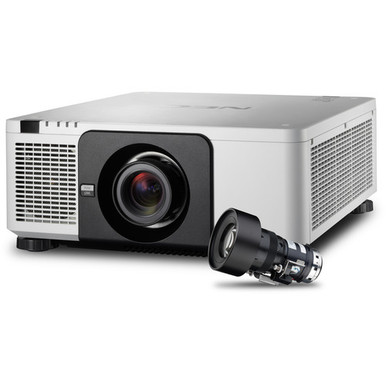
This NEC NP-PX803UL-W-18 Setup Guide and Buying Considerations resource helps AV teams turn an exact product listing into a defensible installation plan. The buying problem is simple. The NEC NP-PX803UL-W-18 listing identifies a white installation projector packaged with an NP18ZL zoom lens, but a model name cannot settle screen size, mounting position, signal requirements, or room-light needs. Those decisions belong in the design before the purchase order is approved.
The related NEC NP-PX803UL listing provides two useful planning facts: 8,000-lumen brightness and WUXGA resolution. Do not automatically transfer those details to the NP-PX803UL-W-18. Verify the exact configuration in current NEC documentation. The NEC NP39ML is also included here because its provided facts classify it as an ultra short throw, wide-angle lens. Its compatibility with either projector has to be confirmed before it enters a system design.
This guide covers deployment fit, NP18ZL lens planning, setup order, sourcing, and price-to-performance. It also shows where the three NEC listings differ. Use the linked product pages for live commerce details, then match the selected product to a measured room and a documented installation scope.
Products at a Glance
- Option 1: NEC NP-PX803UL-W-18 Installation Projector with NP18ZL Zoom Lens (White)
- For teams screening a separate NEC projector listing…: NEC NP-PX803UL 3D WUXGA 1080p DLP Projector 8000 Lumens
- For design teams investigating ultra-short-throw lens…: NEC NP39ML Wide-Angle Lens 5.64mm F/2.0
Quick Comparison Table
| Feature | NEC NP-PX803UL-W-18 Installation Projector with NP18ZL Zoom Lens (White) | NEC NP-PX803UL 3D WUXGA 1080p DLP Projector 8000 Lumens | NEC NP39ML Wide-Angle Lens 5.64mm F/2.0 |
|---|---|---|---|
| Brightness | 8000 Lumens | ||
| Resolution | WUXGA | ||
| Best For | AV teams evaluating the named projector-and-lens configuration for a measured installation plan. | Teams screening a separate NEC projector listing around an 8,000-lumen target and WUXGA resolution. | Design teams investigating ultra-short-throw lens geometry after exact projector compatibility has been validated. |
| Throw Type | Ultra short throw | ||
| Recommended Buyer | AV teams evaluating the named projector-and-lens configuration for a measured installation plan. | Teams screening a separate NEC projector listing around an 8,000-lumen target and WUXGA resolution. | Design teams investigating ultra-short-throw lens geometry after exact projector compatibility has been validated. |
Product Images
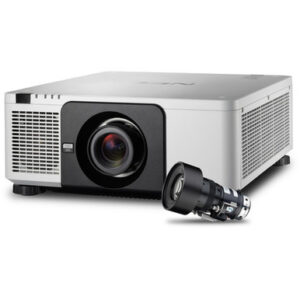
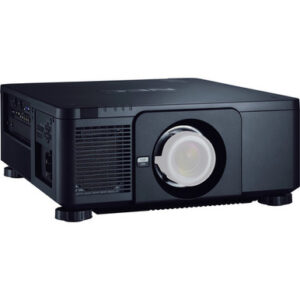
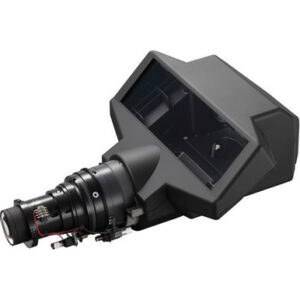
Projector Options from AudioVideoNation
1. NEC NP-PX803UL-W-18 Installation Projector with NP18ZL Zoom Lens (White)
Who should compare it: AV teams evaluating the named projector-and-lens configuration for a measured installation plan.
Why it belongs here: This is the exact configuration covered by the guide, and its product name pairs the NP-PX803UL-W-18 projector with an NP18ZL zoom lens in white.
SKU: NP-PX803UL-W-18
Key Features
- Exact NP-PX803UL-W-18 configuration discussed in this guide
- Product name pairs the projector with an NP18ZL zoom lens
- White configuration identified in the product name
Things to Consider
Confirm current package contents, brightness, resolution, supported signals, throw calculations, mounting requirements, power needs, and clearances before design approval.
2. NEC NP-PX803UL 3D WUXGA 1080p DLP Projector 8000 Lumens
Who should compare it: Teams screening a separate NEC projector listing around an 8,000-lumen target and WUXGA resolution.
Why it belongs here: This related NEC projector listing supplies two concrete planning facts: 8,000-lumen brightness and WUXGA resolution.
SKU: NP-PX803UL
Key Features
- 8,000-lumen brightness from the provided product facts
- WUXGA resolution from the provided product facts
- Separate NP-PX803UL SKU for a related NEC projector listing
Things to Consider
Treat it as a separate SKU. Confirm its lens and package contents, installation requirements, supported signals, and room-specific geometry without assuming it matches the W-18 configuration.
3. NEC NP39ML Wide-Angle Lens 5.64mm F/2.0
Who should compare it: Design teams investigating ultra-short-throw lens geometry after exact projector compatibility has been validated.
Why it belongs here: This NEC lens is relevant to placement research because the provided facts classify it as ultra short throw.
SKU: NP39ML
Key Features
- Ultra short throw classification from the provided product facts
- Wide-angle lens product listing
- Separate NEC NP39ML accessory SKU
Things to Consider
Do not assume compatibility with the NP-PX803UL-W-18 or NP-PX803UL. Verify the exact projector pairing, installation method, and throw calculations before specifying it.
NEC NP-PX803UL-W-18 Installation Projector with NP18ZL Zoom Lens (White) vs NEC NP-PX803UL 3D WUXGA 1080p DLP Projector 8000 Lumens: Main Differences
- Choose NEC NP-PX803UL-W-18 Installation Projector with NP18ZL Zoom Lens (White) if AV teams evaluating the named projector-and-lens configuration for a measured installation plan..
- Choose NEC NP-PX803UL 3D WUXGA 1080p DLP Projector 8000 Lumens if Teams screening a separate NEC projector listing around an 8,000-lumen target and WUXGA resolution..
- Choose NEC NP39ML Wide-Angle Lens 5.64mm F/2.0 if Design teams investigating ultra-short-throw lens geometry after exact projector compatibility has been validated..
Deployment fit: define the room before the projector
Deployment fit starts with the content and audience. A church may need readable lyrics across varied seating positions. A school may display text, diagrams, and video under classroom lighting. A conference room team may care most about fine presentation detail and dependable operation from the room’s normal source equipment. Write down those needs before comparing product listings.
Measure the intended image area, viewing distances, available projector positions, ceiling or structural conditions, cable routes, power access, and service clearance. Record the lighting conditions during actual use. If the room has windows or lights that remain on, calculate the required brightness from the screen, image size, and environment. The related NP-PX803UL is listed at 8,000 lumens, but that value should only guide the NP-PX803UL listing itself until the W-18 configuration is separately verified.
Set acceptance criteria in plain language. Define the image dimensions, content types, required signal formats, operating schedule, and installation restrictions. Include the screen surface and any existing infrastructure in the survey. This turns “we need a large projector” into a set of requirements an installer can test. It also exposes problems early, while lens choice and mounting location can still change.
NP18ZL zoom lens planning and image geometry
The NP18ZL zoom lens is central to the NP-PX803UL-W-18 product configuration. Make it part of the first drawing. Use current NP18ZL documentation or an approved throw calculator to map the desired image size against the measured lens-to-screen distance. Confirm that every acceptable projector position falls inside the documented range.
Record screen width and height, lens position, mounting height, available depth, and any obstructions. Measure from the location specified by the manufacturer’s planning method. A wall-to-projector estimate can create an avoidable placement error because brackets, structural offsets, and the projector body occupy space. Leave room for installation work and later service according to current manufacturer instructions.
The NEC NP39ML deserves separate treatment. Its provided facts classify it as an ultra short throw lens, and its product name identifies a wide-angle design. That may attract teams working with tight placement geometry. It is not an automatic substitute for the NP18ZL. The supplied data does not establish compatibility with the NP-PX803UL-W-18 or NP-PX803UL, so verify the exact projector-and-lens pairing in official documentation and through the seller before specifying it.
Freeze the final lens choice only after the geometry works on paper. Then have the installer confirm the measurements on site. Small errors become expensive once mounting points and cable pathways are fixed.
NEC NP-PX803UL-W-18 installation sequence
Start with a documentation pack for the exact NP-PX803UL-W-18 SKU. Include the current installation instructions, NP18ZL lens documentation, approved mounting information, screen dimensions, source requirements, cable plan, and room survey. Confirm brightness, resolution, supported signals, operating orientation, clearances, and power requirements for this exact configuration before equipment is lifted or fixed in place.
Stage the projector and lens under controlled conditions when the project allows it. Check the received product identifiers and package contents against the purchase documents. Follow the manufacturer’s procedure for lens handling and installation. Keep protective materials in place until the instructions call for their removal, and prevent dust or fingerprints from reaching optical surfaces.
At the site, verify that the support structure and mounting hardware meet the documented requirements. Route electrical and signal infrastructure under the applicable codes and site standards. Preserve the planned service access. If an installer finds that the measured position differs from the drawing, stop and recalculate the image geometry before drilling or relocating infrastructure.
Commission with the sources and content people will use. Test each planned signal path, inspect focus and image coverage across the screen, and confirm that text remains readable from the intended seating area. Check performance under the room’s real lighting conditions. Document final settings, cable labels, source behavior, and acceptance results so the support team has a clean baseline.
How to compare the three provided NEC listings
The NEC NP-PX803UL-W-18 is the exact subject of this guide. Its product name identifies an installation projector, an NP18ZL zoom lens, and a white configuration. It is the logical listing to investigate when procurement wants that named projector-and-lens combination. Confirm the current package contents before ordering, since the product title should not replace a written quotation or packing confirmation.
The NEC NP-PX803UL is a separate SKU. Its provided facts state 8,000-lumen brightness and WUXGA resolution, giving design teams concrete values for initial screening. Those values can help determine whether this listing belongs on a room-specific shortlist. Buyers still need to confirm its package contents, lens requirements, supported signals, mounting details, and all other installation requirements. Similar model names do not prove identical configurations.
The NEC NP39ML is a lens accessory rather than a projector listing. Its ultra short throw classification makes it relevant to geometry research where projector placement is tightly constrained. Compatibility is the gate. Do not add it to a bill of materials until the exact projector pairing and required installation method have been validated.
Keep the comparison boundary clear: the W-18 listing centers on the named NP18ZL package, the NP-PX803UL listing supplies documented brightness and resolution facts, and the NP39ML listing addresses a different lens geometry. Choose from verified room needs, not model-name similarity.
Stock and availability planning without guesswork
Use each linked AudioVideoNation product page for live commerce details. Availability and purchasing conditions can change, so recheck them when the design is approved and again when the order is released. For a scheduled classroom opening, worship installation, or conference room renovation, ask for written confirmation of the exact orderable line, expected timing, package contents, and any proposed substitution.
Copy the product ID, SKU, full display name, and permalink into the quotation request. This matters with the NP-PX803UL-W-18 because the suffix and named NP18ZL lens distinguish the required configuration. A quotation for NP-PX803UL alone should not be treated as the same package without documented confirmation.
Build schedule margin around procurement and installation dependencies. Mounting work, cable installation, commissioning, and user training should follow a confirmed equipment plan. If a substitute is offered, reopen the lens, geometry, brightness, resolution, mounting, and signal checks. A close name is not enough.
Price-to-performance based on the complete deployment
Judge price-to-performance against the finished installation, not a projector line by itself. Request comparable quotations that cover the same scope. That scope may include the required lens, mounting hardware, screen work, cables, source adapters, installation labor, access equipment, commissioning, and documentation. Confirm what each quote includes instead of assuming that similarly named listings arrive as equivalent packages.
Map each total against verified outcomes. Can the exact lens produce the required image from the available position? Does the documented brightness suit the room and screen plan? Is the verified resolution right for the content? Can the installer maintain the required clearances and service access? A lower equipment figure has little value if lens geometry forces structural changes or the package omits a required component.
The NP-PX803UL-W-18 configuration may simplify purchasing when the NP18ZL is the validated lens, but package contents still need confirmation. The NP-PX803UL provides 8,000 lumens and WUXGA as screening facts for its own listing. The NP39ML should enter a cost comparison only after compatibility is established. Put all candidates against the same requirements and quotation scope. That produces a fair commercial comparison without transferring specifications between SKUs.
Final pre-purchase and setup checklist
Hold the purchase until the room survey, exact configuration, and installation documents agree. The approval record should confirm:
- The requested line uses the exact product ID, SKU, display name, and permalink.
- NP18ZL package contents are confirmed for the NP-PX803UL-W-18 order.
- Image size and mounting distance are validated with documentation for the exact lens.
- Brightness, resolution, supported signals, power, orientation, and clearances are verified for the exact projector configuration.
- Structural support, cable routes, electrical work, screen conditions, and service access are approved.
- Live commerce details and the written quotation have been rechecked before order release.
- Commissioning will use the room’s real sources, content, seating positions, and lighting conditions.
If one of these items remains unresolved, keep it visible as a design risk. Resolve it before mounting work begins.
Related AudioVideoNation Links
- Browse Projector at AudioVideoNation
- NEC NP-PX803UL-W-18 with NP18ZL zoom lens
- NEC NP-PX803UL 8000-lumen WUXGA projector
- NEC NP39ML wide-angle lens
Product Information Sources
- NEC NP-PX803UL-W-18 Installation Projector with NP18ZL Zoom Lens (White) product information
- NEC NP-PX803UL 3D WUXGA 1080p DLP Projector 8000 Lumens product information
- NEC NP39ML Wide-Angle Lens 5.64mm F/2.0 product information
FAQ
Does the NEC NP-PX803UL-W-18 listing include an NP18ZL lens?
The product listing identifies the NEC NP-PX803UL-W-18 as an installation projector with an NP18ZL zoom lens. Confirm the current package contents on the linked product page and written quotation before ordering.
Can I apply the NP-PX803UL's 8,000-lumen WUXGA details to the NP-PX803UL-W-18?
No, verify the NP-PX803UL-W-18 separately before applying the related NP-PX803UL's 8,000-lumen and WUXGA details. They are distinct SKUs and may represent different configurations.
Is the NEC NP39ML compatible with the NP-PX803UL-W-18?
Compatibility between the NEC NP39ML and NP-PX803UL-W-18 is not established by the supplied product data. Confirm the pairing in current NEC documentation and with the seller before adding the lens to a design.
How should I determine projector placement with the NP18ZL lens?
Use the desired image size, measured lens-to-screen distance, and current NP18ZL documentation or an approved throw calculator to determine placement. Have the installer verify the measurements on site before fixing the mount.
How should buyers assess price-to-performance for this installation?
Compare complete installed quotations against the same verified room and image requirements. Include the lens, mounting, infrastructure, labor, and commissioning scope so an omitted component does not distort the comparison.
How can I check stock and availability for these NEC products?
Use the linked AudioVideoNation product pages for live commerce details and request written confirmation for the exact SKU. Recheck the selected configuration and package contents when the order is released.
Conclusion
Use this NEC NP-PX803UL-W-18 Setup Guide and Buying Considerations comparison to match documented specifications to the room and installation requirements. Review the linked product pages for current purchase details before ordering.
Products Used
| SKU | Product Name | URL |
|---|---|---|
| NP-PX803UL-W-18 | NEC NP-PX803UL-W-18 Installation Projector with NP18ZL Zoom Lens (White) | View product |
| NP-PX803UL | NEC NP-PX803UL 3D WUXGA 1080p DLP Projector 8000 Lumens | View product |
| NP39ML | NEC NP39ML Wide-Angle Lens 5.64mm F/2.0 | View product |