

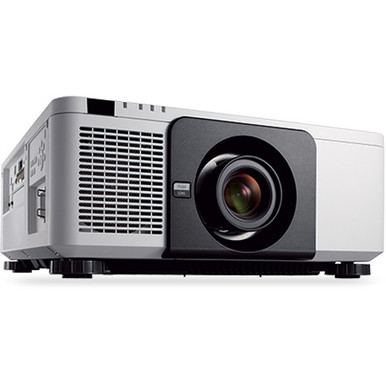
Use this NEC NP-PX1005QL-WH Setup Guide and Buying Considerations resource to turn a model selection into a workable installation plan. The target product is the NEC NP-PX1005QL-W 3D 4K DLP Projector, sold under the exact SKU NP-PX1005QL-WH. Its supplied product facts identify 4K resolution.
The harder questions sit around that specification. Will the planned configuration produce the required image from the available mounting position? Can every source deliver the intended signal? Does the exact SKU include what the installer expects? Those decisions affect churches, schools, conference rooms, and other shared AV spaces long after purchase.
This guide covers deployment fit, setup sequencing, live availability checks, and price-to-performance. It also explains how to assess the NP-PX1005QL-BL and NPPX1005QLB18 listings without assuming that similarly named products are interchangeable.
Products at a Glance
- Option 1: NEC NP-PX1005QL-W 3D 4K DLP Projector
- For procurement teams evaluating another NP-PX1005QL…: NEC NP-PX1005QL-B 3D 4K DLP Projector
- For buyers reviewing the NPPX1005QLB18 listing as a s…: NEC NP-PX1005QLB18 – 3D 4K DLP Projector
Quick Comparison Table
| Feature | NEC NP-PX1005QL-W 3D 4K DLP Projector | NEC NP-PX1005QL-B 3D 4K DLP Projector | NEC NP-PX1005QLB18 – 3D 4K DLP Projector |
|---|---|---|---|
| Resolution | 4K | 4K | 4K |
| Best For | AV teams whose approved bill of materials specifically calls for NP-PX1005QL-WH and who will verify the complete installation configuration before ordering. | Procurement teams evaluating another NP-PX1005QL listing after confirming that its exact configuration meets the approved room and installation requirements. | Buyers reviewing the NPPX1005QLB18 listing as a separately quoted option for a design that has already defined geometry, signal, mounting, and control needs. |
| Recommended Buyer | AV teams whose approved bill of materials specifically calls for NP-PX1005QL-WH and who will verify the complete installation configuration before ordering. | Procurement teams evaluating another NP-PX1005QL listing after confirming that its exact configuration meets the approved room and installation requirements. | Buyers reviewing the NPPX1005QLB18 listing as a separately quoted option for a design that has already defined geometry, signal, mounting, and control needs. |
Product Images
Projector Options from AudioVideoNation
1. NEC NP-PX1005QL-W 3D 4K DLP Projector
Who should compare it: AV teams whose approved bill of materials specifically calls for NP-PX1005QL-WH and who will verify the complete installation configuration before ordering.
Why it belongs here: This is the exact SKU named in the buying brief, making it the primary product for the setup and procurement checks in this guide. Its supplied product facts identify 4K resolution.
SKU: NP-PX1005QL-WH
Key Features
- Exact SKU: NP-PX1005QL-WH
- 4K resolution identified in the supplied product facts
- Listed under Multimedia Projectors, Projectors, and Video
- Direct match to the model addressed by this setup guide
Things to Consider
Confirm image geometry, lens or configuration, brightness suitability, mounting, inputs, control options, ventilation, and included items through the linked page or AudioVideoNation before purchase.
2. NEC NP-PX1005QL-B 3D 4K DLP Projector
Who should compare it: Procurement teams evaluating another NP-PX1005QL listing after confirming that its exact configuration meets the approved room and installation requirements.
Why it belongs here: This separate listing shares the NP-PX1005QL family name and has 4K resolution in the supplied facts. It gives buyers another catalog option to investigate without implying equivalence to the target SKU.
SKU: NP-PX1005QL-BL
Key Features
- Exact SKU: NP-PX1005QL-BL
- 4K resolution identified in the supplied product facts
- Distinct productId 12541 for precise ordering records
- Listed under Multimedia Projectors, Projectors, and Video
Things to Consider
Do not treat NP-PX1005QL-BL as interchangeable with NP-PX1005QL-WH. Confirm the suffix meaning, complete configuration, installation requirements, and included items before approving a substitution.
3. NEC NP-PX1005QLB18 – 3D 4K DLP Projector
Who should compare it: Buyers reviewing the NPPX1005QLB18 listing as a separately quoted option for a design that has already defined geometry, signal, mounting, and control needs.
Why it belongs here: This is a third NEC NP-PX1005QL-family listing with 4K resolution in the supplied facts. Its B18 suffix makes exact configuration verification essential during comparison.
SKU: NPPX1005QLB18
Key Features
- Exact SKU: NPPX1005QLB18
- 4K resolution identified in the supplied product facts
- Distinct productId 12550 for procurement tracking
- Listed under Multimedia Projectors, Projectors, and Video
Things to Consider
Do not infer what B18 includes from the SKU alone. Ask AudioVideoNation to confirm the configuration, included items, installation needs, and any differences from the WH and BL listings.
NEC NP-PX1005QL-W 3D 4K DLP Projector vs NEC NP-PX1005QL-B 3D 4K DLP Projector: Main Differences
- Choose NEC NP-PX1005QL-W 3D 4K DLP Projector if AV teams whose approved bill of materials specifically calls for NP-PX1005QL-WH and who will verify the complete installation configuration before ordering..
- Choose NEC NP-PX1005QL-B 3D 4K DLP Projector if Procurement teams evaluating another NP-PX1005QL listing after confirming that its exact configuration meets the approved room and installation requirements..
- Choose NEC NP-PX1005QLB18 – 3D 4K DLP Projector if Buyers reviewing the NPPX1005QLB18 listing as a separately quoted option for a design that has already defined geometry, signal, mounting, and control needs..
Start With Projector Deployment Fit
Deployment fit begins with the room. Record the desired image dimensions, screen position, available throw distance, mounting location, viewer distance, ceiling constraints, and ambient-light conditions. Note how lighting changes during actual operating hours. A sanctuary with daylight, a classroom with scheduled lessons, and a conference room used for detailed spreadsheets can place different demands on the same projector plan.
The supplied facts confirm 4K resolution for the NP-PX1005QL-WH. Treat that as one confirmed point, then verify the rest of the installation against the exact product configuration. Obtain written confirmation that the selected lens or configuration can create the required image from the planned location. Check brightness suitability using the room conditions and screen plan. Confirm mounting, power, ventilation, input, control, and signal-format requirements from current documentation before approving the bill of materials.
Content matters too. Video, worship graphics, presentation text, and shared computer screens have different readability needs. Decide which content is critical and view it from the least-favorable seat during commissioning.
Set a clear decision gate. The projector should move into procurement only after image geometry, room-light expectations, signal routing, control needs, and installation responsibilities have named owners. That prevents a matching model number from masking an incomplete system design.
NEC NP-PX1005QL-WH Setup Checklist
A disciplined setup sequence catches expensive conflicts while the project can still change.
1. Freeze the image plan. Document the screen dimensions, aspect-ratio goal, image position, mounting point, and unobstructed projection path. Have the installer verify that the exact NP-PX1005QL-WH configuration can meet that geometry before drilling or fabrication begins.
2. Resolve the exact SKU. Put NP-PX1005QL-WH on the quote, purchase order, receiving checklist, and installation documents. Match the delivered label to those records. Similar NEC names in the supplied catalog use different SKUs, so the base family name is not enough for receiving control.
3. Map the complete signal path. Draw every source, switcher, extender, wall plate, cable segment, and projector connection. The listing identifies 4K resolution, but each link still needs to support the resolution, timing, content-protection requirements, and cable distance planned for the room. Confirm accepted projector formats instead of assuming that every 4K source setting will work.
4. Coordinate structure, power, cooling, and control. Verify the mounting surface and hardware with qualified installers. Place power and signal connections where they remain serviceable. Follow current installation documentation for orientation and ventilation clearance. Confirm the available control methods before programming room controls.
5. Stage the system. If the project schedule permits, connect the real source equipment, switching path, and controls before final installation. Test representative video, presentation text, conferencing content, and any fallback source.
6. Commission against written criteria. Check image position, focus, source switching, control commands, startup behavior, shutdown behavior, and recovery after a power cycle. Record the approved settings and train the people who will operate the room.
Comparing the Three NEC NP-PX1005QL Listings
The three provided projector listings share the NP-PX1005QL base name and identify 4K resolution. That is the limit of the confirmed technical comparison. Each listing has a distinct SKU, so treat each as a separate procurement item until AudioVideoNation confirms its exact configuration.
NP-PX1005QL-WH is the direct match for this guide. NP-PX1005QL-BL belongs to a separate listing named NEC NP-PX1005QL-B 3D 4K DLP Projector. NPPX1005QLB18 appears under another listing named NEC NP-PX1005QLB18 – 3D 4K DLP Projector. The supplied facts do not decode the suffix differences.
Do not substitute one SKU for another based only on the shared family name. Ask for confirmation of the chassis designation, lens or package contents, included accessories, intended market configuration, and any installation-relevant differences. Put the answer in the project record.
This verification also helps during future service. An asset list containing the complete SKU, productId, serial number, installed location, and approved configuration gives support staff a precise reference. It also prevents a later buyer from ordering against an abbreviated model name that hides a meaningful suffix.
Plan the 4K Source, Switching, and Control Path
A 4K projector listing does not guarantee that every connected source will produce the intended image without configuration work. Compatibility depends on the entire route. Start at the source and document its output resolution, refresh rate, connector, and content-protection behavior. Then verify each switcher, extender, wall plate, cable, adapter, and projector input against that plan.
Mixed-use rooms deserve extra attention. A conference room may receive laptops and conferencing output. A classroom may add a document source or instructor computer. A church may route presentation graphics and video through different systems. Test every required path with its actual equipment. Avoid approving the system after checking a single convenient source.
Control planning belongs in the same drawing. Verify which control connections and commands are available on the exact projector configuration. Define who can power the projector, select sources, recover from a lost signal, and report a fault. If a room controller will automate those tasks, test normal operation and failure recovery before handoff.
Document one approved source setting for each route after testing. That gives operators a known starting point and gives support teams a faster way to separate a source problem from a switching, cabling, or projector problem.
Stock and Availability: Verify Live Details
Check stock and availability against the exact SKU when the project is ready for procurement. Catalog snapshots age quickly, and a shared family name can lead a buyer to check the wrong listing. Use the linked AudioVideoNation product page or contact the sales team for current availability, requested quantity, lead time, and shipped configuration.
For multi-room projects, confirm that the required quantity can be supplied under the same approved SKU. Record any proposed substitution and send it back through the technical review. A different suffix should not bypass the geometry, signal, mounting, and configuration checks already completed.
Tie procurement timing to installation dependencies. Mounting work, cabling, programming, commissioning, and staff training all rely on the correct projector arriving with its expected configuration. Reconfirm live commerce details before issuing the order rather than building the schedule around an earlier page visit.
Assess Projector Price-to-Performance
Price-to-performance should reflect the complete installed system and the outcomes the room needs. Build a cost worksheet that accounts for the projector, required lens or configuration, mounting hardware, structural work, signal extension, switching, cabling, control programming, electrical work, commissioning, training, and any planned spare equipment. Confirm which items are included before comparing commercial terms.
Next, connect each cost to a real requirement. The 4K resolution listing matters when the content, source path, screen plan, and viewing distance make that detail useful. A lower commercial total loses its appeal if the proposed configuration cannot meet the verified image geometry or requires a redesign. An unneeded component also adds cost without helping the room.
Compare NP-PX1005QL-WH, NP-PX1005QL-BL, and NPPX1005QLB18 only after their configuration differences are documented. If AudioVideoNation confirms that two listings can satisfy the same approved design, compare their complete installed requirements and live commerce details. If they differ, update the design and labor assumptions before drawing a value conclusion.
This method gives buyers an accountable decision. It connects spending to room fit, usable content, operating workflow, and installation scope without relying on an abbreviated model name or an unsupported performance claim.
Commissioning and Project Handoff
Commissioning turns the purchase into a supportable room. Begin by matching the delivered SKU to the approved bill of materials. Verify the installed position, image geometry, focus, content framing, and readability from representative seats under the room conditions users will encounter.
Run every required source through its normal signal path. Check switching and control from the interfaces that staff will use. Restart the room, test recovery from a disconnected source, and confirm that operators know how to return to an approved configuration. Record any settings that should not be changed without technical review.
The handoff package should include the exact product name, SKU, productId, serial number, room location, signal-flow drawing, control notes, approved source settings, and support contact. Keep the current installation documentation with that record. For schools, churches, and conference room teams, a short operator guide can reduce preventable support calls.
Finish with acceptance sign-off from the installer and room owner. That sign-off should confirm that the agreed content, sources, controls, and viewing positions were tested. It creates a clear baseline for later troubleshooting or expansion.
Related AudioVideoNation Links
- Browse Projector at AudioVideoNation
- View the NEC NP-PX1005QL-WH product page
- Review the NEC NP-PX1005QL-BL listing
- Review the NEC NPPX1005QLB18 listing
Product Information Sources
- NEC NP-PX1005QL-W 3D 4K DLP Projector product information
- NEC NP-PX1005QL-B 3D 4K DLP Projector product information
- NEC NP-PX1005QLB18 – 3D 4K DLP Projector product information
FAQ
Is the NEC NP-PX1005QL-WH a 4K projector?
Yes, the provided product facts identify the NEC NP-PX1005QL-WH as a 4K projector. Confirm the exact accepted source formats and the capabilities of every switcher, extender, cable, and adapter in the planned signal path.
Can NP-PX1005QL-BL or NPPX1005QLB18 replace NP-PX1005QL-WH?
No direct interchangeability is established by the supplied product data. They are distinct SKUs, so AudioVideoNation should confirm configuration, included items, and installation-relevant differences before either is approved as a substitute.
What should installers verify before mounting the projector?
Installers should verify image geometry, the exact projector configuration, mounting structure, power, ventilation, signal routing, and service access before mounting begins. The planned image dimensions and projector position should be checked together so the room design does not depend on an unconfirmed lens or throw assumption.
How should buyers check current price, stock, and availability?
Buyers should use the linked AudioVideoNation product page or contact the sales team for live price and availability tied to the exact SKU. Confirm requested quantity, lead time, shipped configuration, and any proposed substitution when the order is ready.
What determines price-to-performance for this projector deployment?
Price-to-performance depends on the complete installed cost and whether the verified configuration meets the room's image, content, signal, control, and operating requirements. Include mounting, cabling, switching, programming, labor, commissioning, and required configuration items in the comparison.
Does the 4K listing guarantee compatibility with every 4K source?
No, a 4K resolution listing alone does not guarantee compatibility with every source or signal path. Verify resolution, timing, connectors, content protection, switching equipment, extension hardware, and accepted projector formats for each required route.
Conclusion
Use this NEC NP-PX1005QL-WH Setup Guide and Buying Considerations comparison to match documented specifications to the room and installation requirements. Review the linked product pages for current purchase details before ordering.
Products Used
| SKU | Product Name | URL |
|---|---|---|
| NP-PX1005QL-WH | NEC NP-PX1005QL-W 3D 4K DLP Projector | View product |
| NP-PX1005QL-BL | NEC NP-PX1005QL-B 3D 4K DLP Projector | View product |
| NPPX1005QLB18 | NEC NP-PX1005QLB18 – 3D 4K DLP Projector | View product |