

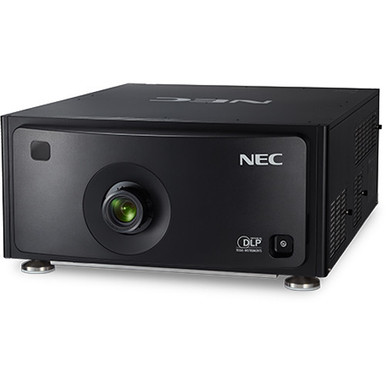
This NEC NP-PH1202HL1 Setup Guide and Buying Considerations article helps AV teams turn a projector listing into a defensible deployment plan. The NEC NP-PH1202HL1 is identified as a Full HD projector. That gives you one confirmed image-format fact, but it does not settle lens fit, throw distance, brightness, mounting, signal connections, or room suitability. Verify those points before converting a quote into an installation schedule.
The central buyer problem is system fit. Churches, schools, conference teams, and installers need screen coverage, readable content, dependable source handling, and a practical installation path. This guide explains how to qualify the projector, examine three NEC zoom-lens listings without assuming compatibility, prepare the site, commission the system, and review live commerce details. The supplied facts do not connect any listed lens to the NP-PH1202HL1, so treat each lens as a candidate until the exact pairing is confirmed through current documentation or the seller.
Products at a Glance
- Option 1: NEC NP-PH1202HL1 3D Full HD 1080p DLP Projector
- For installers who receive exact compatibility confir…: NEC NP-9LS12ZM1 Zoom Lens 18.6mm-26.7mm – F/2.5
- For teams that have verified NP-9LS16ZM1 for the inte…: NEC NP-9LS16ZM1 Zoom Lens – 25.5mm-32mm – F/2.5
- For aV designers who have confirmed NP-9LS13ZM1 compa…: NEC NP-9LS13ZM1 Zoom Lens – 20.7mm-32.7mm – F/2.5
Quick Comparison Table
| Feature | NEC NP-PH1202HL1 3D Full HD 1080p DLP Projector | NEC NP-9LS12ZM1 Zoom Lens 18.6mm-26.7mm – F/2.5 | NEC NP-9LS16ZM1 Zoom Lens – 25.5mm-32mm – F/2.5 | NEC NP-9LS13ZM1 Zoom Lens – 20.7mm-32.7mm – F/2.5 |
|---|---|---|---|---|
| Resolution | Full HD | |||
| Best For | AV teams whose documented design calls for Full HD and who can verify the remaining room, lens, signal, and installation requirements before purchase. | Installers who receive exact compatibility confirmation for NP-9LS12ZM1 and calculate a room fit from the current lens-planning data. | Teams that have verified NP-9LS16ZM1 for the intended projector and matched its documented coverage to measured site geometry. | AV designers who have confirmed NP-9LS13ZM1 compatibility and shown through documented calculations that it covers the planned screen from the usable mounting area. |
| Recommended Buyer | AV teams whose documented design calls for Full HD and who can verify the remaining room, lens, signal, and installation requirements before purchase. | Installers who receive exact compatibility confirmation for NP-9LS12ZM1 and calculate a room fit from the current lens-planning data. | Teams that have verified NP-9LS16ZM1 for the intended projector and matched its documented coverage to measured site geometry. | AV designers who have confirmed NP-9LS13ZM1 compatibility and shown through documented calculations that it covers the planned screen from the usable mounting area. |
Product Images
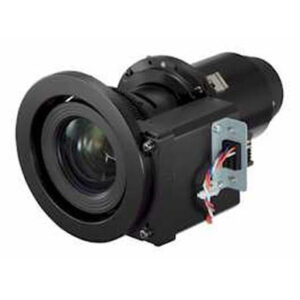
Projector Options from AudioVideoNation
1. NEC NP-PH1202HL1 3D Full HD 1080p DLP Projector
Who should compare it: AV teams whose documented design calls for Full HD and who can verify the remaining room, lens, signal, and installation requirements before purchase.
Why it belongs here: This is the projector addressed by the guide and the only supplied projector with Full HD identified in the extracted product facts.
SKU: NP-PH1202HL1
Key Features
- Full HD resolution in the supplied product facts
- Exact NEC model designation NP-PH1202HL1
- Listed under Multimedia Projectors, Projectors, and Video
- Dedicated product page for live commerce details
Things to Consider
Confirm rated brightness, compatible lenses, signal connections, dimensions, weight, mounting requirements, approved orientation, clearances, and environmental limits in current documentation. Full HD alone does not establish deployment fit.
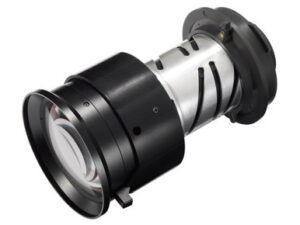
2. NEC NP-9LS12ZM1 Zoom Lens 18.6mm-26.7mm – F/2.5
Who should compare it: Installers who receive exact compatibility confirmation for NP-9LS12ZM1 and calculate a room fit from the current lens-planning data.
Why it belongs here: This is one of the supplied NEC lens listings that buyers can place into a controlled compatibility and throw-planning review. Its inclusion does not establish compatibility with the NP-PH1202HL1.
SKU: NP-9LS12ZM1
Key Features
- Listed as an NEC zoom-lens accessory
- Cataloged under Accessories and Lenses
- Exact SKU NP-9LS12ZM1 supports an unambiguous compatibility check
- Dedicated product page for live commerce details
Things to Consider
Verify compatibility, throw ratio, supported image sizes, placement range, optical adjustment limits, and approved installation conditions before adding this lens to the bill of materials.
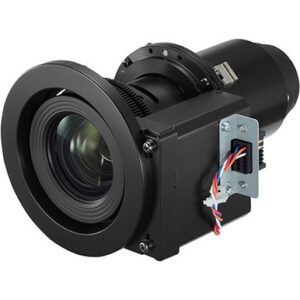
3. NEC NP-9LS16ZM1 Zoom Lens – 25.5mm-32mm – F/2.5
Who should compare it: Teams that have verified NP-9LS16ZM1 for the intended projector and matched its documented coverage to measured site geometry.
Why it belongs here: This NEC lens listing gives designers another exact SKU to assess after projector compatibility has been established. The supplied facts do not connect it to the NP-PH1202HL1.
SKU: NP-9LS16ZM1
Key Features
- Listed as an NEC zoom-lens accessory
- Cataloged under Accessories and Lenses
- Exact SKU NP-9LS16ZM1 supports precise purchasing records
- Dedicated product page for live commerce details
Things to Consider
Do not infer projector fit from the NEC brand or product title. Confirm the exact projector pairing and obtain official throw, placement, image-size, and installation limits before ordering.
4. NEC NP-9LS13ZM1 Zoom Lens – 20.7mm-32.7mm – F/2.5
Who should compare it: AV designers who have confirmed NP-9LS13ZM1 compatibility and shown through documented calculations that it covers the planned screen from the usable mounting area.
Why it belongs here: This is the third supplied NEC lens listing available for a documented compatibility and room-coverage comparison. Inclusion is conditional, not a compatibility claim.
SKU: NP-9LS13ZM1
Key Features
- Listed as an NEC zoom-lens accessory
- Cataloged under Accessories and Lenses
- Exact SKU NP-9LS13ZM1 helps prevent ordering ambiguity
- Dedicated product page for live commerce details
Things to Consider
Verify the compatible projector list, throw planning values, image-size limits, permitted placement, and installation requirements. Recalculate the room if this lens replaces another SKU.
NEC NP-PH1202HL1 3D Full HD 1080p DLP Projector vs NEC NP-9LS12ZM1 Zoom Lens 18.6mm-26.7mm – F/2.5: Main Differences
- Choose NEC NP-PH1202HL1 3D Full HD 1080p DLP Projector if AV teams whose documented design calls for Full HD and who can verify the remaining room, lens, signal, and installation requirements before purchase..
- Choose NEC NP-9LS12ZM1 Zoom Lens 18.6mm-26.7mm – F/2.5 if Installers who receive exact compatibility confirmation for NP-9LS12ZM1 and calculate a room fit from the current lens-planning data..
- Choose NEC NP-9LS16ZM1 Zoom Lens – 25.5mm-32mm – F/2.5 if Teams that have verified NP-9LS16ZM1 for the intended projector and matched its documented coverage to measured site geometry..
- Choose NEC NP-9LS13ZM1 Zoom Lens – 20.7mm-32.7mm – F/2.5 if AV designers who have confirmed NP-9LS13ZM1 compatibility and shown through documented calculations that it covers the planned screen from the usable mounting area..
Start with projector deployment fit
Deployment fit starts with what the audience must see. Record the screen width and aspect ratio, farthest viewing position, common content, ambient light during use, and whether the room can be darkened. A church may prioritize readable lyrics and presentation slides across a deep room. A school may need clear text while room lights remain on. Conference teams may care about spreadsheet detail and predictable source switching. These are requirements to measure, not performance claims about the projector.
Full HD is the confirmed resolution class for the NEC NP-PH1202HL1. It does not establish a suitable image size or prove that the projector can overcome a room's ambient light. Obtain the rated brightness and its measurement basis, then have the system designer assess it against the planned screen surface, image dimensions, and lighting conditions.
Next, map the physical constraints. Identify possible mounting locations, obstructions, ceiling structure, service access, ventilation needs, available power, and cable routes. The projector should advance to the purchasing stage only after the room requirements and the verified product specifications agree.
Full HD projector setup starts with the signal path
Draw the entire route from each source to the screen. List computers, media players, presentation switchers, wall plates, extenders, converters, and any control equipment. Then verify the NEC NP-PH1202HL1 input types, accepted signal formats, content-protection support, refresh-rate limits, and cable-distance requirements in current product documentation. A Full HD label alone does not prove that every source and adapter will establish a usable connection.
Plan audio as a separate path unless the documented design confirms otherwise. Decide whether sound travels through a switcher, audio processor, conferencing system, or another component. Match that route to the room's existing sound system. This matters in sanctuaries and classrooms, where a good image cannot correct an incomplete audio plan.
Treat control and network requirements the same way. If the system must join an automation platform, monitoring service, or scheduled power routine, confirm a documented control method before purchase. Finish with a bench-test plan that exercises each intended source, cable path, switching step, and control command before the projector is mounted in a difficult-to-reach location.
NEC projector lens selection needs exact compatibility
The supplied product set includes three NEC lens SKUs: NP-9LS12ZM1, NP-9LS16ZM1, and NP-9LS13ZM1. Each is listed as a lens accessory. The provided facts do not establish that any of them works with the NEC NP-PH1202HL1. Similar branding is not enough.
Compatibility is the first gate. Request a current lens matrix, installation document, or written seller confirmation that ties the exact NP-PH1202HL1 projector SKU to the exact lens SKU. After that pairing is established, obtain the lens's documented throw-ratio range, supported image-size range, placement limits, shift capabilities, and approved installation orientations. Do not choose a lens from the focal-length wording in its product title alone. Those labels cannot replace the planning data used for screen coverage.
Only then should room geometry separate the candidates. Compare the verified coverage of each compatible lens with the screen width and usable mounting distance. Keep the calculations under the full SKU so purchasing cannot substitute a similar-looking lens accidentally. If exact compatibility remains unresolved, leave that lens out of the final bill of materials.
Complete the throw-distance survey before ordering
A reliable throw plan uses measured site geometry and verified lens data. Start with the finished image width, not the screen's diagonal measurement. Measure the usable distance from the manufacturer's specified lens reference point to the image surface. Account for wall offsets, mount depth, structural beams, lighting fixtures, ceiling treatments, and any location where the projector would block sightlines or service access.
Throw ratio is calculated by dividing throw distance by image width. Use that relationship only with the documented ratio range for a confirmed compatible lens. Calculate the allowed placement range, compare it with field measurements, and leave an installation tolerance that follows the lens documentation. A single theoretical mounting point creates risk if construction dimensions shift.
Confirm vertical and horizontal placement rules separately. Verify whether the selected configuration supplies the required optical adjustment and whether the proposed orientation is approved. Do not plan around digital geometry correction or another adjustment unless current NP-PH1202HL1 documentation confirms it. Put the final screen dimensions, measurement reference, mounting coordinates, projector SKU, lens SKU, and source for every planning value on the approved installation drawing.
Install and commission against documented limits
Before equipment is lifted, verify the approved mounting orientation, projector weight, mounting-hole pattern, hardware load rating, power requirements, ventilation clearances, and service space. Use current installation instructions, suitable mounting hardware, qualified personnel, and the rules that apply at the site. Confirm that the lens is secured according to its instructions and that cables have strain relief without blocking airflow or access panels.
Commission the image with a known reference source. Check focus across the screen, geometry, cropping, text legibility, and signal acquisition. Make only the optical or electronic adjustments documented for the installed projector-and-lens combination. Test every planned source path rather than approving the system from one laptop connection.
Run acceptance content that reflects the room. That might include lyrics and camera feeds in a church, lesson slides and small text in a classroom, or conferencing layouts and spreadsheets in a meeting room. Test the separate audio path, control commands, startup, shutdown, and recovery after a power cycle. Record the accepted settings, cable route, installed SKUs, and test results so later service work begins with a known configuration.
Check stock and availability before scheduling
Use each linked product page for live commerce details, then request current confirmation before committing labor or room downtime. Check the NEC NP-PH1202HL1 and the selected lens separately. A projector procurement plan is incomplete if the required, verified lens cannot arrive within the same project window.
Ask the seller to confirm the exact SKU, required quantity, expected timing, and what the quoted configuration includes. Keep that confirmation with the purchase record. Do not treat a related NEC lens SKU as interchangeable. Any substitution should return to compatibility verification and throw planning before it is approved.
Add a procurement checkpoint ahead of lift rental, installer scheduling, ceiling work, and room closure. Recheck the linked pages when the order is ready, since commerce details can change. This process addresses stock and availability without relying on an earlier page view or an unsupported assumption.
Evaluate projector price-to-performance as a system
Price-to-performance begins with pass-or-fail room requirements. The NEC NP-PH1202HL1 has a confirmed Full HD designation. The remaining design inputs should be documented before comparison, including brightness, compatible optics, signal connections, mounting limits, environmental requirements, and support terms. Resolution cannot compensate for unverified screen coverage or insufficient light output for the planned room.
Calculate the total installed system, including the projector, confirmed lens, mount, screen, signal distribution, extenders, control equipment, audio interfaces, electrical work, installation labor, and commissioning. Include only what the approved design needs. Use the linked product pages and a current quote for live commerce figures rather than carrying old figures into the decision.
Create a requirements matrix with evidence beside each item. Mark whether the proposed system meets the target screen size, mounting range, content needs, lighting plan, source workflow, control plan, and project schedule. The projector should advance when every critical dependency is supported by documentation. If lens compatibility, brightness, or another essential input remains open, resolve it before using price-to-performance as the deciding factor.
Related AudioVideoNation Links
- Browse Projector at AudioVideoNation
- NEC NP-PH1202HL1 projector
- NEC NP-9LS12ZM1 zoom lens
- NEC NP-9LS16ZM1 zoom lens
- NEC NP-9LS13ZM1 zoom lens
Product Information Sources
- NEC NP-PH1202HL1 3D Full HD 1080p DLP Projector product information
- NEC NP-9LS12ZM1 Zoom Lens 18.6mm-26.7mm – F/2.5 product information
- NEC NP-9LS16ZM1 Zoom Lens – 25.5mm-32mm – F/2.5 product information
- NEC NP-9LS13ZM1 Zoom Lens – 20.7mm-32.7mm – F/2.5 product information
FAQ
Is the NEC NP-PH1202HL1 a Full HD projector?
Yes, the provided product facts identify the NEC NP-PH1202HL1 as a Full HD projector. Resolution alone does not confirm brightness, screen-size suitability, lens coverage, or connection support, so verify those items for the planned room.
Which listed NEC lens works with the NP-PH1202HL1?
The provided data does not confirm that any of the three listed NEC lenses works with the NP-PH1202HL1. Verify the exact projector-and-lens SKU pairing through current documentation or written seller confirmation before calculating throw distance or ordering.
What information is needed to calculate projector throw distance?
You need the finished image width, measured mounting distance, and the documented throw-ratio range of a confirmed compatible lens. Use the manufacturer's specified measurement reference and account for the physical mount, obstructions, service access, and installation tolerance.
How should buyers check stock and availability?
Buyers should review the linked product page and request current confirmation for each exact SKU before scheduling installation work. Check the projector and verified lens separately, and confirm what the proposed configuration includes.
How should price-to-performance be evaluated for this projector?
Evaluate price-to-performance against the total installed system and verified room requirements, not the projector line item alone. Include the confirmed lens, mounting, signal transport, control, audio integration, electrical work, labor, and commissioning, then use current product pages or a quote for live commerce figures.
What should installers test during commissioning?
Installers should test focus, geometry, cropping, text legibility, signal acquisition, every planned source path, audio routing, control commands, and power-cycle recovery. Use content that reflects the room's real workload and record the accepted configuration for future service.
Conclusion
Use this NEC NP-PH1202HL1 Setup Guide and Buying Considerations comparison to match documented specifications to the room and installation requirements. Review the linked product pages for current purchase details before ordering.
Products Used
| SKU | Product Name | URL |
|---|---|---|
| NP-PH1202HL1 | NEC NP-PH1202HL1 3D Full HD 1080p DLP Projector | View product |
| NP-9LS12ZM1 | NEC NP-9LS12ZM1 Zoom Lens 18.6mm-26.7mm – F/2.5 | View product |
| NP-9LS16ZM1 | NEC NP-9LS16ZM1 Zoom Lens – 25.5mm-32mm – F/2.5 | View product |
| NP-9LS13ZM1 | NEC NP-9LS13ZM1 Zoom Lens – 20.7mm-32.7mm – F/2.5 | View product |