

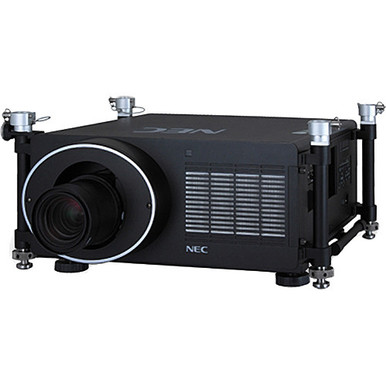
NEC NP-PH1000U-R vs NP-PH1202HL1: Which Projector Should You Choose? That question matters because the supplied product data does not document the same specifications for both projectors. The NEC NP-PH1000U-R has an 11,000-lumen brightness figure and large-venue positioning. The NEC NP-PH1202HL1 has Full HD resolution. The data does not provide the first projector’s resolution or the second projector’s brightness, and it supplies no throw or lens details for either. Naming a universal winner from those facts would create false certainty.
This guide turns the confirmed information into practical decision gates for AV buyers, installers, churches, schools, and conference room technology teams. It covers brightness, resolution, room fit, installation planning, price-to-performance, and live purchasing checks. It also examines two Epson alternatives with disclosed brightness and resolution figures. The aim is simple: build a defensible shortlist, identify every open question, and verify those questions before approving the system.
Products at a Glance
- Option 1: NEC NP-PH1000U-R 11000lm Large Venue Projector
- For projects that require a documented Full HD resolu…: NEC NP-PH1202HL1 3D Full HD 1080p DLP Projector
- For projects whose calculated light-output target and…: Epson Powerlite L270F 5200-Lumen Full HD Laser 3LCD Projector (V11HC68020)
- For projects that can work within a verified 4,000-lu…: Epson PowerLite 992F 4000-Lumen Full HD Projector with Wi-Fi (V11H988020)
Quick Comparison Table
| Feature | NEC NP-PH1000U-R 11000lm Large Venue Projector | NEC NP-PH1202HL1 3D Full HD 1080p DLP Projector | Epson Powerlite L270F 5200-Lumen Full HD Laser 3LCD Projector (V11HC68020) | Epson PowerLite 992F 4000-Lumen Full HD Projector with Wi-Fi (V11H988020) |
|---|---|---|---|---|
| Brightness | 11000lm | 5200 lumens | 4000 lumens | |
| Resolution | Full HD | Full HD | Full HD | |
| Best For | Large-room projects that place stated light output near the top of the screening criteria and can verify the remaining installation specifications. | Projects that require a documented Full HD resolution baseline and have a process for confirming brightness and installation fit. | Projects whose calculated light-output target and content plan align with 5,200 lumens and Full HD after an installer reviews the room. | Projects that can work within a verified 4,000-lumen design and need Full HD plus a confirmed wireless presentation workflow. |
| Smart Features | Wi-Fi | |||
| Recommended Buyer | Large-room projects that place stated light output near the top of the screening criteria and can verify the remaining installation specifications. | Projects that require a documented Full HD resolution baseline and have a process for confirming brightness and installation fit. | Projects whose calculated light-output target and content plan align with 5,200 lumens and Full HD after an installer reviews the room. | Projects that can work within a verified 4,000-lumen design and need Full HD plus a confirmed wireless presentation workflow. |
Product Images
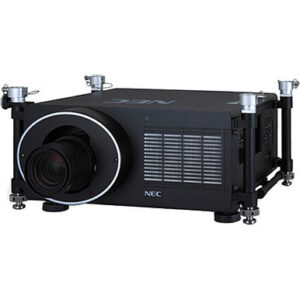
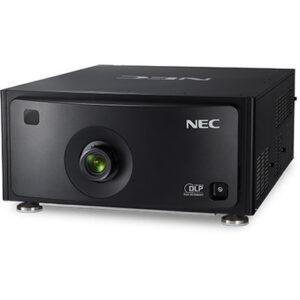
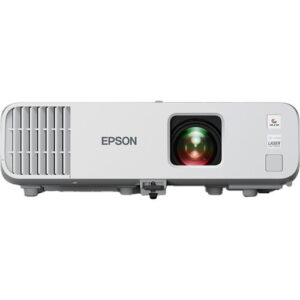
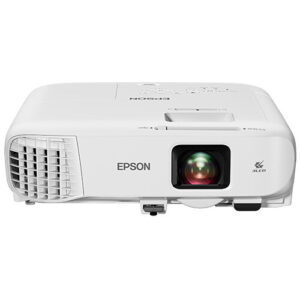
Projector Options from AudioVideoNation
1. NEC NP-PH1000U-R 11000lm Large Venue Projector
Who should compare it: Large-room projects that place stated light output near the top of the screening criteria and can verify the remaining installation specifications.
Why it belongs here: This projector anchors the brightness-led side of the NEC comparison with a disclosed output of 11,000 lumens. Its listing also places it in the large-venue projector category.
SKU: NP-PH1000U-R
Key Features
- 11,000-lumen stated brightness
- Large-venue focus stated in the product listing
- Exact NEC SKU NP-PH1000U-R for procurement checks
Things to Consider
Resolution, throw, lens, inputs, and physical installation details are not supplied in the product facts. Confirm each item for this exact SKU before designing the system.
2. NEC NP-PH1202HL1 3D Full HD 1080p DLP Projector
Who should compare it: Projects that require a documented Full HD resolution baseline and have a process for confirming brightness and installation fit.
Why it belongs here: This is the resolution-led NEC candidate because Full HD is confirmed in the supplied facts. It belongs in the direct comparison with the NP-PH1000U-R.
SKU: NP-PH1202HL1
Key Features
- Full HD resolution
- Multimedia-projector and video catalog placement
- Exact NEC SKU NP-PH1202HL1 for project documentation
Things to Consider
The supplied facts do not include brightness, throw, lens, input, or mounting details. Verify those fields instead of assuming that Full HD alone establishes deployment fit.
3. Epson Powerlite L270F 5200-Lumen Full HD Laser 3LCD Projector (V11HC68020)
Who should compare it: Projects whose calculated light-output target and content plan align with 5,200 lumens and Full HD after an installer reviews the room.
Why it belongs here: Its disclosed 5,200-lumen output and Full HD resolution give buyers an alternative with both core screening fields available.
SKU: PL-L270F
Key Features
- 5,200-lumen stated brightness
- Full HD resolution
- Exact Epson SKU PL-L270F for quote and specification checks
Things to Consider
Do not infer throw, lens, connectivity, mounting, or room suitability from the brightness and resolution alone. Confirm the complete installation specification and live commerce details.
4. Epson PowerLite 992F 4000-Lumen Full HD Projector with Wi-Fi (V11H988020)
Who should compare it: Projects that can work within a verified 4,000-lumen design and need Full HD plus a confirmed wireless presentation workflow.
Why it belongs here: This Epson supplies three disclosed screening points: 4,000 lumens, Full HD resolution, and Wi-Fi. It broadens the comparison for projects with different output and connectivity priorities.
SKU: PL-992F
Key Features
- 4,000-lumen stated brightness
- Full HD resolution
- Wi-Fi listed as a smart feature
- Exact Epson SKU PL-992F for procurement checks
Things to Consider
Confirm that the brightness fits the room and that Wi-Fi supports the required devices, applications, and security policy. Throw and physical installation details also need verification.
NEC NP-PH1000U-R 11000lm Large Venue Projector vs NEC NP-PH1202HL1 3D Full HD 1080p DLP Projector: Main Differences
- Choose NEC NP-PH1000U-R 11000lm Large Venue Projector if Large-room projects that place stated light output near the top of the screening criteria and can verify the remaining installation specifications..
- Choose NEC NP-PH1202HL1 3D Full HD 1080p DLP Projector if Projects that require a documented Full HD resolution baseline and have a process for confirming brightness and installation fit..
- Choose Epson Powerlite L270F 5200-Lumen Full HD Laser 3LCD Projector (V11HC68020) if Projects whose calculated light-output target and content plan align with 5,200 lumens and Full HD after an installer reviews the room..
- Choose Epson PowerLite 992F 4000-Lumen Full HD Projector with Wi-Fi (V11H988020) if Projects that can work within a verified 4,000-lumen design and need Full HD plus a confirmed wireless presentation workflow..
NEC projector comparison at a glance
The clearest difference is the requirement each NEC listing documents. The NP-PH1000U-R states 11,000 lumens, giving a designer a concrete brightness figure to screen against the project brief. The NP-PH1202HL1 states Full HD resolution, giving the technology team a defined resolution baseline. These facts describe separate parts of image performance. They cannot be combined into a single score or used to declare one projector superior.
Treat every missing field as an open question, not a weakness. The absence of a supplied resolution for the NP-PH1000U-R does not establish what resolution it uses. The same rule applies to the NP-PH1202HL1’s brightness. If the project has mandatory thresholds for both light output and resolution, the supplied listing data alone does not complete the comparison.
Ask for current technical documentation tied to the exact SKU. Confirm brightness, native resolution, throw requirements, lens details, physical installation needs, signal inputs, and control options for both candidates. Put those fields into one pass-or-fail matrix. A projector that misses a mandatory requirement leaves the shortlist. If both pass, installation cost, scheduling, and system design can decide the next step.
Large venue projector deployment fit for churches and schools
The NP-PH1000U-R belongs on a brightness-first shortlist because its disclosed output is 11,000 lumens and its product listing positions it for large venues. That does not prove it will satisfy a particular screen size, throw distance, or ambient-light condition. The installer still needs to calculate the required output for the actual room and confirm the complete optical specification.
The NP-PH1202HL1 deserves consideration where Full HD is an explicit content or system requirement. Its disclosed resolution gives planners one confirmed checkpoint, but sufficient light output and installation compatibility still need verification. Do not assume that a resolution match settles room fit.
Churches should document the image size, daylight conditions, mounting location, and the needs of both live and prerecorded content. Schools may have different conditions in classrooms, multipurpose rooms, lecture halls, and auditoriums. Conference room teams should begin with the actual display surface, seating distance, source equipment, and control workflow instead of choosing from the room label alone.
The installation environment decides the fit. Measure the room. Record the throw distance and mount position. Confirm access for installation and service, along with power, signal transport, and control requirements. These checks prevent a promising projector specification from turning into an expensive redesign.
Projector brightness and Full HD resolution priorities
Brightness and resolution answer different questions. A lumen figure helps the designer evaluate light output against the planned image size and room conditions. Resolution defines the available pixel structure for text, graphics, and video. One cannot substitute for the other.
The NP-PH1000U-R provides the only brightness figure among the two NEC projectors: 11,000 lumens. The supplied data does not support a numerical brightness comparison with the NP-PH1202HL1. The NP-PH1202HL1 provides the only confirmed resolution among the pair: Full HD. The data does not support a resolution comparison with the NP-PH1000U-R.
Set minimum requirements before requesting quotes. For brightness, document the screen, image width, room lighting, and operating conditions. For resolution, examine the source material, text size, viewing distance, and output settings of connected equipment. Then request matching fields for both exact SKUs.
Keep manufacturer terminology and measurement conditions aligned during review. A comparison becomes useful only when both candidates have equivalent data. Until then, 11,000 lumens is a confirmed reason to investigate the NP-PH1000U-R, while Full HD is a confirmed reason to investigate the NP-PH1202HL1. Neither fact completes the system design by itself.
Projector installation checklist for AV teams
Start with the optical path. Record the required image dimensions, available throw distance, lens position, mounting height, and any placement restrictions. Neither NEC product input includes throw type or lens information, so obtain those details before approving the projector or its mounting plan. Confirm whether the proposed configuration can produce the required image from the available location.
Next, map the signal path. List every source, its output resolution, the planned cable or transport system, and the control method. Verify the necessary inputs and control connections on the exact projector. Do not design around a port or protocol that has not been confirmed. If the organization has network or security rules, include those requirements in the same review.
Physical planning matters too. Confirm dimensions, weight, power needs, mount requirements, ventilation clearances, and service access. Check which lenses, mounts, adapters, and other installation items are included in the proposal. The supplied product data does not settle those questions.
Finish with an acceptance plan. Specify the target image size, source formats, operating conditions, control behavior, and content that will be tested. Record the exact SKU on drawings and purchase documents. This protects against substitutions that appear similar by name but do not match the approved configuration. Installers and technology teams should sign off on the completed specification matrix before the order is placed.
Projector price-to-performance, stock, and availability
Use the linked product pages for live purchase details and current availability. Commerce information can change, so confirm the exact SKU, required quantity, expected fulfillment timing, and any project deadline with the seller before committing installation labor.
Price-to-performance should reflect the complete installed system. Compare the current projector cost along with any required lens, mount, signal transport, cabling, adapters, and labor. Include the cost of design changes if a candidate cannot work from the planned location. A projector with an attractive purchase figure can lose that advantage if the room needs substantial rework.
Count only performance that supports a documented need. The NP-PH1000U-R’s 11,000-lumen figure has value when the room design requires that level of stated output. The NP-PH1202HL1’s Full HD specification has value when Full HD satisfies the content and system brief. Extra capability outside the approved requirements should not control the purchase.
Build a short procurement worksheet with verified specifications, system components, installed cost, schedule, and unresolved risks. This keeps the decision accountable without relying on a temporary price or inventory snapshot. Recheck the product page and seller confirmation immediately before purchase.
Full HD projector alternatives from Epson
Two Epson projectors provide useful reference points because both have disclosed brightness and resolution. The Epson Powerlite L270F has a stated output of 5,200 lumens and Full HD resolution. The Epson PowerLite 992F has a stated output of 4,000 lumens, Full HD resolution, and Wi-Fi. Those facts let buyers screen them against projects with lower calculated brightness requirements or an explicit Full HD requirement.
Do not treat either Epson as an automatic substitute for the NEC projectors. A lower lumen figure may or may not suit the room, and a shared Full HD label does not establish identical installation requirements or image behavior. Run each projector through the same optical, signal, mounting, and control checklist.
Wi-Fi gives the PowerLite 992F an additional connectivity item to investigate. It does not confirm support for a particular application, security policy, device, or presentation workflow. Verify the intended wireless use before making it part of the design.
These alternatives are most useful when the NEC candidates leave a key requirement unresolved or when the project needs several brightness tiers evaluated. Confirm throw, lens, inputs, physical requirements, and current commerce details for each exact SKU. Do not assume either Epson has a lower installed cost without a complete quote.
Final decision guide for NEC NP-PH1000U-R vs NP-PH1202HL1
Shortlist the NP-PH1000U-R when 11,000 lumens is relevant to the calculated room requirement and the remaining technical checks can be confirmed. Shortlist the NP-PH1202HL1 when Full HD is an explicit requirement and its brightness, optical configuration, and system connections can be verified. Neither recommendation replaces an installation review.
Consider the Epson Powerlite L270F when 5,200 lumens and Full HD match the initial brief. Evaluate the Epson PowerLite 992F when 4,000 lumens, Full HD, and a verified Wi-Fi workflow align with the project. Their disclosed figures make early screening easier, but the full system still needs validation.
The final matrix should include brightness, native resolution, throw and lens configuration, inputs, control, mounting, power, current availability, and installed cost. Mark unknown fields as open items rather than assigning them a failing value. Then eliminate any projector that misses a mandatory requirement.
For large venues, the NP-PH1000U-R supplies the stronger starting fact for a brightness-led search. For a Full HD-led search, the NP-PH1202HL1 supplies the clearer starting fact. The right purchase is the projector whose complete, verified specification matches the room and the approved system design.
Related AudioVideoNation Links
- Browse Projector at AudioVideoNation
- View the NEC NP-PH1000U-R projector
- View the NEC NP-PH1202HL1 projector
- View the Epson Powerlite L270F projector
- View the Epson PowerLite 992F projector
Product Information Sources
- NEC NP-PH1000U-R 11000lm Large Venue Projector product information
- NEC NP-PH1202HL1 3D Full HD 1080p DLP Projector product information
- Epson Powerlite L270F 5200-Lumen Full HD Laser 3LCD Projector (V11HC68020) product information
- Epson PowerLite 992F 4000-Lumen Full HD Projector with Wi-Fi (V11H988020) product information
FAQ
Is the NEC NP-PH1000U-R brighter than the NP-PH1202HL1?
The supplied data does not support a numerical brightness comparison because only the NP-PH1000U-R has a stated figure of 11,000 lumens. Obtain the NP-PH1202HL1 brightness specification under equivalent measurement conditions before deciding.
Which NEC projector has Full HD resolution?
The NP-PH1202HL1 is the only compared NEC projector with Full HD confirmed in the supplied facts. No resolution is supplied for the NP-PH1000U-R, so verify it rather than treating the missing field as a different resolution.
Which NEC projector is better for a church or school?
Neither NEC projector is universally better for a church or school from the supplied data. Start with the NP-PH1000U-R for a brightness-led evaluation or the NP-PH1202HL1 for a Full HD-led evaluation, then verify room and installation requirements.
How should buyers compare projector price-to-performance?
Compare the verified performance requirements against the complete installed system cost, not the projector purchase figure alone. Include required lenses, mounts, signal transport, cabling, adapters, labor, and any room changes in the current quote.
How can buyers confirm stock and availability?
Buyers should check the linked product page and confirm the exact SKU, quantity, and fulfillment timing with the seller before ordering. Recheck close to the purchase date because commerce details can change.
Are the Epson L270F and PowerLite 992F direct replacements for the NEC projectors?
The Epson projectors should be treated as alternatives to evaluate, not confirmed direct replacements. The L270F has 5,200 lumens and Full HD, while the 992F has 4,000 lumens, Full HD, and Wi-Fi, but complete installation compatibility still requires verification.
Conclusion
Use this NEC NP-PH1000U-R vs NP-PH1202HL1: Which Projector Should You Choose? comparison to match documented specifications to the room and installation requirements. Review the linked product pages for current purchase details before ordering.
Products Used
| SKU | Product Name | URL |
|---|---|---|
| NP-PH1000U-R | NEC NP-PH1000U-R 11000lm Large Venue Projector | View product |
| NP-PH1202HL1 | NEC NP-PH1202HL1 3D Full HD 1080p DLP Projector | View product |
| PL-L270F | Epson Powerlite L270F 5200-Lumen Full HD Laser 3LCD Projector (V11HC68020) | View product |
| PL-992F | Epson PowerLite 992F 4000-Lumen Full HD Projector with Wi-Fi (V11H988020) | View product |