

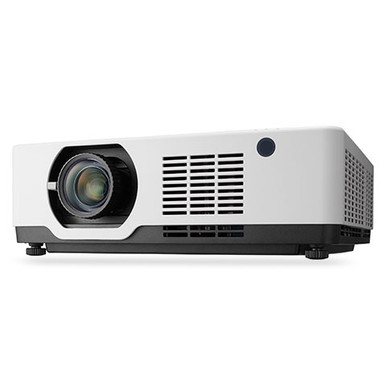
This NEC NP-PE506UL Setup Guide and Buying Considerations resource addresses a common procurement problem: choosing the projector is only one part of a successful installation. Room dimensions, mounting geometry, screen placement, signal paths, controls, and service access all affect the result. Buyers also need a disciplined way to compare the NEC NP-PE506UL with alternatives when the available product data differs by model. This guide walks AV buyers, installers, churches, schools, and conference room teams through deployment planning, setup questions, and purchase checks. It also compares the supplied facts for two Epson projectors without assuming that any model fits a room before the essential design details are confirmed.
Products at a Glance
- Option 1: NEC Display NP-PE506UL LCD Projector – 16:10 – Ceiling Mountable
- For projects whose verified requirements call for a 5…: Epson Powerlite L270F 5200-Lumen Full HD Laser 3LCD Projector (V11HC68020)
- For buyers evaluating a 4000-lumen Full HD projector…: Epson PowerLite 992F 4000-Lumen Full HD Projector with Wi-Fi (V11H988020)
Quick Comparison Table
| Feature | NEC Display NP-PE506UL LCD Projector – 16:10 – Ceiling Mountable | Epson Powerlite L270F 5200-Lumen Full HD Laser 3LCD Projector (V11HC68020) | Epson PowerLite 992F 4000-Lumen Full HD Projector with Wi-Fi (V11H988020) |
|---|---|---|---|
| Brightness | 5200 lumens | 4000 lumens | |
| Resolution | Full HD | Full HD | |
| Best For | Teams specifically sourcing the NP-PE506UL and prepared to validate its current imaging, connection, mounting, and installation details against their room design. | Projects whose verified requirements call for a 5200-lumen Full HD option, subject to room geometry and connection checks. | Buyers evaluating a 4000-lumen Full HD projector with Wi-Fi after confirming that its installation and wireless workflow match the project. |
| Smart Features | Wi-Fi | ||
| Recommended Buyer | Teams specifically sourcing the NP-PE506UL and prepared to validate its current imaging, connection, mounting, and installation details against their room design. | Projects whose verified requirements call for a 5200-lumen Full HD option, subject to room geometry and connection checks. | Buyers evaluating a 4000-lumen Full HD projector with Wi-Fi after confirming that its installation and wireless workflow match the project. |
Product Images
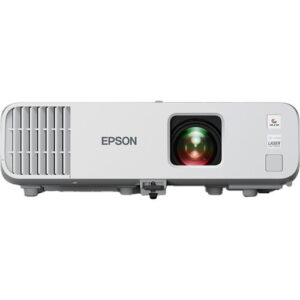
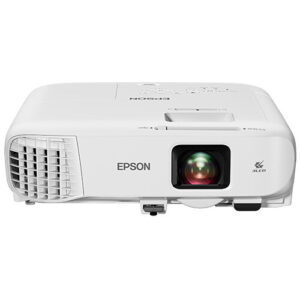
Projector Options from AudioVideoNation
1. NEC Display NP-PE506UL LCD Projector – 16:10 – Ceiling Mountable
Who should compare it: Teams specifically sourcing the NP-PE506UL and prepared to validate its current imaging, connection, mounting, and installation details against their room design.
Why it belongs here: This is the exact NEC model addressed by the guide and the direct product path for buyers planning an NP-PE506UL deployment.
SKU: NP-PE506UL
Key Features
- Exact procurement identifier: NP-PE506UL
- Listed in the Projectors category
- Model-specific product page for checking current commerce details
Things to Consider
Verify rated brightness, native resolution, lens and throw data, connections, control options, mounting requirements, and ventilation clearances before completing the system design.
2. Epson Powerlite L270F 5200-Lumen Full HD Laser 3LCD Projector (V11HC68020)
Who should compare it: Projects whose verified requirements call for a 5200-lumen Full HD option, subject to room geometry and connection checks.
Why it belongs here: It gives buyers a projector alternative with documented brightness and resolution values for a fact-based comparison.
SKU: PL-L270F
Key Features
- Rated brightness: 5200 lumens
- Resolution: Full HD
- Exact procurement identifier: PL-L270F
- Listed in the Projectors category
Things to Consider
Confirm throw data, supported image sizes, connections, controls, mounting rules, and all other installation requirements before treating it as a substitute for the NEC model.
3. Epson PowerLite 992F 4000-Lumen Full HD Projector with Wi-Fi (V11H988020)
Who should compare it: Buyers evaluating a 4000-lumen Full HD projector with Wi-Fi after confirming that its installation and wireless workflow match the project.
Why it belongs here: It provides another Full HD comparison point and is the supplied projector option with documented Wi-Fi.
SKU: PL-992F
Key Features
- Rated brightness: 4000 lumens
- Resolution: Full HD
- Wi-Fi
- Exact procurement identifier: PL-992F
Things to Consider
Wi-Fi does not confirm compatibility with a particular platform, network, or security policy. Verify wireless requirements, throw data, connections, controls, and mounting details.
NEC Display NP-PE506UL LCD Projector – 16:10 – Ceiling Mountable vs Epson Powerlite L270F 5200-Lumen Full HD Laser 3LCD Projector (V11HC68020): Main Differences
- Choose NEC Display NP-PE506UL LCD Projector – 16:10 – Ceiling Mountable if Teams specifically sourcing the NP-PE506UL and prepared to validate its current imaging, connection, mounting, and installation details against their room design..
- Choose Epson Powerlite L270F 5200-Lumen Full HD Laser 3LCD Projector (V11HC68020) if Projects whose verified requirements call for a 5200-lumen Full HD option, subject to room geometry and connection checks..
- Choose Epson PowerLite 992F 4000-Lumen Full HD Projector with Wi-Fi (V11H988020) if Buyers evaluating a 4000-lumen Full HD projector with Wi-Fi after confirming that its installation and wireless workflow match the project..
Start with projector deployment fit
Define the room before committing to a projector. Measure the distance between the intended lens position and screen, the available image area, the mounting height, and any obstacles in the light path. Record where viewers sit and whether the screen must remain visible from wide or off-center positions. These measurements create a design brief that an installer can test against current NP-PE506UL documentation.
Next, document ambient-light conditions at the hours the room will be used. A sanctuary with daylight through windows poses a different problem from a classroom with controllable shades. A conference room may need lights left on for note-taking. Rated brightness matters, but a lumen number alone cannot establish deployment fit. Screen size, screen material, room light, content, and installation geometry all influence the design decision.
Confirm the NP-PE506UL's rated brightness, native resolution, lens and throw information, supported image-size range, inputs, control options, power requirements, mounting rules, and ventilation clearances before approving the layout. Use current product or manufacturer documentation for those checks. Do not infer throw distance from another NEC projector or assume that an existing mount, lens position, or cable plan transfers to this model.
Content should shape the requirements too. A team displaying spreadsheets and small text may prioritize different image characteristics than a church showing lyrics or a school presenting mixed video and slides. List the sources, their output resolutions, and the content that viewers must read. That turns a broad projector search into a room-specific decision.
NEC NP-PE506UL setup workflow
Begin with a site survey. Photograph the intended screen wall, mounting area, equipment location, cable route, power access, and any structural obstructions. Mark the measurements on a simple room drawing. The drawing does not need to be elaborate. It needs to be accurate enough for the installer to calculate image placement and identify conflicts before hardware is installed.
Set the screen position first, then establish the projector position from verified lens and throw data. Avoid choosing a ceiling location because it is convenient for an existing outlet or tile opening. If a ceiling installation is planned, confirm an approved mounting approach, structural attachment requirements, orientation rules, and service clearance. Mounting hardware must match the projector and the building structure. A qualified installer should assess any overhead installation.
Plan the complete signal chain on paper. Identify every source, switcher, wall plate, extender, adapter, and destination. Record cable type and route length. Each component is a separate compatibility decision, so verify supported formats and connections across the entire path. Wireless presentation requirements also need their own design review. Do not assume wireless capability or compatibility for the NP-PE506UL without current documentation.
Provide suitable power and keep signal wiring away from hazards or sources of interference where required by the installation design. Leave access for cable changes, inspection, and cleaning. Ventilation clearances should remain open after ceiling hardware, nearby fixtures, or architectural panels are added.
Commissioning comes last. Use representative sources and real content, not a single test slide. Check image position, focus, readable text size, source switching, control behavior, and system recovery after a power cycle. Save the approved settings, label cables, and record the final equipment configuration. Short operating instructions help teachers, volunteers, and meeting hosts use the room without changing installation settings.
Compare the NEC with Full HD projector alternatives
The supplied product data gives a different level of detail for each projector, so compare only documented facts. The NEC NP-PE506UL is the requested model, but its critical imaging and installation values should be confirmed through current product documentation before it is placed against another projector on a specification sheet.
The Epson Powerlite L270F is documented here at 5200 lumens with Full HD resolution. The Epson PowerLite 992F is documented at 4000 lumens with Full HD resolution and Wi-Fi. Those facts make the Epson products useful reference points when a project brief calls for a known brightness figure, Full HD, or Wi-Fi. They do not prove that either Epson projector will fit a given screen position or outperform the NEC in the intended room.
Use the same worksheet for all three products. Enter verified brightness, native resolution, throw data, supported image size, required connections, control needs, installation orientation, and mounting requirements. Mark the source for every value. If a field cannot be verified, leave the decision open until current documentation or a knowledgeable seller resolves it.
Wi-Fi also requires a practical review. The presence of Wi-Fi on the Epson PowerLite 992F does not establish support for a particular presentation platform, managed network, authentication method, or security policy. Confirm the intended workflow with the relevant documentation and the organization's IT team. A wired signal path may still be required by the room design.
Check live stock, availability, and price-to-performance
Check each linked product page when the purchase is ready for approval. Product availability and commerce details can change, so a saved page, old proposal, or search result should not be treated as a current purchasing record. For a multi-room project, confirm whether the required quantity and delivery timing align with the installation schedule. Ask the seller about any time-sensitive procurement details that are not clear on the page.
Price-to-performance should be judged against the project brief, not a single specification. Start with live commerce details from the product pages, then account for the parts and labor needed to create a working room. Possible project costs include an appropriate mount, screen, cabling, signal extension, switching, control equipment, electrical work, installation labor, and commissioning. Include only the items the design actually requires.
A lower equipment cost can lose its advantage if the projector creates extra installation work or leaves a required function unresolved. A higher brightness figure can also add little value if the room, screen, and content do not call for it. Compare the cost of meeting the same verified requirements with each candidate.
Procurement teams should record the exact SKU on quotes and purchase orders. The three projector identifiers in this guide are NP-PE506UL, PL-L270F, and PL-992F. Matching the SKU, product name, and linked page reduces ambiguity when proposals pass among AV staff, finance teams, installers, and resellers.
Planning for churches, schools, and conference rooms
Church teams should test the design against every common service condition. Note whether daylight changes during the service, whether house lights remain on, and whether the content includes lyrics, video, announcements, or detailed graphics. Confirm that volunteers can select the correct source and recover from common operating errors without reaching installation menus. If the projector will be overhead, plan safe service access with the installer.
Schools should focus on repeatability. Record the source devices used by teachers, required connections, room-control expectations, mounting constraints, and the smallest text students need to read. If several rooms are involved, validate one complete design before repeating it. Standardization can simplify training and support, but only after the chosen projector has been verified for each room's dimensions and light conditions.
Conference room teams should map the full meeting workflow. Identify resident computers, guest laptops, conferencing systems, switchers, and control interfaces. Decide who owns network approval if wireless presentation is required. Test switching and recovery behavior with the same sources users will bring into meetings. A projector specification cannot replace an end-to-end signal test.
Across all three settings, assign ownership. Facilities may approve structural mounting and power. IT may approve networked functions. AV staff or an integrator may calculate image geometry and commission the signal path. The purchasing team should confirm the exact product identifiers and live commerce details. Clear ownership prevents a projector order from moving ahead while a critical installation question remains unanswered.
Final NEC NP-PE506UL buying checklist
Move forward with the NEC NP-PE506UL only after the room design and current model documentation agree. Confirm screen dimensions, lens position, throw requirements, brightness needs, native resolution, source formats, physical connections, controls, power, mounting hardware, orientation, ventilation, and service access. Capture those decisions in the project file.
Then compare the completed NEC design with the Epson alternatives using the same requirements and cost boundaries. The L270F supplies a documented 5200-lumen Full HD reference. The 992F supplies a documented 4000-lumen Full HD reference with Wi-Fi. Neither should replace the NEC by default. Each must pass the room, workflow, installation, and purchasing checks.
Finally, open the selected product page for current commerce details and verify the exact SKU before ordering. For larger deployments, align purchasing timing with installer availability, site readiness, and commissioning. That last coordination step keeps equipment from arriving before the room can support it.
Related AudioVideoNation Links
- Browse Projector at AudioVideoNation
- NEC Display NP-PE506UL projector
- Epson Powerlite L270F projector
- Epson PowerLite 992F projector with Wi-Fi
Product Information Sources
- NEC Display NP-PE506UL LCD Projector – 16:10 – Ceiling Mountable product information
- Epson Powerlite L270F 5200-Lumen Full HD Laser 3LCD Projector (V11HC68020) product information
- Epson PowerLite 992F 4000-Lumen Full HD Projector with Wi-Fi (V11H988020) product information
FAQ
What should I verify before installing the NEC NP-PE506UL?
Verify the screen geometry, rated brightness, native resolution, throw data, connections, controls, power, mounting requirements, ventilation, and service access before installation. Match each value to current documentation and the measured room rather than relying on another projector's layout.
How do I calculate placement for the NEC NP-PE506UL?
Calculate placement from the desired image size, measured lens-to-screen distance, and verified NP-PE506UL lens and throw data. An installer should resolve mounting height, structural attachment, image alignment, clearance, and service access before holes are drilled.
How does the Epson Powerlite L270F compare with the Epson PowerLite 992F?
The supplied data lists the L270F at 5200 lumens and the 992F at 4000 lumens, with both documented as Full HD. The 992F also has documented Wi-Fi, but each projector still needs separate checks for geometry, connections, controls, and workflow fit.
Does the NEC NP-PE506UL support my wireless presentation system?
Confirm NP-PE506UL wireless support and compatibility with your specific presentation system in current product documentation before purchase. Network authentication, security policy, source platforms, and required accessories can affect whether a wireless workflow is suitable.
Where should I check current price, stock, and availability?
Check the linked AudioVideoNation product page for current commerce details when you are ready to buy. For multi-room orders or schedule-sensitive projects, confirm the required quantity and delivery timing directly before finalizing installation dates.
How should I compare projector price-to-performance?
Compare the total cost of meeting the same verified room and workflow requirements with each projector. Include the necessary mount, screen, signal path, controls, installation, and commissioning alongside live product-page details, while excluding equipment the design does not need.
Conclusion
Use this NEC NP-PE506UL Setup Guide and Buying Considerations comparison to match documented specifications to the room and installation requirements. Review the linked product pages for current purchase details before ordering.
Products Used
| SKU | Product Name | URL |
|---|---|---|
| NP-PE506UL | NEC Display NP-PE506UL LCD Projector – 16:10 – Ceiling Mountable | View product |
| PL-L270F | Epson Powerlite L270F 5200-Lumen Full HD Laser 3LCD Projector (V11HC68020) | View product |
| PL-992F | Epson PowerLite 992F 4000-Lumen Full HD Projector with Wi-Fi (V11H988020) | View product |