

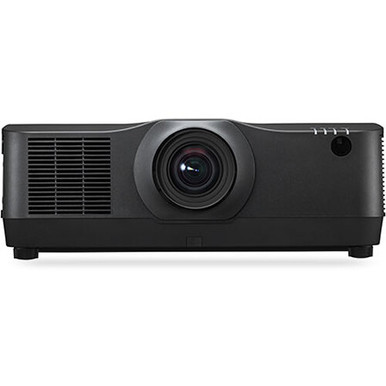
This NEC NP-PA804UL-BL Setup Guide and Buying Considerations article tackles a costly AV problem: choosing an installation projector before the room, signal path, lens requirements, and operating plan are fully documented. The NEC NP-PA804UL-B is an 8,200-lumen WUXGA professional-installation laser LCD projector. Those confirmed facts create a useful starting point, but they do not settle room fit by themselves.
Churches may need to balance ambient light against readable lyrics and presentation content. Schools must account for screen size, sightlines, and simple daily operation. Conference room teams often care about source handling, control, and support handoff. Installers need firm measurements before hardware reaches the site. This guide explains how to evaluate those needs, sequence the setup, compare the NEC with the provided Epson alternative, and judge price-to-performance without relying on unsupported claims. Use the linked product pages for current commerce details before ordering.
Products at a Glance
- Option 1: NEC NP-PA804UL-B 8,200 Lumen WUXGA Professional Installation Laser LCD Projector
- For teams evaluating a 5,200-lumen Full HD laser 3LCD…: Epson Powerlite L270F 5200-Lumen Full HD Laser 3LCD Projector (V11HC68020)
- For broader AV network plans that specifically call f…: HP Aruba JL557A 48x GBE PoE+ 4x 1GB SFP Port Switch
Quick Comparison Table
| Feature | NEC NP-PA804UL-B 8,200 Lumen WUXGA Professional Installation Laser LCD Projector | Epson Powerlite L270F 5200-Lumen Full HD Laser 3LCD Projector (V11HC68020) | HP Aruba JL557A 48x GBE PoE+ 4x 1GB SFP Port Switch |
|---|---|---|---|
| Brightness | 8,200 Lumen | 5200 lumens | |
| Resolution | WUXGA | Full HD | |
| Best For | AV teams whose documented room design calls for an 8,200-lumen WUXGA professional-installation laser LCD projector. | Teams evaluating a 5,200-lumen Full HD laser 3LCD projector against their measured room and content requirements. | Broader AV network plans that specifically call for a 48-port GBE PoE+ switch with four 1GB SFP ports. |
| Recommended Buyer | AV teams whose documented room design calls for an 8,200-lumen WUXGA professional-installation laser LCD projector. | Teams evaluating a 5,200-lumen Full HD laser 3LCD projector against their measured room and content requirements. | Broader AV network plans that specifically call for a 48-port GBE PoE+ switch with four 1GB SFP ports. |
Product Images
Projector Options from AudioVideoNation
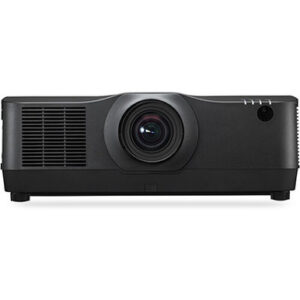
1. NEC NP-PA804UL-B 8,200 Lumen WUXGA Professional Installation Laser LCD Projector
Who should compare it: AV teams whose documented room design calls for an 8,200-lumen WUXGA professional-installation laser LCD projector.
Why it belongs here: This is the subject projector and the clearest match for a design brief centered on 8,200-lumen brightness and WUXGA resolution. Its professional-installation positioning also makes room survey, projection geometry, mounting, and commissioning central to the buying decision.
SKU: NP-PA804UL-BL
Key Features
- 8,200-lumen stated brightness
- WUXGA resolution
- Laser light source
- LCD imaging
- Professional-installation projector design
Things to Consider
Verify the required lens, throw geometry, mount, inputs, control, networking, audio path, and installation clearances before ordering. Check the linked product page for current commerce details.
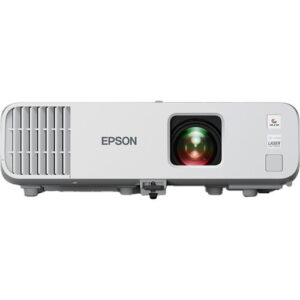
2. Epson Powerlite L270F 5200-Lumen Full HD Laser 3LCD Projector (V11HC68020)
Who should compare it: Teams evaluating a 5,200-lumen Full HD laser 3LCD projector against their measured room and content requirements.
Why it belongs here: This is the other projector in the supplied selection and gives buyers a concrete specification comparison: 5,200 lumens and Full HD rather than the NEC projector’s 8,200 lumens and WUXGA.
SKU: PL-L270F
Key Features
- 5,200-lumen stated brightness
- Full HD resolution
- Laser light source
- 3LCD imaging
Things to Consider
Do not assume it can replace the NEC projector without redesign. Confirm projection geometry, mounting, connections, control requirements, and every required accessory for the Epson installation.
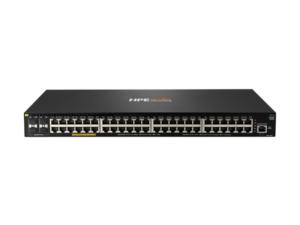
3. HP Aruba JL557A 48x GBE PoE+ 4x 1GB SFP Port Switch
Who should compare it: Broader AV network plans that specifically call for a 48-port GBE PoE+ switch with four 1GB SFP ports.
Why it belongs here: Some AV deployments include a separate network-infrastructure purchase. This switch provides a defined option for teams whose network design independently requires 48 GBE PoE+ ports and four 1GB SFP ports.
SKU: JL557A
Key Features
- 48 GBE ports
- PoE+ capability
- Four 1GB SFP ports
- Network switch category
Things to Consider
This switch is not identified as an NEC projector accessory, and the supplied data does not establish compatibility or a PoE requirement for the projector. Validate it with the network design, security policy, power plan, and support team.
NEC NP-PA804UL-B 8,200 Lumen WUXGA Professional Installation Laser LCD Projector vs Epson Powerlite L270F 5200-Lumen Full HD Laser 3LCD Projector (V11HC68020): Main Differences
- Choose NEC NP-PA804UL-B 8,200 Lumen WUXGA Professional Installation Laser LCD Projector if AV teams whose documented room design calls for an 8,200-lumen WUXGA professional-installation laser LCD projector..
- Choose Epson Powerlite L270F 5200-Lumen Full HD Laser 3LCD Projector (V11HC68020) if Teams evaluating a 5,200-lumen Full HD laser 3LCD projector against their measured room and content requirements..
- Choose HP Aruba JL557A 48x GBE PoE+ 4x 1GB SFP Port Switch if Broader AV network plans that specifically call for a 48-port GBE PoE+ switch with four 1GB SFP ports..
NEC NP-PA804UL deployment fit starts with the room
The NEC projector has an 8,200-lumen brightness specification and WUXGA resolution. Use both as design inputs. Neither replaces a site survey. The image reaching the audience will also depend on screen size and material, ambient light, projection distance, content, and room geometry.
Start with the content standard. WUXGA may suit teams whose sources and presentation workflow already use that named resolution format. Confirm the output settings of computers, media systems, and other sources rather than assuming every source will deliver the intended signal.
Next, document the viewing environment. A sanctuary with daylight, a classroom with controllable lighting, and an enclosed conference room place different demands on a projection system. Record where light enters, whether fixtures can be zoned, and how large the image must be. Check sightlines from the closest and farthest seats. If the planned screen or image area is already installed, measure it instead of working from a room drawing alone.
Treat 8,200 lumens as a stated projector specification, not a promise about on-screen results. An installer should connect that figure to the actual screen and room conditions before approving the design.
Pre-installation survey: screen, throw, lens, and mounting
Resolve projection geometry before choosing a mount location. The provided product data does not establish throw type, throw distance, lens options, lens adjustment range, or mounting orientation. Verify those details in the applicable NEC installation documentation and match them to measured site dimensions.
Measure from the proposed lens position to the screen plane. Then record the required image width and height, ceiling height, obstructions, and the centerline relationship between the projector and screen. Structural attachment points matter too. A convenient ceiling tile location is not a mounting plan.
Confirm the exact lens and mounting hardware needed for the design before ordering. Do not assume that parts from another projector installation will fit. Allow the clearances required by the manufacturer, and preserve access for inspection, cleaning, cable service, and alignment. The projector uses a laser light source, but the installation still needs a maintenance path.
Map power and cabling while the ceiling or wall route is accessible. Record the source locations, expected cable lengths, wall plates, pathway capacity, and any signal-extension equipment in the proposed chain. The supplied facts do not list projector inputs, control connections, networking functions, or audio capabilities. Check each required connection against current product documentation. If sound is part of the project, design and verify that path separately rather than assuming the projector will cover the room.
A practical NEC NP-PA804UL setup sequence
A disciplined setup order prevents mounting, signal, and image problems from becoming tangled together.
1. Verify the order. Match the carton and purchase record to SKU NP-PA804UL-BL and the intended installation. Confirm the selected lens, mount, cables, and any external signal equipment against the approved design.
2. Inspect the site. Recheck screen dimensions, mounting coordinates, structure, power location, cable routes, ventilation clearances, and service access. Construction changes can make an earlier drawing inaccurate.
3. Prove the signal path. Before final concealment, test the intended source, cabling, extenders, and switching path together. Confirm that the source can send the required content format and that the complete route remains stable during normal operation. This is a system test, not a claim about a connection type that was not provided.
4. Install and align. Follow NEC documentation for mounting and startup. Set the physical position and optical alignment first. Use electronic correction only after the projector, lens, and screen relationship has been checked. Record any final mounting measurements that differ from the drawings.
5. Configure for the room. Choose settings that match the approved content, lighting plan, and operating schedule. Avoid copying settings from another room without validation. The screen, sources, and audience may be different.
6. Run acceptance tests. Check common presentations and video from every planned source location. Inspect focus across the image, framing, readable text, source changes, startup, shutdown, and recovery after a power cycle. Have the owner’s representative approve the result.
7. Document the handoff. Save the final settings, cable map, source instructions, support contacts, and product identifiers. Short operator instructions reduce accidental changes after commissioning.
Signal and network infrastructure planning
Keep the projector decision separate from the wider network design. The provided data does not identify network ports, control protocols, wireless functions, or compatibility for the NEC projector. Confirm those requirements before assigning switch ports or buying control hardware.
The HP Aruba JL557A in the product list is a 48-port GBE PoE+ switch with four 1GB SFP ports. It can be evaluated when the broader project independently calls for that network configuration. It is not identified as an NEC projector accessory, and the supplied facts do not establish compatibility between the products.
Build a port schedule for the entire AV system. List each endpoint, its network connection, any PoE+ requirement, the switch location, and the responsible network team. Then validate the proposed switch against the organization’s security, management, uplink, power, and support requirements. This avoids selecting network equipment solely because it appeared beside a projector during product research.
Apply the same caution to wireless accessories. The Optoma SI07B is identified as an IFPD Wi-Fi and Bluetooth module, not as an accessory for this NEC projector, so it should not be treated as part of the NEC setup without documented compatibility.
Price-to-performance, stock, and availability checks
Price-to-performance begins with the approved room requirement. A lower purchase price does not help if the selected projector misses the specified brightness or resolution. A higher brightness figure also does not justify extra project cost when the room does not need it. Compare each candidate against the same screen, content, lighting, and installation brief.
Include the complete installed cost. Depending on the confirmed design, that may involve a lens, mount, structural work, cabling, signal extension, switching, electrical work, control programming, installation labor, commissioning, and staff training. Do not compare projector prices while ignoring different installation requirements. The supplied data does not define which supporting parts are required, so request a design-specific bill of materials.
For stock and availability, check the linked AudioVideoNation product page close to the purchase date. Do the same for the selected lens and every critical accessory. A projector without the correct installation parts cannot meet the deployment schedule. Confirm product identifiers on the quote and purchase order so NP-PA804UL-BL is not confused with a nearby configuration.
Set a substitution rule before ordering. If the NEC projector or a required component cannot meet the project timeline, any replacement should be reviewed against the original brightness, resolution, projection geometry, connections, mounting plan, and operating needs. Similar naming is not enough.
NEC NP-PA804UL vs Epson PowerLite L270F
The provided projector alternatives differ in two confirmed specifications. The NEC NP-PA804UL-B is stated at 8,200 lumens with WUXGA resolution. The Epson PowerLite L270F is stated at 5,200 lumens with Full HD resolution. Both product names identify laser light sources, while the NEC is described as LCD and the Epson as 3LCD.
Use those differences to narrow the design, not to declare a universal winner. If the approved brief calls for 8,200 lumens and WUXGA, the NEC matches those named requirements. If the room brief calls for 5,200 lumens and Full HD, the Epson matches that combination. If neither brief exists, finish the room assessment first.
Do not treat the Epson projector as a drop-in substitute. The provided data does not establish comparable throw geometry, lens options, mounting, inputs, control, audio, or networking. Each candidate needs its own installation check. Compare live product-page information and project-specific quotes only after confirming that both projectors can meet the physical and operational design.
Commissioning and handoff checklist for AV teams
Commission with the content people actually use. For a church, that may include lyrics, presentation slides, and video. A school should test instructor computers and the approved classroom workflow. A conference room team should test every planned source and operating scenario. These examples guide testing. They do not claim built-in compatibility with any source.
Inspect the image from several audience positions. Confirm framing, focus, readable text, and visibility under the lighting conditions approved for presentations. Test source changes and the documented startup and shutdown process. If external switching, extension, control, networking, or audio equipment is installed, test the complete path and record its configuration.
Finish with a concise handoff package. Include SKU NP-PA804UL-BL, the projector and accessory records, a cable map, final settings, mounting measurements, operator steps, and the escalation path for support. Photographing labeled connections can help the local team restore a cable after service.
Assign ownership. Someone should control configuration changes, maintain the documentation, and train new operators. A clear handoff protects the installed design and gives churches, schools, and conference room teams a repeatable way to operate the system.
Related AudioVideoNation Links
- Browse Projector at AudioVideoNation
- NEC NP-PA804UL-B professional installation projector
- Epson PowerLite L270F laser projector
- HP Aruba JL557A PoE+ switch
Product Information Sources
- NEC NP-PA804UL-B 8,200 Lumen WUXGA Professional Installation Laser LCD Projector product information
- Epson Powerlite L270F 5200-Lumen Full HD Laser 3LCD Projector (V11HC68020) product information
- HP Aruba JL557A 48x GBE PoE+ 4x 1GB SFP Port Switch product information
FAQ
What are the confirmed specifications of the NEC NP-PA804UL-B?
The confirmed core specifications are 8,200 lumens, WUXGA resolution, a laser light source, and LCD imaging. The product is positioned for professional installation, so buyers should verify its lens, throw, mounting, connection, and control details against the room design.
Is 8,200 lumens enough for a church, classroom, or conference room?
Suitability cannot be decided from the 8,200-lumen specification alone. Screen size and material, ambient light, projection distance, content, and viewing expectations must be assessed together.
What throw distance or lens does the NEC NP-PA804UL-BL require?
Installers must verify the required throw distance and lens from current NEC documentation before ordering or mounting the projector. The supplied product facts do not establish the projection geometry needed for a specific room.
How does the NEC NP-PA804UL compare with the Epson PowerLite L270F?
The NEC is stated at 8,200 lumens and WUXGA, while the Epson is stated at 5,200 lumens and Full HD. Compare their room fit, installation requirements, connections, and live commerce details before selecting either projector.
How should buyers check the current price, stock, and availability?
Buyers should check the linked AudioVideoNation product page near the purchase date for current price, stock, and availability details. Critical lenses, mounts, and other confirmed accessories should also be checked before the project schedule is approved.
Can the HP Aruba JL557A switch be assumed to work with the NEC projector?
No, the supplied data does not establish compatibility between the HP Aruba JL557A and the NEC projector. Evaluate the switch only when the broader network design calls for its 48 GBE PoE+ ports and four 1GB SFP ports.
Conclusion
Use this NEC NP-PA804UL-BL Setup Guide and Buying Considerations comparison to match documented specifications to the room and installation requirements. Review the linked product pages for current purchase details before ordering.
Products Used
| SKU | Product Name | URL |
|---|---|---|
| NP-PA804UL-BL | NEC NP-PA804UL-B 8,200 Lumen WUXGA Professional Installation Laser LCD Projector | View product |
| PL-L270F | Epson Powerlite L270F 5200-Lumen Full HD Laser 3LCD Projector (V11HC68020) | View product |
| JL557A | HP Aruba JL557A 48x GBE PoE+ 4x 1GB SFP Port Switch | View product |