

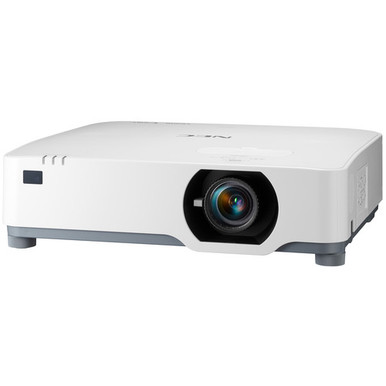
NEC NP-P605UL vs NP-PA653U: Which Projector Should You Choose? For churches, schools, conference rooms, and installation teams, the hard part is deciding how much of the plan can rest on confirmed product data. Both NEC projectors are listed at WUXGA resolution. The NP-P605UL also has a documented brightness of 6000 lumens. For the NP-PA653U, brightness and projection geometry need confirmation before anyone commits to a room design.
That gap shapes this comparison. It does not make the NP-PA653U the weaker projector. It limits the claims a buyer can safely make from the supplied facts. This guide separates confirmed specifications from pre-purchase checks, then connects them to deployment fit, price-to-performance, and current availability. It also places two supplied Epson alternatives in context. By the end, you will have a clear shortlist and a practical verification checklist for the exact SKU you plan to order.
Products at a Glance
- Option 1: NEC NP-P605UL Display Entry Installation NP-P605UL LCD Projector 16:10
- For teams already specifying the NP-PA653U and prepar…: NEC NP-PA653U 3D WUXGA 1080p LCD Projector (No Lens)
- For buyers whose brief accepts Full HD instead of WUX…: Epson Powerlite L270F 5200-Lumen Full HD Laser 3LCD Projector (V11HC68020)
- For teams evaluating Full HD and a documented Wi-Fi c…: Epson PowerLite 992F 4000-Lumen Full HD Projector with Wi-Fi (V11H988020)
Quick Comparison Table
| Feature | NEC NP-P605UL Display Entry Installation NP-P605UL LCD Projector 16:10 | NEC NP-PA653U 3D WUXGA 1080p LCD Projector (No Lens) | Epson Powerlite L270F 5200-Lumen Full HD Laser 3LCD Projector (V11HC68020) | Epson PowerLite 992F 4000-Lumen Full HD Projector with Wi-Fi (V11H988020) |
|---|---|---|---|---|
| Brightness | 6000 lumens | 5200 lumens | 4000 lumens | |
| Resolution | WUXGA | WUXGA | Full HD | Full HD |
| Best For | Installations that require WUXGA and want a documented 6000-lumen figure during the initial comparison. | Teams already specifying the NP-PA653U and prepared to confirm brightness, optics, accessories, and integration details before approval. | Buyers whose brief accepts Full HD instead of WUXGA and who want a documented 5200-lumen option to evaluate. | Teams evaluating Full HD and a documented Wi-Fi capability, subject to room, network, and workflow verification. |
| Smart Features | Wi-Fi | |||
| Recommended Buyer | Installations that require WUXGA and want a documented 6000-lumen figure during the initial comparison. | Teams already specifying the NP-PA653U and prepared to confirm brightness, optics, accessories, and integration details before approval. | Buyers whose brief accepts Full HD instead of WUXGA and who want a documented 5200-lumen option to evaluate. | Teams evaluating Full HD and a documented Wi-Fi capability, subject to room, network, and workflow verification. |
Product Images
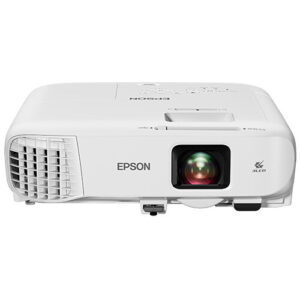
Projector Options from AudioVideoNation
1. NEC NP-P605UL Display Entry Installation NP-P605UL LCD Projector 16:10
Who should compare it: Installations that require WUXGA and want a documented 6000-lumen figure during the initial comparison.
Why it belongs here: It is one of the two requested NEC projectors, and its supplied facts give buyers two concrete planning points: WUXGA resolution and 6000 lumens.
SKU: NP-P605UL
Key Features
- WUXGA resolution
- 6000-lumen listed brightness
- Exact procurement SKU: NP-P605UL
Things to Consider
Confirm the throw ratio, lens package, connections, controls, audio plan, mounting requirements, and other site details before purchase. Use the linked page for current commercial information.
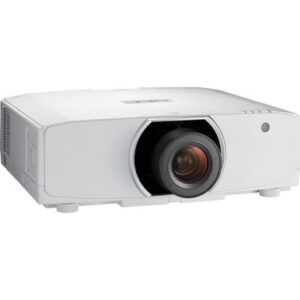
2. NEC NP-PA653U 3D WUXGA 1080p LCD Projector (No Lens)
Who should compare it: Teams already specifying the NP-PA653U and prepared to confirm brightness, optics, accessories, and integration details before approval.
Why it belongs here: It is the second NEC projector in the requested comparison, and the supplied product facts confirm WUXGA resolution.
SKU: NP-PA653U
Key Features
- WUXGA resolution
- Exact procurement SKU: NP-PA653U
- Listed in the Multimedia Projectors, Projectors, and Video categories
Things to Consider
Obtain confirmed brightness, lens and throw information, connections, controls, mounting requirements, and the complete accessory list for the exact SKU. Check the linked page for current commercial details.
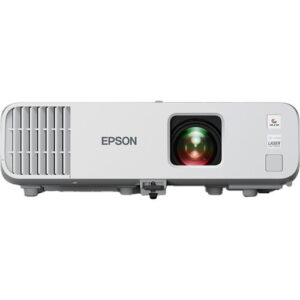
3. Epson Powerlite L270F 5200-Lumen Full HD Laser 3LCD Projector (V11HC68020)
Who should compare it: Buyers whose brief accepts Full HD instead of WUXGA and who want a documented 5200-lumen option to evaluate.
Why it belongs here: It gives buyers a supplied alternative with documented 5200-lumen brightness and Full HD resolution.
SKU: PL-L270F
Key Features
- 5200-lumen listed brightness
- Full HD resolution
- Exact procurement SKU: PL-L270F
Things to Consider
Full HD differs from the WUXGA resolution listed for both NEC projectors. Confirm optics, throw geometry, connections, controls, mounting, and accessories before treating it as a viable substitute.
4. Epson PowerLite 992F 4000-Lumen Full HD Projector with Wi-Fi (V11H988020)
Who should compare it: Teams evaluating Full HD and a documented Wi-Fi capability, subject to room, network, and workflow verification.
Why it belongs here: It adds a supplied Full HD alternative with documented 4000-lumen brightness and Wi-Fi.
SKU: PL-992F
Key Features
- 4000-lumen listed brightness
- Full HD resolution
- Wi-Fi
- Exact procurement SKU: PL-992F
Things to Consider
Its resolution and listed brightness differ from the NEC pair's WUXGA resolution and the NP-P605UL's 6000-lumen figure. Confirm wireless workflow, device compatibility, network policy, optics, and installation details.
NEC NP-P605UL Display Entry Installation NP-P605UL LCD Projector 16:10 vs NEC NP-PA653U 3D WUXGA 1080p LCD Projector (No Lens): Main Differences
- Choose NEC NP-P605UL Display Entry Installation NP-P605UL LCD Projector 16:10 if Installations that require WUXGA and want a documented 6000-lumen figure during the initial comparison..
- Choose NEC NP-PA653U 3D WUXGA 1080p LCD Projector (No Lens) if Teams already specifying the NP-PA653U and prepared to confirm brightness, optics, accessories, and integration details before approval..
- Choose Epson Powerlite L270F 5200-Lumen Full HD Laser 3LCD Projector (V11HC68020) if Buyers whose brief accepts Full HD instead of WUXGA and who want a documented 5200-lumen option to evaluate..
- Choose Epson PowerLite 992F 4000-Lumen Full HD Projector with Wi-Fi (V11H988020) if Teams evaluating Full HD and a documented Wi-Fi capability, subject to room, network, and workflow verification..
NEC WUXGA projector comparison at a glance
Both NEC projectors share the same listed WUXGA resolution, so the resolution label does not separate them. The NP-P605UL adds one confirmed decision point: 6000 lumens. The supplied NP-PA653U facts confirm WUXGA, but buyers should obtain its brightness and optical details before making a direct performance comparison.
Treat that distinction carefully. An unlisted brightness value is not evidence of lower output. It is an open procurement question. If your bid requires a stated lumen threshold, the NP-P605UL can be screened against that threshold now. The NP-PA653U can remain on the shortlist after its exact configuration is documented.
Use the SKU on every quote and approval record. NP-P605UL and NP-PA653U identify the two products in this comparison. Then verify the planned lens package, throw geometry, connections, controls, mounting, and audio path for that exact product. Shared WUXGA resolution does not establish shared installation hardware or system compatibility.
Projector deployment fit for churches, schools, and conference rooms
Start with the room. A church may need to account for a large image, ambient light, long cable paths, several content sources, and controls that volunteers can operate consistently. The NP-P605UL's documented 6000-lumen figure gives the design team a concrete number to compare with the room requirement. That number alone cannot promise a satisfactory result. Screen dimensions, lighting, placement, and content still shape the design.
A school planning one classroom or many should document the same details for every approved SKU. Confirm image geometry, source connections, control method, mounting plan, and the route used for classroom audio. Both NEC projectors have WUXGA resolution in the supplied data, but that shared fact does not settle the remaining system questions. Standardization works only when the approved configuration is complete.
Conference room teams should map each projector to the actual presentation workflow. Record the sources, switching path, control interface, network rules, screen, and planned mounting position. If wireless presentation is required, confirm the exact method rather than assuming that a general wireless capability will support the organization's devices or security policy.
Across all three settings, deployment fit comes from matching a verified projector configuration to the room. A model name or resolution label cannot replace that work.
6000-lumen WUXGA projector planning: brightness and resolution
The only supplied numeric brightness statement for the NEC pair belongs to the NP-P605UL: 6000 lumens. The NP-PA653U should not be assigned a value until the buyer confirms it for the exact product. This means the current data supports a brightness-threshold check for the NP-P605UL, but it does not support declaring either NEC projector brighter than the other.
Brightness is one part of projection planning. Screen size, ambient light, screen surface, placement, and the material being displayed all affect the required output. A 6000-lumen listing helps with early screening. It is not a promise that every image will remain clear under every room condition.
Resolution provides a simpler comparison. Both NEC choices are listed as WUXGA, so the supplied facts establish no resolution advantage between them. The Epson Powerlite L270F is listed at 5200 lumens and Full HD, while the Epson PowerLite 992F is listed at 4000 lumens and Full HD. Those figures create useful reference points, but the different resolution labels prevent a strict like-for-like comparison.
Set the room's minimum requirements first. Then ask for confirmed brightness and resolution data for every candidate before comparing commercial details.
Lens, throw, and installation checks
Confirm throw ratio and lens configuration for both exact NEC SKUs before selecting a mounting point. Measure the available distance from the planned projector location to the screen and record the required image width. The installer can then check whether the proposed configuration can produce that image within its documented optical range.
Ask the seller or project designer to identify the exact lens package and every required installation accessory. Do not assume that a lens, mount, or accessory transfers between NEC products. Confirm zoom, focus, image-positioning allowances, mounting orientation, and physical clearances from current documentation for the chosen SKU.
The signal plan deserves the same attention. List each source, required input, switching device, control interface, cable run, and endpoint. If the room needs sound, document whether audio follows the presentation signal or connects directly to a separate room system. Then confirm the necessary connections.
Installation approval should include a drawing, equipment list, cable plan, and exact product identifiers. This catches geometry or integration problems before equipment and labor schedules are committed.
Projector price-to-performance without unsupported assumptions
Price-to-performance cannot be settled without current commercial details and a complete equipment list. Use each linked product page for live information and request a quote tied to the exact SKU. Compare the complete installed requirement: projector, any required lens, mount, cables, signal equipment, controls, accessories, and installation labor.
The supplied evidence gives the NP-P605UL two clear screening facts: WUXGA resolution and 6000 lumens. The NP-PA653U has confirmed WUXGA resolution, while its brightness and installation details need verification. The Epson L270F contributes a 5200-lumen Full HD alternative. The Epson 992F contributes a 4000-lumen Full HD option with documented Wi-Fi.
Turn the project brief into pass-or-verify gates. Start with resolution, required brightness, image geometry, connections, controls, audio routing, and mounting. Record a confirmed fact or a required follow-up beside each item. A lower quote cannot rescue a candidate that fails a non-negotiable room requirement.
Once every remaining candidate passes those gates, compare its full installed quote and procurement terms. The supplied data does not support naming one projector the better value without that project-specific information.
Projector stock and availability before procurement
Check the linked product page for current availability and request confirmation before scheduling installation labor. Commercial conditions can change, so the purchase record should state the exact SKU, required quantity, configuration, accessories, and expected delivery timing.
For a multiroom school, church campus, or conference facility, confirm whether the full quantity can be supplied in the approved configuration. If a substitute is proposed, run it through the same resolution, brightness, lens, throw, connection, and control checks. A similar name does not establish equivalent installation fit.
Keep the product approval and installation schedule connected. That reduces the chance of designing around one configuration and receiving another. The live product pages are the proper source for current price and availability details.
WUXGA vs Full HD projector alternatives
The Epson Powerlite L270F gives buyers a documented alternative at 5200 lumens and Full HD resolution. Consider it when the project brief accepts Full HD and its listed brightness fits the calculated room requirement. It does not share the WUXGA label of the two NEC projectors, so keep the resolution terms distinct during approval.
The Epson PowerLite 992F is listed at 4000 lumens, Full HD resolution, and Wi-Fi. Its documented Wi-Fi capability can place it on a shortlist where wireless operation matters. Confirm the intended devices, presentation method, network rules, and security requirements before treating that capability as a workflow match.
Neither Epson projector should be treated as an automatic replacement for an NEC SKU. Recheck throw geometry, lens configuration, connections, controls, mounts, audio routing, and required accessories. Their documented brightness figures also differ from the NP-P605UL's 6000-lumen listing.
These alternatives are useful when the NEC models do not close every requirement or when live commercial details change. Apply the same evidence standard to all four products.
How to choose between NP-P605UL and NP-PA653U
Choose the NP-P605UL when the brief calls for WUXGA, a documented 6000-lumen figure satisfies the initial brightness requirement, and the verified optics and integration details fit the room. Its supplied facts answer the brightness question earlier in the buying process. They do not remove the need for installation checks.
Keep the NP-PA653U under consideration when that exact SKU is required or proposed. Before approval, obtain its confirmed brightness, lens configuration, throw information, connections, controls, mounting requirements, and accessory list. Its supplied WUXGA specification supports the resolution portion of the brief, but the room design needs the remaining facts.
If Full HD is acceptable, compare the Epson L270F and 992F using their documented brightness and connectivity facts. Then apply the same installation checklist.
The final approval record should contain the exact SKU, resolution, brightness, lens and throw details, signal path, control plan, audio route, mounting plan, room conditions, current quote, and availability confirmation. The defensible choice is the projector whose verified configuration satisfies every required item.
Related AudioVideoNation Links
- Browse Projector at AudioVideoNation
- NEC NP-P605UL product page
- NEC NP-PA653U product page
- Epson Powerlite L270F product page
- Epson PowerLite 992F product page
Product Information Sources
- NEC NP-P605UL Display Entry Installation NP-P605UL LCD Projector 16:10 product information
- NEC NP-PA653U 3D WUXGA 1080p LCD Projector (No Lens) product information
- Epson Powerlite L270F 5200-Lumen Full HD Laser 3LCD Projector (V11HC68020) product information
- Epson PowerLite 992F 4000-Lumen Full HD Projector with Wi-Fi (V11H988020) product information
FAQ
Do the NEC NP-P605UL and NP-PA653U have the same resolution?
Both NEC projectors are listed with WUXGA resolution. The supplied facts therefore establish no resolution advantage for either product.
Is the NEC NP-P605UL brighter than the NP-PA653U?
The provided data cannot prove that the NP-P605UL is brighter because only it has a supplied brightness figure, at 6000 lumens. Confirm the NP-PA653U brightness before making a direct lumen comparison.
Which NEC projector should I use in a bright church or classroom?
Neither projector should be approved for a bright room from the supplied facts alone; calculate the room requirement and verify the exact configuration. The NP-P605UL provides a documented 6000-lumen figure, while the NP-PA653U requires brightness confirmation.
What installation details should I verify before ordering?
Verify the exact lens package, throw ratio, image geometry, connections, controls, mounting requirements, audio route, and required accessories. Match those details to measured room conditions and the exact SKU on the quote.
How should I compare projector price and availability?
Use the linked product pages for current price and availability, then request an exact-SKU quote for the complete installed configuration. Compare required lenses, mounts, signal equipment, controls, accessories, and labor alongside the projector.
What alternatives can I compare with these NEC projectors?
The supplied alternatives are the 5200-lumen Full HD Epson Powerlite L270F and the 4000-lumen Full HD Epson PowerLite 992F with Wi-Fi. Recheck resolution requirements, brightness, optics, integration, and mounting because neither is an automatic substitute for a WUXGA NEC projector.
Conclusion
Use this NEC NP-P605UL vs NP-PA653U: Which Projector Should You Choose? comparison to match documented specifications to the room and installation requirements. Review the linked product pages for current purchase details before ordering.
Products Used
| SKU | Product Name | URL |
|---|---|---|
| NP-P605UL | NEC NP-P605UL Display Entry Installation NP-P605UL LCD Projector 16:10 | View product |
| NP-PA653U | NEC NP-PA653U 3D WUXGA 1080p LCD Projector (No Lens) | View product |
| PL-L270F | Epson Powerlite L270F 5200-Lumen Full HD Laser 3LCD Projector (V11HC68020) | View product |
| PL-992F | Epson PowerLite 992F 4000-Lumen Full HD Projector with Wi-Fi (V11H988020) | View product |