

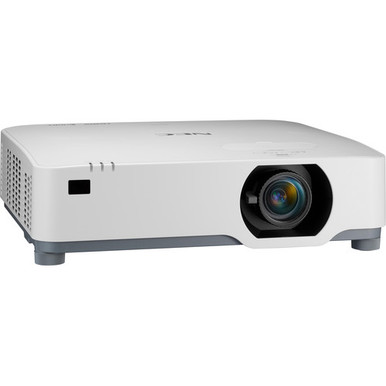
Choosing a projector for a church, classroom, or conference room starts with a practical question: will the complete installation work in the intended space? This NEC NP-P525UL Setup Guide and Buying Considerations resource helps AV buyers answer that question before equipment arrives.
The standard NEC NP-P525UL listing provides two firm planning anchors: 5,200-lumen brightness and WUXGA resolution. A separate used PJ-P525UL listing offers another procurement path, although the supplied facts for that listing are narrower. Those details matter. They do not settle screen size, mounting position, signal compatibility, or total project cost by themselves.
Use this guide to define deployment fit, prepare a setup checklist, compare the standard and used listings, and assess price-to-performance with current commerce details from each linked product page. It also separates the projector choices from an Optoma connectivity accessory that may apply to a different display in a mixed-equipment room. That boundary can prevent an expensive compatibility mistake.
Products at a Glance
- Option 1: NEC NP-P525UL 5200-Lumen WUXGA Laser LCD Projector
- For organizations permitted to buy used projectors an…: NEC PJ-P525UL Display 5200-Lumen WUXGA LCD Laser Projector – White [USED]
- For mixed-display deployments that include a compatib…: Optoma Technology SI07B IFPD Wi-Fi and Bluetooth Module
Quick Comparison Table
| Feature | NEC NP-P525UL 5200-Lumen WUXGA Laser LCD Projector | NEC PJ-P525UL Display 5200-Lumen WUXGA LCD Laser Projector – White [USED] | Optoma Technology SI07B IFPD Wi-Fi and Bluetooth Module |
|---|---|---|---|
| Brightness | 5200 lumens | ||
| Resolution | WUXGA | WUXGA | |
| Best For | Churches, schools, conference rooms, and installation teams evaluating the standard NP-P525UL listing against a measured room design. | Organizations permitted to buy used projectors and prepared to verify condition, included items, purchasing terms, and installation fit before approval. | Mixed-display deployments that include a compatible Optoma IFPD, subject to exact model verification before purchase. |
| Smart Features | Wi-Fi, Bluetooth | ||
| Recommended Buyer | Churches, schools, conference rooms, and installation teams evaluating the standard NP-P525UL listing against a measured room design. | Organizations permitted to buy used projectors and prepared to verify condition, included items, purchasing terms, and installation fit before approval. | Mixed-display deployments that include a compatible Optoma IFPD, subject to exact model verification before purchase. |
Product Images
Projector Options from AudioVideoNation
1. NEC NP-P525UL 5200-Lumen WUXGA Laser LCD Projector
Who should compare it: Churches, schools, conference rooms, and installation teams evaluating the standard NP-P525UL listing against a measured room design.
Why it belongs here: This is the standard NP-P525UL catalog listing and the clearest starting point for the room plan. Its supplied facts identify 5,200-lumen brightness and WUXGA resolution, giving buyers two concrete requirements to test against the deployment.
SKU: NP-P525UL
Key Features
- 5,200-lumen brightness rating
- WUXGA resolution
- Exact NP-P525UL catalog SKU
- Listed in the Multimedia Projectors, Projectors, and Video categories
Things to Consider
Verify throw distance, lens adjustment, mounting requirements, inputs, controls, audio needs, included items, and current commerce details on the linked product page and in current documentation.
2. NEC PJ-P525UL Display 5200-Lumen WUXGA LCD Laser Projector – White [USED]
Who should compare it: Organizations permitted to buy used projectors and prepared to verify condition, included items, purchasing terms, and installation fit before approval.
Why it belongs here: This listing gives buyers a separate used P525UL procurement path. WUXGA resolution is confirmed in the supplied facts, while the used designation makes condition review a central part of the decision.
SKU: NP-P525UL-USED
Key Features
- WUXGA resolution
- Used condition identified in the product name
- Exact NP-P525UL-USED catalog SKU
- Listed in the Projectors category
Things to Consider
Do not assume every specification or included item matches the standard listing. Review the live page and confirm condition evidence, exact model, accessories, service information, fulfillment details, and any applicable return or warranty terms.
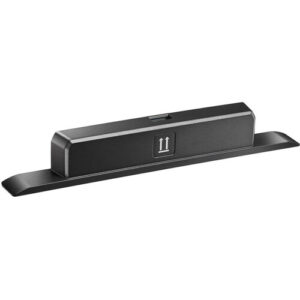
3. Optoma Technology SI07B IFPD Wi-Fi and Bluetooth Module
Who should compare it: Mixed-display deployments that include a compatible Optoma IFPD, subject to exact model verification before purchase.
Why it belongs here: This accessory is relevant only when the wider room project includes a separately supported Optoma interactive display. It helps buyers distinguish display-specific connectivity equipment from confirmed NEC projector accessories.
SKU: SI07B
Key Features
- Wi-Fi listed in the supplied facts
- Bluetooth listed in the supplied facts
- Cataloged as an accessory
- Exact SI07B catalog SKU
Things to Consider
No compatibility with the NEC NP-P525UL is established by the supplied data. Do not treat this module as a projector wireless upgrade without explicit confirmation for the intended equipment.
NEC NP-P525UL 5200-Lumen WUXGA Laser LCD Projector vs NEC PJ-P525UL Display 5200-Lumen WUXGA LCD Laser Projector – White [USED]: Main Differences
- Choose NEC NP-P525UL 5200-Lumen WUXGA Laser LCD Projector if Churches, schools, conference rooms, and installation teams evaluating the standard NP-P525UL listing against a measured room design..
- Choose NEC PJ-P525UL Display 5200-Lumen WUXGA LCD Laser Projector – White [USED] if Organizations permitted to buy used projectors and prepared to verify condition, included items, purchasing terms, and installation fit before approval..
- Choose Optoma Technology SI07B IFPD Wi-Fi and Bluetooth Module if Mixed-display deployments that include a compatible Optoma IFPD, subject to exact model verification before purchase..
Start the NEC P525UL installation with firm requirements
Write the room requirements before choosing hardware. Record the intended image dimensions, normal lighting conditions, viewing positions, source equipment, cable routes, mounting restrictions, control needs, and installation date. Churches should account for presentation slides and other planned content. Schools may need several staff devices to follow one repeatable connection process. Conference room teams should include the actual computers, docks, and conferencing endpoints used by employees.
The standard NP-P525UL listing supplies a 5,200-lumen brightness rating and WUXGA resolution. Treat those as inputs to the design. Brightness must still be evaluated against ambient light, image size, projection surface, and the level of contrast the application needs. WUXGA must match the content and source workflow.
Turn every requirement into a pass-or-fail check. “Fits the room” is too vague. “Can produce the required image from the approved mounting location under documented lighting conditions” gives the installer something concrete to verify. Use the same approach for signals, controls, mounting, and purchasing terms.
Plan the room around a 5,200-lumen WUXGA projector
Start with the image, not the ceiling mount. Measure the proposed image width and height, the distance to the closest and farthest viewers, the available projection path, and any obstructions. Document the room under the lighting states used during real events or lessons. A sanctuary during daylight can present a different design problem from the same room during an evening service.
Next, check the required throw distance and lens adjustment limits in current product documentation. The listed lumen value cannot determine mounting distance. It also cannot tell you whether a particular screen size will work from an existing structural point. Confirm the relationship between image size, lens position, and mounting location before ordering hardware or committing to cable lengths.
Ambient-light control may be part of the solution. Record windows, shades, task lighting, and fixtures near the image. If lights must remain on, include that condition in the review rather than evaluating the projector in a dark-room scenario that users will never encounter. The goal is a repeatable room plan built around measured conditions.
NEC NP-P525UL setup checklist for installers
A clean installation begins on paper. Complete these checks before the projector is mounted:
- Placement: Mark the required image boundaries, lens center, proposed mounting point, and measured projection distance. Validate them against current throw and lens documentation.
- Mounting: Confirm the approved orientation, mounting pattern, structural capacity, hardware selection, service access, and required clearances. Follow the manufacturer’s instructions and local requirements.
- Signal path: List every source output, adapter, switcher, extender, and cable run. Confirm that the projector accepts the planned signal and that every intermediate component supports the required format over the installed distance.
- Power and access: Plan a code-compliant power location. Leave the access and clearance specified for installation and future service.
- Control: If the room needs centralized control, remote monitoring, or automated shutdown, verify the exact supported control method. Do not infer network or control support from the model name.
- Commissioning: Test with the room’s real sources. Check image geometry, focus, framing, content legibility, source changes, and operation under normal lighting.
Finish with a handoff record. Note the exact SKU, mounting measurements, cable labels, source settings, approved operating procedure, and any configuration decisions. Short documentation now saves guesswork when a teacher, volunteer, or support technician has to troubleshoot later.
Match WUXGA resolution to sources and content
WUXGA is the confirmed resolution for both projector listings. Build the content workflow around that fact, then validate the entire chain. A source computer, dock, switcher, extender, or conferencing system can change the signal before it reaches the projector.
Test presentation decks, browser content, signage layouts, and conferencing interfaces on the real source equipment. Check text size from the farthest occupied position. Confirm that aspect-ratio handling does not crop or distort the material. If the project requires a particular input timing, higher-resolution signal acceptance, wireless casting, onboard audio, or application support, verify each item in current product documentation before purchase.
Standardize source settings where several people share the room. Schools and churches often depend on quick volunteer or staff handoffs. A written connection sequence and a known-good test source can make commissioning clearer and ongoing support easier.
Compare the standard and used NP-P525UL listings carefully
The supplied catalog contains two P525UL purchasing paths. The standard NP-P525UL listing explicitly identifies 5,200-lumen brightness and WUXGA resolution. The NP-P525UL-USED listing is marked used and confirms WUXGA resolution in the supplied facts. Keep those records separate. Shared model wording does not prove that condition, included items, documentation, or purchasing terms are identical.
For the used listing, request the condition description, current photos, included accessories, service notes, and operating-hour information if available. Confirm the exact model and SKU. Review the live product page for any applicable return or warranty terms without assuming that a particular policy is included.
Apply the same purchasing discipline to the standard listing. Confirm the exact product, included items, documentation, and fulfillment details at the time of order. If organizational rules exclude used equipment, resolve that requirement early. If used equipment is allowed, evaluate it against the same room-fit and signal-path checklist.
Used does not automatically mean better value. Compare the live commerce details, condition evidence, project risk, and total installed cost before deciding.
Stock and availability planning without schedule surprises
Treat stock and availability as live commerce data. Open the linked product page during quoting and check it again before approval. Confirm the exact SKU, requested quantity, condition, and expected fulfillment timing with the seller. Editorial copy cannot settle those details for a future purchase date.
Tie the installation schedule to confirmed procurement milestones. Avoid booking specialized labor, room closures, or access equipment solely from an early product-page check. For multiroom projects, verify whether every room can receive equipment that meets the same approved requirements.
An alternate listing still needs technical review. Do not assume the used listing can replace the standard listing simply because both names contain P525UL. Recheck mounting, signals, included items, condition, and procurement rules. Record the date of each confirmation so the project team knows which information supported the schedule.
Judge projector price-to-performance by total installed cost
Judge price-to-performance with required outcomes and total installed cost. Start with the current price on each linked product page. Then add every confirmed project expense: mounting hardware, signal equipment, cabling, electrical work, access equipment, labor, commissioning, room treatments, and the organization’s support plan.
Use objective purchase gates:
- The documented throw and placement limits fit the measured room.
- WUXGA meets the approved content requirement.
- The 5,200-lumen rating of the standard listing meets the room calculation.
- Required signals and control methods are confirmed.
- Product condition and purchasing terms meet organizational policy.
- Fulfillment timing supports the deployment schedule.
A lower acquisition figure cannot rescue a projector that fails one of those gates. The used listing may change both cost and risk, so credit only documented savings and documented condition. If both listings pass the technical review, compare their current total project costs alongside procurement risk and support expectations. That produces a defensible value decision without relying on an unsupported performance promise.
Verify accessory compatibility in mixed-display rooms
The Optoma Technology SI07B lists Wi-Fi and Bluetooth, but it is an Optoma IFPD module. The supplied data does not establish compatibility with the NEC NP-P525UL. Do not purchase it as a wireless projector upgrade unless current manufacturer documentation explicitly confirms that use.
It can still matter in a mixed-display project. A conference or teaching space may have a separately supported Optoma interactive display alongside the NEC projector. In that case, keep the module on its own equipment line, confirm the exact supported display, and document which room function it addresses.
Apply the same rule to network infrastructure. A switch is not a projector accessory merely because the room has networked AV equipment. Define the network architecture, bandwidth, power, management, and control requirements first, then assess infrastructure products against that separate design. Close the purchase review only after the team has confirmed the projector SKU, room geometry, signals, controls, audio plan, mounting hardware, accessories, product condition, and current commerce details.
Related AudioVideoNation Links
- Browse Projector at AudioVideoNation
- View the NEC NP-P525UL projector
- View the used NEC PJ-P525UL listing
- View the Optoma SI07B module
Product Information Sources
- NEC NP-P525UL 5200-Lumen WUXGA Laser LCD Projector product information
- NEC PJ-P525UL Display 5200-Lumen WUXGA LCD Laser Projector – White [USED] product information
- Optoma Technology SI07B IFPD Wi-Fi and Bluetooth Module product information
FAQ
What brightness and resolution are listed for the NEC NP-P525UL?
The standard NEC NP-P525UL listing specifies 5,200-lumen brightness and WUXGA resolution. Use those values as design inputs, then verify room fit against image size, ambient light, throw requirements, and the planned signal path.
How can I tell whether the NEC NP-P525UL will fit my room?
Room fit requires checking the desired image size, measured projection distance, mounting location, ambient light, and source path against current product documentation. The brightness and resolution facts alone cannot confirm placement or screen suitability.
Can the used NP-P525UL listing replace the standard listing?
The used NP-P525UL listing should be treated as a separate procurement choice, not an automatic replacement for the standard listing. Confirm its exact specifications, condition, included items, mounting fit, purchasing terms, and current fulfillment details before approval.
Does the Optoma SI07B add Wi-Fi or Bluetooth to the NEC NP-P525UL?
The supplied data does not establish the Optoma SI07B as compatible with the NEC NP-P525UL. It lists Wi-Fi and Bluetooth for an Optoma IFPD module, so verify the exact supported display before purchasing it.
How should buyers check NP-P525UL stock and availability?
Buyers should use the linked product page and confirm the exact SKU, quantity, condition, and timing at the point of purchase. Check again before scheduling labor or closing a room for installation because commerce details can change.
How should I compare NP-P525UL price-to-performance?
Compare the current product-page price as one part of the total installed cost and require the projector to pass every room, signal, condition, and schedule check. Include mounting, cabling, signal equipment, electrical work, labor, commissioning, and support planning in the comparison.
Conclusion
Use this NEC NP-P525UL Setup Guide and Buying Considerations comparison to match documented specifications to the room and installation requirements. Review the linked product pages for current purchase details before ordering.
Products Used
| SKU | Product Name | URL |
|---|---|---|
| NP-P525UL | NEC NP-P525UL 5200-Lumen WUXGA Laser LCD Projector | View product |
| NP-P525UL-USED | NEC PJ-P525UL Display 5200-Lumen WUXGA LCD Laser Projector – White [USED] | View product |
| SI07B | Optoma Technology SI07B IFPD Wi-Fi and Bluetooth Module | View product |