

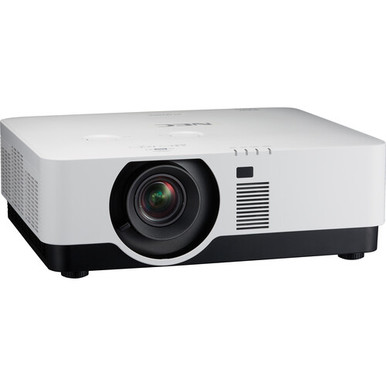
This NEC NP-P506QL Setup Guide and Buying Considerations article helps technology teams turn a projector choice into a defensible room plan. The confirmed product data identifies the NP-P506QL as a 4K projector, and its supplied name positions it for conference-room use. Start there. Treat brightness, throw geometry, lens details, connections, control options, mounting requirements, and environmental limits as verification items before ordering or scheduling labor.
The supplied products also include the Epson Powerlite L270F, which has a documented brightness of 5,200 lumens and Full HD resolution. It gives buyers a useful alternative, but the available facts do not support declaring either projector brighter, easier to install, or better for every room. The Optoma SI07B appears for a different reason: it illustrates why wireless accessories must be checked against the exact display platform instead of assumed compatible.
This guide covers deployment fit, physical planning, the 4K signal path, price-to-performance, live availability checks, and commissioning. Use it to build your questions, compare the supported facts, and decide which product deserves a fully validated design.
Products at a Glance
- Option 1: NEC NP-P506QL 4K DLP Conference Room Laser Projector
- For projects where a documented 5,200-lumen value and…: Epson Powerlite L270F 5200-Lumen Full HD Laser 3LCD Projector (V11HC68020)
- For separately verified Optoma IFPD projects that req…: Optoma Technology SI07B IFPD Wi-Fi and Bluetooth Module
Quick Comparison Table
| Feature | NEC NP-P506QL 4K DLP Conference Room Laser Projector | Epson Powerlite L270F 5200-Lumen Full HD Laser 3LCD Projector (V11HC68020) | Optoma Technology SI07B IFPD Wi-Fi and Bluetooth Module |
|---|---|---|---|
| Brightness | 5200 lumens | ||
| Resolution | 4K | Full HD | |
| Best For | Teams evaluating a 4K projector for a conference-room deployment and prepared to verify the remaining installation details before purchase. | Projects where a documented 5,200-lumen value and Full HD resolution align with the room calculations and content plan. | Separately verified Optoma IFPD projects that require the listed Wi-Fi and Bluetooth functions. |
| Smart Features | Wi-Fi, Bluetooth | ||
| Recommended Buyer | Teams evaluating a 4K projector for a conference-room deployment and prepared to verify the remaining installation details before purchase. | Projects where a documented 5,200-lumen value and Full HD resolution align with the room calculations and content plan. | Separately verified Optoma IFPD projects that require the listed Wi-Fi and Bluetooth functions. |
Product Images
Projector Options from AudioVideoNation
1. NEC NP-P506QL 4K DLP Conference Room Laser Projector
Who should compare it: Teams evaluating a 4K projector for a conference-room deployment and prepared to verify the remaining installation details before purchase.
Why it belongs here: It is the subject of this deployment guide, and its confirmed 4K resolution anchors the room, source, and procurement questions.
SKU: NP-P506QL
Key Features
- The supplied resolution fact is 4K.
- SKU NP-P506QL gives procurement teams an exact model identifier.
- It is categorized under Multimedia Projectors, Projectors, and Video.
- The supplied product name positions it for conference-room use.
Things to Consider
Confirm rated brightness, throw and lens requirements, inputs, control, audio, dimensions, weight, mount requirements, power, and operating clearances before approving the design.
2. Epson Powerlite L270F 5200-Lumen Full HD Laser 3LCD Projector (V11HC68020)
Who should compare it: Projects where a documented 5,200-lumen value and Full HD resolution align with the room calculations and content plan.
Why it belongs here: It gives buyers a projector alternative with two confirmed decision points: 5,200-lumen brightness and Full HD resolution.
SKU: PL-L270F
Key Features
- The supplied brightness fact is 5,200 lumens.
- The supplied resolution fact is Full HD.
- It is categorized as a projector.
- SKU PL-L270F provides the exact purchasing identifier.
Things to Consider
Full HD and 4K are different resolution targets. Verify throw, placement, inputs, control, mounting, and other installation requirements for this exact product instead of transferring assumptions from the NEC.
3. Optoma Technology SI07B IFPD Wi-Fi and Bluetooth Module
Who should compare it: Separately verified Optoma IFPD projects that require the listed Wi-Fi and Bluetooth functions.
Why it belongs here: It provides a useful boundary check for wireless planning: Wi-Fi and Bluetooth are identified, but the supplied data does not establish it as an NP-P506QL accessory.
SKU: SI07B
Key Features
- Wi-Fi is identified in the supplied product facts.
- Bluetooth is identified in the supplied product facts.
- It is categorized as an accessory.
- SKU SI07B provides the exact module identifier.
Things to Consider
Compatibility with the NEC NP-P506QL is not established by the supplied data. Do not purchase it for that projector without written confirmation for the exact planned system.
NEC NP-P506QL 4K DLP Conference Room Laser Projector vs Epson Powerlite L270F 5200-Lumen Full HD Laser 3LCD Projector (V11HC68020): Main Differences
- Choose NEC NP-P506QL 4K DLP Conference Room Laser Projector if Teams evaluating a 4K projector for a conference-room deployment and prepared to verify the remaining installation details before purchase..
- Choose Epson Powerlite L270F 5200-Lumen Full HD Laser 3LCD Projector (V11HC68020) if Projects where a documented 5,200-lumen value and Full HD resolution align with the room calculations and content plan..
- Choose Optoma Technology SI07B IFPD Wi-Fi and Bluetooth Module if Separately verified Optoma IFPD projects that require the listed Wi-Fi and Bluetooth functions..
NEC NP-P506QL setup: start with confirmed facts
The supplied resolution fact for the NEC NP-P506QL is 4K. That is the firm technical starting point for this guide. Resolution can shape source selection, content preparation, and signal-path testing, but the 4K label does not document every supported input format or connection. Verify those details against current product documentation before selecting cables, switchers, extenders, or presentation equipment.
Keep the exact SKU, NP-P506QL, on every quote, drawing, and approval. Similar-looking model names can lead to incorrect manuals or accessory selections. The full supplied product name is useful for identification, but it should not replace an installation manual, dimensional drawing, or written configuration check.
Build a verification sheet for rated brightness, throw range, image-size limits, lens arrangement, mounting orientation, physical dimensions, weight, power requirements, inputs, audio, control, and operating clearances. Record the source and revision date for every answer. If a critical field remains unverified, pause the design decision tied to it. A confirmed model number and resolution are useful. They are not a complete installation plan.
Projector deployment fit for conference rooms, schools, and churches
Deployment fit begins with the room and its content. Measure the usable screen area, viewing distances, ceiling height, possible mounting positions, and the path between sources and the projector. Document ambient light at the times the room will be used. Photos help, but measurements decide whether the proposed placement is workable.
Conference-room teams should list the material people will actually present, such as spreadsheets, diagrams, slides, or video. Schools should account for seating positions, supervision needs, and repeated operation by different users. Churches should map sightlines, service positions, control locations, and any lighting states used during gatherings. These are planning inputs, not claims about what the NP-P506QL can handle.
Next, obtain the model-specific brightness and throw information needed to test the proposed screen size and placement. Do not infer either value from the 4K resolution. If the room has windows or lighting that cannot be reduced, have the installer calculate the required image brightness using verified projector data and the chosen screen. If a large audience depends on small text, validate readability with the planned content and viewing distances before approving the design.
Throw, placement, and the projector installation checklist
Measure first. Do not mark a mounting point until the exact throw and lens information has been verified for NP-P506QL. Ask for the permitted image sizes, throw range, available image-positioning adjustments, approved orientations, and any clearance rules. A scaled plan and elevation should show the screen, lens centerline, mount, ceiling structure, audience sightlines, and nearby obstructions.
Confirm the projector's dimensions and weight before choosing a mount or reviewing structural support. Verify whether the proposed mount is approved for that load and installation environment. The supplied data does not establish which mount, lens arrangement, or orientation is required, so those choices need product-specific documentation and installer signoff.
Plan service access as carefully as initial placement. A projector that cannot be reached safely can turn a routine inspection into a larger facilities task. Keep access panels, ventilation paths, sprinklers, lights, and other ceiling equipment in the drawing. Before drilling, compare the final field measurements with the approved design. Small placement errors can affect alignment and cable reach, even when the projector itself has not changed.
Plan the 4K signal path, power, audio, and control
A 4K projector plan needs a source chain that has been checked end to end. List every source, its output connection, intended resolution, content-protection requirements, and expected cable distance. Then verify the NP-P506QL inputs and accepted signal formats using current documentation. The supplied 4K resolution fact alone does not confirm a particular connector, refresh rate, cable type, or transport method.
Long cable routes may require a different signal design from a short conference-table connection. Have the installer validate bandwidth and distance for the selected cable or extension system. If the project includes switching, wall plates, adapters, or control equipment, test the whole path at the intended content format before the room enters service.
Power, audio, and control need the same discipline. Confirm outlet location, electrical requirements, startup and shutdown procedures, audio routing, and the control method rather than assuming they are built in or supported. Decide who can operate the room and what happens when a source fails to appear. Label both ends of every installed cable. A short operating guide near the control position can prevent avoidable support calls.
NEC NP-P506QL and Epson L270F comparison
The confirmed comparison is narrow but useful. The NEC NP-P506QL is identified as 4K. The Epson Powerlite L270F is identified as Full HD with 5,200 lumens. Resolution and brightness answer different design questions, so these facts should not be collapsed into a single score.
If 4K resolution is a firm project requirement, the NEC is the product in this set with that documented resolution. If the procurement brief calls for a documented 5,200-lumen value and Full HD satisfies the content plan, the Epson deserves evaluation. The provided data does not include a brightness value for the NEC, so it does not support a brightness comparison or a claim that either projector will produce the better image in a given room.
Apply the same room survey to both choices. Confirm throw, image size, placement adjustments, inputs, control, mounting, physical requirements, and operating conditions for the exact SKU under review. Do not transfer assumptions from one projector to the other. The useful decision is the product whose verified documentation matches the room, content, infrastructure, and operating team. A model name alone cannot settle that choice.
Wireless accessories: keep compatibility claims separate
The Optoma Technology SI07B data identifies Wi-Fi and Bluetooth, and the supplied name describes it as an IFPD module. It is categorized as an accessory. Nothing in the provided data establishes compatibility with the NEC NP-P506QL, so it should not be placed on an NEC projector bill of materials without separate manufacturer or installer confirmation.
This boundary matters across the whole project. A wireless label does not show which display, operating environment, security policy, or presentation workflow an accessory supports. Ask for the exact compatible-product list and any setup requirements before treating a module as part of the room design.
If wireless presentation is required, define the user experience first. Record the source devices, guest-access rules, network restrictions, content types, and support process. Then identify equipment documented for that workflow and for the selected display system. The SI07B may warrant consideration in a separately verified Optoma IFPD project because Wi-Fi and Bluetooth are listed. It is not a documented shortcut for adding those functions to NP-P506QL.
Stock, availability, and price-to-performance
Check the linked product page when the purchase is ready for approval. Commercial details and availability can change, so a saved page or early planning note should not be treated as the final buying record. Confirm the exact SKU, current terms, required quantity, and delivery timing through the live commerce source before scheduling installation labor.
Judge price-to-performance against the complete deployment. Start with verified requirements: resolution, calculated brightness needs, screen size, throw, source formats, control, and service access. Then include any required screen, mount, signal transport, adapters, control equipment, electrical work, installation labor, configuration, and training. Do not assume an item is included merely because the room needs it.
A lower projector cost can lose its advantage if the design requires unplanned infrastructure. A higher project total also needs a clear requirement behind it. Ask each vendor or installer to identify assumptions and exclusions in writing so quotes can be compared on the same scope. Use the linked product pages for current purchasing details rather than placing a fixed price or inventory claim in the design narrative.
Commissioning and handoff for a repeatable room
Commission the installed system against an agreed test plan. Confirm the exact model and SKU first. Test each approved source through its normal connection path using the intended content format. Check image position, focus, geometry, content readability, startup, shutdown, source switching, audio routing, and control behavior where those functions are part of the verified design.
Run tests under the room lighting states people will use. Record results and unresolved issues instead of treating a successful power-on as acceptance. If wireless presentation or network-connected equipment is included elsewhere in the system, test it under the site's real access and security rules.
Finish with documentation. Save the approved drawing, equipment list, cable labels, settings record, manuals, support contacts, and verification sources in a location the facilities or technology team can reach. Train the people who will operate and support the room. Keep the handoff short enough to use, with clear steps for selecting a source, shutting down, and reporting a fault. That final discipline protects the design work and gives future service teams a reliable baseline.
Related AudioVideoNation Links
- Browse Projector at AudioVideoNation
- NEC NP-P506QL product page
- Epson Powerlite L270F product page
- Optoma Technology SI07B product page
Product Information Sources
- NEC NP-P506QL 4K DLP Conference Room Laser Projector product information
- Epson Powerlite L270F 5200-Lumen Full HD Laser 3LCD Projector (V11HC68020) product information
- Optoma Technology SI07B IFPD Wi-Fi and Bluetooth Module product information
FAQ
What resolution is confirmed for the NEC NP-P506QL?
The supplied product data confirms 4K resolution for the NEC NP-P506QL. Verify accepted input formats, connections, and the complete source path separately because the resolution label does not document those details.
How should buyers verify NP-P506QL brightness and throw requirements?
Buyers should obtain current model-specific brightness, throw, lens, and image-size documentation before choosing a screen or mounting point. Give those verified figures and room measurements to the installer for the placement and brightness calculations.
Is the Optoma SI07B compatible with the NEC NP-P506QL?
Compatibility between the Optoma SI07B and NEC NP-P506QL is not established by the supplied data. The SI07B is identified as an IFPD Wi-Fi and Bluetooth module, so use it only in a separately confirmed compatible system.
How does the NEC NP-P506QL compare with the Epson Powerlite L270F?
The confirmed difference is that the NEC NP-P506QL is identified as 4K, while the Epson Powerlite L270F is identified as Full HD with 5,200-lumen brightness. The data does not support a direct brightness comparison because a brightness value for the NEC must be verified separately.
How can a buyer assess price-to-performance without fixed prices?
A buyer can assess price-to-performance by comparing live commercial details against the complete verified deployment scope. Include any required screen, mounting, signal transport, control, electrical work, installation, and training when comparing project totals.
What should an installer confirm before mounting the NP-P506QL?
An installer should confirm throw geometry, image size, lens arrangement, dimensions, weight, approved orientation, mount requirements, structural support, power, ventilation clearances, and service access. The mounting location should remain provisional until those details agree with field measurements and the approved drawing.
Conclusion
Use this NEC NP-P506QL Setup Guide and Buying Considerations comparison to match documented specifications to the room and installation requirements. Review the linked product pages for current purchase details before ordering.
Products Used
| SKU | Product Name | URL |
|---|---|---|
| NP-P506QL | NEC NP-P506QL 4K DLP Conference Room Laser Projector | View product |
| PL-L270F | Epson Powerlite L270F 5200-Lumen Full HD Laser 3LCD Projector (V11HC68020) | View product |
| SI07B | Optoma Technology SI07B IFPD Wi-Fi and Bluetooth Module | View product |