

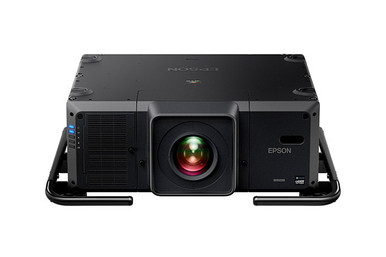
Epson L30000UNL vs L30002UNL: Which Projector Should You Choose? That question cannot be answered responsibly from the model numbers alone. The supplied product data lists both Epson projectors at 30,000 lumens with WUXGA resolution. On those two documented facts, they are tied. No supported brightness or resolution advantage separates them.
The decision turns on deployment and procurement details that must be confirmed for each exact SKU: optics and throw coverage, included items, signal and control needs, physical installation, support terms, live availability, and total installed cost. This guide gives AV buyers, installers, churches, schools, and conference room technology teams a practical comparison process. It also explains when a different Epson projector class deserves consideration. Use the linked product pages for current commerce details, then get model-specific answers in writing before approving either projector.
Products at a Glance
- Option 1: Epson Pro L30000UNL Laser WUXGA 3LCD Projector with 4K Enhancement
- For projects whose written specification calls for a…: Epson Pro L30002UNL Laser WUXGA 3LCD Projector with 4K Enhancement
- For projects that have been independently designed ar…: Epson LightScene EV-110 2200-Lumen WXGA Laser 3LCD Projector (V11HA22020)
Quick Comparison Table
| Feature | Epson Pro L30000UNL Laser WUXGA 3LCD Projector with 4K Enhancement | Epson Pro L30002UNL Laser WUXGA 3LCD Projector with 4K Enhancement | Epson LightScene EV-110 2200-Lumen WXGA Laser 3LCD Projector (V11HA22020) |
|---|---|---|---|
| Brightness | 30,000 lumens | 30,000 lumens | 2200 lumens |
| Resolution | WUXGA | WUXGA | WXGA |
| Best For | Projects whose approved design calls for a 30,000-lumen WUXGA Epson projector, after the team validates the exact optics, package, installation, and signal requirements. | Projects whose written specification calls for a 30,000-lumen WUXGA Epson projector and whose installer confirms the L30002UNL configuration for the intended room. | Projects that have been independently designed around 2,200-lumen brightness and WXGA resolution, not projects requiring an assumed substitute for either 30,000-lumen WUXGA model. |
| Recommended Buyer | Projects whose approved design calls for a 30,000-lumen WUXGA Epson projector, after the team validates the exact optics, package, installation, and signal requirements. | Projects whose written specification calls for a 30,000-lumen WUXGA Epson projector and whose installer confirms the L30002UNL configuration for the intended room. | Projects that have been independently designed around 2,200-lumen brightness and WXGA resolution, not projects requiring an assumed substitute for either 30,000-lumen WUXGA model. |
Product Images
Projector Options from AudioVideoNation
1. Epson Pro L30000UNL Laser WUXGA 3LCD Projector with 4K Enhancement
Who should compare it: Projects whose approved design calls for a 30,000-lumen WUXGA Epson projector, after the team validates the exact optics, package, installation, and signal requirements.
Why it belongs here: The L30000UNL is one of the two exact Epson models under comparison, and its documented brightness and resolution create the shared performance baseline.
SKU: L30000UNL
Key Features
- Listed brightness: 30,000 lumens
- Listed resolution: WUXGA
- Exact catalog SKU: L30000UNL
Things to Consider
The supplied facts do not establish a performance advantage over the L30002UNL. Confirm model-specific optics, included items, connections, controls, physical requirements, support terms, availability, and installed scope before purchasing.
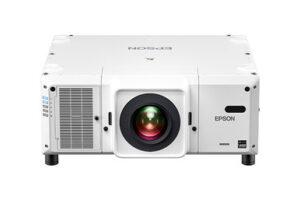
2. Epson Pro L30002UNL Laser WUXGA 3LCD Projector with 4K Enhancement
Who should compare it: Projects whose written specification calls for a 30,000-lumen WUXGA Epson projector and whose installer confirms the L30002UNL configuration for the intended room.
Why it belongs here: The L30002UNL is the second exact comparison model and carries the same documented 30,000-lumen brightness and WUXGA resolution as the L30000UNL.
SKU: L30002UNL
Key Features
- Listed brightness: 30,000 lumens
- Listed resolution: WUXGA
- Exact catalog SKU: L30002UNL
Things to Consider
No supplied fact proves that this projector is brighter, sharper, or a better value than the L30000UNL. Verify optics, package contents, signal and control support, mounting, power, support, availability, and total installed scope for this exact SKU.
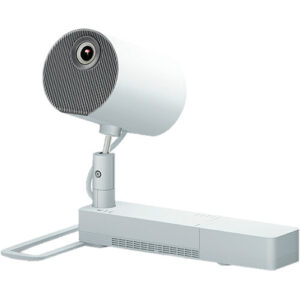
3. Epson LightScene EV-110 2200-Lumen WXGA Laser 3LCD Projector (V11HA22020)
Who should compare it: Projects that have been independently designed around 2,200-lumen brightness and WXGA resolution, not projects requiring an assumed substitute for either 30,000-lumen WUXGA model.
Why it belongs here: The EV-110 provides a documented Epson alternative in a different brightness and resolution class, which helps teams test whether the original project requirement has been defined correctly.
SKU: EV-110
Key Features
- Listed brightness: 2,200 lumens
- Listed resolution: WXGA
- Exact catalog SKU: EV-110
Things to Consider
Its documented brightness and resolution differ from both main comparison models. Recalculate the full room, screen, content, optics, mounting, and control plan before considering it for the same project.
Epson Pro L30000UNL Laser WUXGA 3LCD Projector with 4K Enhancement vs Epson Pro L30002UNL Laser WUXGA 3LCD Projector with 4K Enhancement: Main Differences
- Choose Epson Pro L30000UNL Laser WUXGA 3LCD Projector with 4K Enhancement if Projects whose approved design calls for a 30,000-lumen WUXGA Epson projector, after the team validates the exact optics, package, installation, and signal requirements..
- Choose Epson Pro L30002UNL Laser WUXGA 3LCD Projector with 4K Enhancement if Projects whose written specification calls for a 30,000-lumen WUXGA Epson projector and whose installer confirms the L30002UNL configuration for the intended room..
- Choose Epson LightScene EV-110 2200-Lumen WXGA Laser 3LCD Projector (V11HA22020) if Projects that have been independently designed around 2,200-lumen brightness and WXGA resolution, not projects requiring an assumed substitute for either 30,000-lumen WUXGA model..
Epson L30000UNL comparison: what the supplied data proves
The documented baseline is direct. The L30000UNL and L30002UNL each list 30,000-lumen brightness and WUXGA resolution. Those facts support a shared planning baseline. They do not establish that either projector produces a brighter image, resolves finer detail, or fits a particular throw distance better.
Brightness on a product listing is not a completed screen-luminance plan. Image size, screen characteristics, room light, optical configuration, and installation geometry all affect the design. WUXGA identifies the listed resolution, but it does not document the models’ accepted signal formats or scaling behavior.
Both catalog names contain the phrase “with 4K Enhancement.” The extracted resolution for each remains WUXGA, so buyers should describe them as WUXGA projectors and confirm how Epson defines that enhancement for these exact models. The supplied facts do not support a native 4K claim.
Treat L30000UNL and L30002UNL as separate procurement identities. Similar headline specifications do not prove identical packaging, physical requirements, connections, controls, optics, or support terms.
30,000-lumen WUXGA projector planning starts with the room
A 30,000-lumen specification becomes useful after it is connected to a real design. Give the installer the intended image dimensions, screen information, ambient-light conditions, viewing distance, and target screen brightness. Ask for one documented calculation method to be applied to both projectors. That keeps the comparison consistent.
Next, map the content workflow. List source resolutions, aspect ratios, presentation layouts, video systems, and the smallest text viewers must read. WUXGA may match the written requirement, but source handling still needs model-specific confirmation. If 4K sources are part of the system, verify accepted formats, connection requirements, and image-processing behavior from current documentation before ordering.
Optical planning deserves the same discipline. Record the mounting location and distance to the screen, then have the seller or installer confirm an appropriate lens configuration for each exact SKU. Include the expected zoom and image-positioning needs in that request. Until those answers arrive, brightness and resolution remain the only supported performance comparison, and both rows stay equal.
Projector deployment planning for churches, schools, and conference rooms
Deployment fit depends on the room and operating plan. The audience label alone cannot select between L30000UNL and L30002UNL.
- Churches and worship spaces: Document the largest image, daylight or service-light conditions, seating angles, architectural limits, operating schedule, and who controls the system. Ask the installer to validate lens placement, mounting, service access, and the control workflow for each SKU.
- Schools and institutional spaces: Define source standards, control expectations, staff handoff, shutdown procedures, maintenance access, and any campus purchasing rules. If centralized monitoring or network control is required, make it a written pass-or-fail item and confirm support from current model documentation.
- Conference and presentation environments: Test the design around the smallest text, common presentation layouts, conferencing outputs, and the expected source mix. Confirm switching, signal transport, control, and processing requirements as one system. The projector cannot be evaluated in isolation.
- Installers: Survey the mounting point, structural plan, cable routes, electrical service, airflow, and access for future work. Request exact dimensions, weight, mounting details, power requirements, and thermal guidance for the quoted model.
These are verification steps, not claims that the two projectors differ. They expose any real difference before purchasing, when changing the design is still manageable.
Installation checks that can separate L30000UNL and L30002UNL
Send the same questionnaire to the seller or manufacturer for both models. Require every answer to reference the exact SKU.
- Product identity and package: Confirm the manufacturer part number, quoted SKU, included items, and any required accessories.
- Optical design: Confirm the appropriate lens, supported throw range, image-positioning adjustments, and coverage for the planned screen.
- Signal path: Verify physical inputs, accepted resolutions and frame rates, content-protection requirements, processing, and any adapters or external equipment needed.
- Control and monitoring: Check the required wired, network, automation, and status-monitoring functions against current documentation.
- Physical and electrical work: Obtain dimensions, weight, mounting points, power draw, airflow guidance, and service clearances before finalizing rigging or electrical plans.
- Support: Confirm the applicable warranty, service route, documentation, and escalation process for the exact product being quoted.
Attach the written responses to the project record. A shared 30,000-lumen WUXGA specification does not guarantee identical delivered configurations or installation requirements. It also does not prove that differences exist. This checklist resolves the uncertainty without guessing from the final digits in each model number.
Stock and availability: use a live procurement check
Treat stock and availability as live commerce information. Open each linked AudioVideoNation product page and ask the sales team to confirm the exact SKU, required quantity, expected fulfillment timing, quote-validity period, and substitution policy. Save a dated response with the project documents.
Do not approve an informal substitution between L30000UNL and L30002UNL. If the requested model changes, route the replacement through the installer and project owner. Recheck optics, mounting, power, signal flow, control, support, and the complete bill of materials before accepting it.
For schedule-sensitive work, set a procurement decision date and identify the latest acceptable delivery point. That turns availability into a managed project condition without relying on an editorial stock statement that may change.
Projector price-to-performance without unsupported shortcuts
A price-to-performance verdict requires live quotes and a verified bill of materials. Start with a pass-or-fail review. Each model must satisfy the approved brightness, resolution, optical, signal, control, physical, support, and schedule requirements. Remove any option that fails a mandatory condition.
Then compare complete, equally scoped proposals. Include the projector and any required optics, mounting or rigging, signal equipment, cabling, installation labor, electrical work, commissioning, and requested support. Use only line items that apply to the actual project. A low projector quote can lose its advantage if the proposed configuration needs extra system components or site work.
Keep assumptions out of the value calculation. If both projectors meet every requirement, compare total installed cost, delivery commitments, included items, and documented support on the same basis. If one quote leaves a required detail unresolved, it is not ready for a fair comparison. This method identifies value without inventing a performance difference between the two Epson models.
When the Epson LightScene EV-110 belongs in the discussion
The Epson LightScene EV-110 belongs to a different documented specification class. Its supplied facts list 2,200 lumens and WXGA resolution, while the L30000UNL and L30002UNL each list 30,000 lumens and WUXGA. Those figures do not support treating the EV-110 as a direct substitute.
Include the EV-110 only if the project brief is being reconsidered and its documented brightness and resolution align with a newly validated room plan. Repeat the image-size, ambient-light, viewing, signal, optics, mounting, and control review from the beginning. A product selected for one specification class should not be dropped into another design without a fresh calculation.
This alternative is useful during early scoping because it forces the team to define the actual requirement before choosing a model.
Final decision: keep both Epson models on the shortlist
The supplied evidence supports no performance ranking between L30000UNL and L30002UNL. Both have the same documented 30,000-lumen brightness and WUXGA resolution. Keep both in contention until model-specific verification is complete.
Use this decision sequence:
1. Confirm that 30,000 lumens and WUXGA match the approved room and content plan.
2. Send one installation and procurement questionnaire for both exact SKUs.
3. Compare written answers, delivered configurations, live fulfillment information, and equally scoped installed quotes.
4. Approve the exact model that clears every mandatory requirement.
If one projector fails a verified requirement, remove it. If both pass, choose according to the complete commercial proposal and project schedule. Do not infer a hidden advantage from “00” or “02.” The product pages are the right starting points for live details, but the final purchase record should also include the installer’s design approval and written model-specific confirmations.
Related AudioVideoNation Links
- Browse Projector at AudioVideoNation
- Shop the Epson Pro L30000UNL projector
- Shop the Epson Pro L30002UNL projector
- View the Epson LightScene EV-110 projector
Product Information Sources
- Epson Pro L30000UNL Laser WUXGA 3LCD Projector with 4K Enhancement product information
- Epson Pro L30002UNL Laser WUXGA 3LCD Projector with 4K Enhancement product information
- Epson LightScene EV-110 2200-Lumen WXGA Laser 3LCD Projector (V11HA22020) product information
FAQ
Do the Epson L30000UNL and L30002UNL have the same documented brightness and resolution?
Yes, the supplied data lists both projectors at 30,000 lumens with WUXGA resolution. Those two facts create a tie, but they do not prove that every optical, physical, signal, control, package, or support detail is identical.
Which Epson projector is better for a church, school, or conference room?
Neither projector can be selected for those environments from the supplied facts alone. The room design must establish image size, ambient-light conditions, viewing needs, optics, mounting, signal flow, control, service access, and operating requirements before the exact model is approved.
Are the L30000UNL and L30002UNL native 4K projectors?
No native 4K specification is documented in the supplied data for either projector. Both are listed at WUXGA resolution, while their product names reference 4K Enhancement, so buyers should confirm accepted signals and image-processing behavior without treating enhancement as a native-resolution claim.
Can the L30000UNL and L30002UNL use the same lens and mounting plan?
The supplied data does not confirm shared lens compatibility or identical mounting requirements. Have the installer validate the lens, throw coverage, dimensions, weight, mounting points, power, airflow, and service access for each exact SKU.
Which model has better price-to-performance?
Neither model can be identified as the better value without equally scoped live quotes and verified configurations. Compare total installed cost only after both options pass every mandatory optical, signal, control, physical, support, and schedule requirement.
How should buyers check stock and availability for these Epson projectors?
Buyers should use each linked product page and obtain dated confirmation for the exact SKU and required quantity. Ask about expected fulfillment timing, quote validity, and substitution terms, then revalidate the design if the proposed model changes.
Conclusion
Use this Epson L30000UNL vs L30002UNL: Which Projector Should You Choose? comparison to match documented specifications to the room and installation requirements. Review the linked product pages for current purchase details before ordering.
Products Used
| SKU | Product Name | URL |
|---|---|---|
| L30000UNL | Epson Pro L30000UNL Laser WUXGA 3LCD Projector with 4K Enhancement | View product |
| L30002UNL | Epson Pro L30002UNL Laser WUXGA 3LCD Projector with 4K Enhancement | View product |
| EV-110 | Epson LightScene EV-110 2200-Lumen WXGA Laser 3LCD Projector (V11HA22020) | View product |