

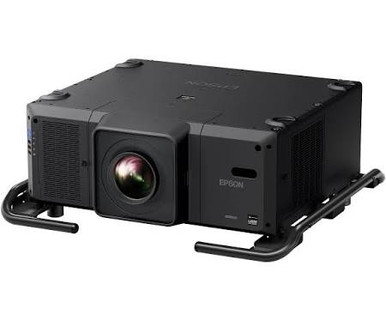
This Epson L25000U Setup Guide and Buying Considerations article addresses a costly AV problem: a projector can match the headline requirement yet conflict with the room, infrastructure, or installation plan. The Epson L25000U gives buyers two clear planning anchors: 25,000-lumen brightness and WUXGA resolution. Those facts make it relevant to projects that need substantial light output, but they do not settle lens selection, throw geometry, mounting, power, signal transport, or control.
This guide helps churches, schools, conference room teams, and AV installers turn that short specification list into a defensible buying decision. It also compares four other Epson paths from the supplied products, including ultra-short-throw displays with 4K enhancement and a 2,200-lumen WXGA option. Start with the room. Then match the projector to the job.
Products at a Glance
- Option 1: Epson V11H679820 Pro L25000U WUXGA 1080p 3LCD Projector 25000 Lumens
- For rooms where ultra-short-throw placement and a 4K…: Epson PowerLite 875E 5 Ultra Short Throw Display with 4K Enhancement (V11HC04120)
- For instructional or collaborative rooms with documen…: Epson BrightLink 870Ei Ultra Short Throw Interactive Display with 4K Enhancement (V11HC03020)
- For schools and meeting spaces comparing Epson intera…: Epson BrightLink 780Ei Ultra Short Throw Interactive Display with 4K Enhancement (V11HC10020)
- For applications whose room study supports 2,200 lume…: Epson LightScene EV-110 2200-Lumen WXGA Laser 3LCD Projector (V11HA22020)
Quick Comparison Table
| Feature | Epson V11H679820 Pro L25000U WUXGA 1080p 3LCD Projector 25000 Lumens | Epson PowerLite 875E 5 Ultra Short Throw Display with 4K Enhancement (V11HC04120) | Epson BrightLink 870Ei Ultra Short Throw Interactive Display with 4K Enhancement (V11HC03020) | Epson BrightLink 780Ei Ultra Short Throw Interactive Display with 4K Enhancement (V11HC10020) | Epson LightScene EV-110 2200-Lumen WXGA Laser 3LCD Projector (V11HA22020) |
|---|---|---|---|---|---|
| Brightness | 25000 Lumens | 2200 lumens | |||
| Resolution | WUXGA | 4K | 4K | 4K | WXGA |
| Best For | Projects whose documented room study calls for 25,000 lumens and WUXGA resolution. | Rooms where ultra-short-throw placement and a 4K requirement lead the specification. | Instructional or collaborative rooms with documented interaction and ultra-short-throw requirements. | Schools and meeting spaces comparing Epson interactive ultra-short-throw displays against written room requirements. | Applications whose room study supports 2,200 lumens and WXGA resolution. |
| Throw Type | Ultra short throw | Ultra short throw | Ultra short throw | ||
| Recommended Buyer | Projects whose documented room study calls for 25,000 lumens and WUXGA resolution. | Rooms where ultra-short-throw placement and a 4K requirement lead the specification. | Instructional or collaborative rooms with documented interaction and ultra-short-throw requirements. | Schools and meeting spaces comparing Epson interactive ultra-short-throw displays against written room requirements. | Applications whose room study supports 2,200 lumens and WXGA resolution. |
Product Images
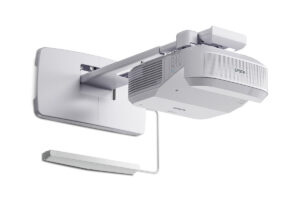
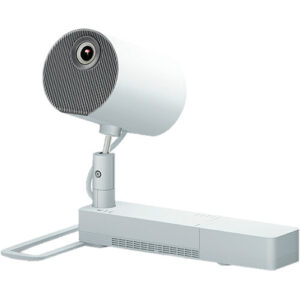
Projector Options from AudioVideoNation
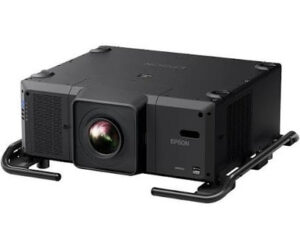
1. Epson V11H679820 Pro L25000U WUXGA 1080p 3LCD Projector 25000 Lumens
Who should compare it: Projects whose documented room study calls for 25,000 lumens and WUXGA resolution.
Why it belongs here: It anchors the guide because its 25,000-lumen rating and WUXGA resolution define the primary deployment brief.
SKU: L25000U
Key Features
- 25,000-lumen brightness
- WUXGA resolution
- Epson Pro L25000U model identity
- Listed for multimedia projection and video
Things to Consider
Confirm lens and throw geometry, mounting requirements, electrical needs, signal transport, control, and service access from current project documentation before ordering.
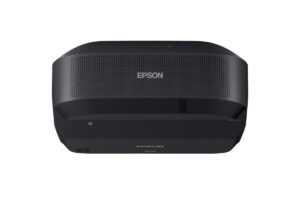
2. Epson PowerLite 875E 5 Ultra Short Throw Display with 4K Enhancement (V11HC04120)
Who should compare it: Rooms where ultra-short-throw placement and a 4K requirement lead the specification.
Why it belongs here: It gives buyers an Epson ultra-short-throw and 4K path when close placement is central to the room design.
SKU: PL-875E
Key Features
- Ultra-short-throw configuration
- 4K resolution in the supplied product facts
- 4K enhancement named in the product listing
- Epson PowerLite 875E model identity
Things to Consider
Verify image geometry, mounting, source handling, and how 4K enhancement applies to the planned content workflow.
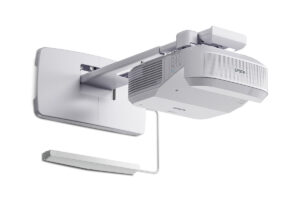
3. Epson BrightLink 870Ei Ultra Short Throw Interactive Display with 4K Enhancement (V11HC03020)
Who should compare it: Instructional or collaborative rooms with documented interaction and ultra-short-throw requirements.
Why it belongs here: It provides an interactive Epson option with ultra-short-throw placement and 4K enhancement named in the listing.
SKU: BL-870Ei
Key Features
- Ultra-short-throw configuration
- Interactive display product type
- 4K resolution in the supplied product facts
- 4K enhancement named in the product listing
Things to Consider
Define the required interaction workflow, then confirm mounting, image size, source support, and installation details for the exact BrightLink configuration.
4. Epson BrightLink 780Ei Ultra Short Throw Interactive Display with 4K Enhancement (V11HC10020)
Who should compare it: Schools and meeting spaces comparing Epson interactive ultra-short-throw displays against written room requirements.
Why it belongs here: It adds another BrightLink route for buyers evaluating interactive, ultra-short-throw projection with 4K enhancement.
SKU: BL-780Ei
Key Features
- Ultra-short-throw configuration
- Interactive display product type
- 4K resolution in the supplied product facts
- Epson BrightLink 780Ei model identity
Things to Consider
Compare its current documentation with the BrightLink 870Ei for the required interaction, placement, signal, and mounting details rather than assuming the two are interchangeable.
5. Epson LightScene EV-110 2200-Lumen WXGA Laser 3LCD Projector (V11HA22020)
Who should compare it: Applications whose room study supports 2,200 lumens and WXGA resolution.
Why it belongs here: Its 2,200-lumen rating and WXGA resolution show buyers a clearly different Epson deployment brief from the L25000U.
SKU: EV-110
Key Features
- 2,200-lumen brightness
- WXGA resolution
- Epson LightScene EV-110 model identity
- Listed in the projector category
Things to Consider
Confirm that 2,200 lumens and WXGA match the ambient light, image size, viewing distance, and content before comparing it with higher-output options.
Epson V11H679820 Pro L25000U WUXGA 1080p 3LCD Projector 25000 Lumens vs Epson PowerLite 875E 5 Ultra Short Throw Display with 4K Enhancement (V11HC04120): Main Differences
- Choose Epson V11H679820 Pro L25000U WUXGA 1080p 3LCD Projector 25000 Lumens if Projects whose documented room study calls for 25,000 lumens and WUXGA resolution..
- Choose Epson PowerLite 875E 5 Ultra Short Throw Display with 4K Enhancement (V11HC04120) if Rooms where ultra-short-throw placement and a 4K requirement lead the specification..
- Choose Epson BrightLink 870Ei Ultra Short Throw Interactive Display with 4K Enhancement (V11HC03020) if Instructional or collaborative rooms with documented interaction and ultra-short-throw requirements..
- Choose Epson BrightLink 780Ei Ultra Short Throw Interactive Display with 4K Enhancement (V11HC10020) if Schools and meeting spaces comparing Epson interactive ultra-short-throw displays against written room requirements..
- Choose Epson LightScene EV-110 2200-Lumen WXGA Laser 3LCD Projector (V11HA22020) if Applications whose room study supports 2,200 lumens and WXGA resolution..
Start Projector Deployment Planning With the Room
The supplied L25000U facts give you two fixed anchors: 25,000 lumens and WUXGA resolution. Start there, but build the requirement from the space. Record the screen dimensions, viewing distances, ambient-light conditions, presentation content, operating schedule, and any lighting that will remain on during use. A lumen rating alone cannot determine the right screen, placement, or final image result.
Each audience should document different pressure points. A church may need to assess stage lighting, sightlines, and whether the projector supports worship content, cameras, and presentation graphics within the planned signal system. A school should consider text legibility from the farthest seat, room access, supervision, and repeatable operation by different staff members. A conference room team should test whether 25,000 lumens reflects the actual room requirement or a specification carried over from another project.
Treat WUXGA the same way. Confirm that it matches the content workflow and the signal format that the complete AV chain will deliver. If the project brief calls for another resolution, revise the brief or compare a different projector before approving the purchase. A strong deployment fit comes from matching brightness and resolution to measured needs, not from choosing the largest number on the shortlist.
Epson L25000U Setup: Lens, Throw, and Physical Layout
Throw geometry is the first hard approval gate. Confirm the lens configuration offered with the exact L25000U listing, then calculate image size and placement from current Epson documentation. The model name and lumen rating do not tell you where the projector can be mounted. Do not reserve a mounting point from an estimate.
Map the full light path. Check for beams, lighting fixtures, speakers, banners, screens, and people who could interrupt it. Verify that the planned image remains clear from every important seat. If the projector will be suspended, have the responsible installer confirm structural support, mount ratings, attachment points, and the permitted installation orientation. Use the current installation documentation for dimensions, weight, airflow clearance, and service access rather than carrying figures over from another Epson model.
Access matters after opening day. Leave a practical route for inspection and maintenance, and make sure routine work will not require unsafe improvisation. Coordinate projector placement with the screen, mount, ceiling trades, electrical work, and cable pathways before any final drilling or fabrication. This sequence keeps a late lens or geometry correction from forcing changes elsewhere in the room.
Plan Power, Signals, Audio, and Control Before Installation
Draw the signal path before equipment is ordered. Show every source, switcher, transport link, wall plate, receiver, and destination. WUXGA is the known projector resolution, so confirm that each device in the chain can carry the planned format across the installed distance. Existing cabling should be identified and tested. Do not assume an older extender or switcher will support the new design simply because it passes an image today.
Give the electrical team the current voltage, current, and circuit requirements from the applicable product documentation. A 25,000-lumen rating is not a substitute for electrical data. Confirm outlet location, cable management, shutdown procedures, and any project rules for backup power with the responsible trades.
Keep audio in the system drawing even when projection is the main purchase. Document where sound enters the system, how it is routed, and who owns level control. For control, identify only the methods supported by the final projector configuration and the wider AV system. Decide what users need to do at startup, during source changes, and at shutdown. Simple operation requires careful planning. It does not happen by accident.
Commission the 25,000-Lumen WUXGA Projector With Real Content
Commissioning should reproduce the conditions users will face. Test the Epson L25000U with the room lighting states, source devices, presentation files, camera feeds, and graphics that matter to the project. Evaluate legibility from the closest and farthest seats. Check focus, geometry, framing, and visible detail across the image. Use only the adjustment controls documented for the selected configuration.
Run every source through its normal path. A direct connection can hide a problem in a switcher, cable run, or transport link. Test source changes, startup, shutdown, and recovery after a lost signal. If the room has several user roles, ask representatives to complete the common tasks rather than having the installer demonstrate them once.
Write the acceptance criteria before this session. Record the approved settings, source formats, control steps, and final physical configuration. Photograph cable labels and mounting references where project policy allows. Then hand the team a short operating guide tied to the installed system. This creates a useful baseline for support without making claims that the projector documentation does not support.
Evaluate Price-to-Performance Across the Installed System
Judge price-to-performance against the approved room requirement. If the calculation calls for 25,000 lumens and WUXGA, the L25000U directly addresses those two stated needs. If placement requires ultra-short throw, interactive use, or a 4K path, another Epson product in this guide may align better even though its specification set is different.
Compare the complete installed scope. Confirm what the quote covers for the projector configuration, lens, mounting, signal transport, control, cabling, labor, structural work, and electrical work. Some of those items may sit outside the product purchase, so the procurement team should define them rather than assume. Use each linked product page for current commerce details and request a project-specific quote when needed.
A high lumen count creates value only when the room needs it. The same discipline applies to resolution and throw type. Paying for the wrong placement approach can push cost into construction or mounting, while choosing too little brightness can force a redesign. Build one requirement matrix, price the complete scope, and compare each candidate against the same acceptance criteria.
Alternative Epson Projector Paths by Use Case
The PowerLite 875E offers an ultra-short-throw layout with 4K enhancement named in its product listing. That combination gives teams a different placement path when close-to-surface projection drives the room design. Confirm image geometry, mounting, source handling, and the exact meaning of 4K enhancement for the intended workflow before treating it as a candidate.
The BrightLink 870Ei and BrightLink 780Ei are also listed as ultra-short-throw interactive displays with 4K enhancement. They deserve consideration where interaction is part of the written requirement, such as an instructional or collaborative space. The supplied facts do not establish the differences between the two BrightLink choices, so compare their current product documentation against the same room, interaction, mounting, and signal criteria.
The LightScene EV-110 has a 2,200-lumen rating and WXGA resolution. Those figures define a substantially different brief from the L25000U's 25,000 lumens and WUXGA resolution. Treat it as a separate application path rather than a like-for-like substitute.
These alternatives clarify the decision. Choose the L25000U when its known brightness and resolution match the approved design. Choose an ultra-short-throw option when placement geometry leads. Consider a BrightLink product when interaction is required, and evaluate the EV-110 only where its stated brightness and resolution fit the room.
Stock and Availability Planning for the Exact SKU
Treat procurement as a technical approval gate. Use the exact product name, SKU, and linked page when requesting current commerce details. For the primary projector, that means Epson L25000U and SKU L25000U. Similar naming across a product family is not enough to confirm the configuration.
Check the linked product page for live availability, then confirm the quoted configuration, fulfillment timing, included components, and required accessories with the seller before scheduling installation. Align delivery with structural, electrical, screen, and cabling work. Do not finalize mount fabrication or site openings until the ordered configuration and approved documentation agree.
If timing requires an alternate, return to the requirement matrix. An ultra-short-throw model is not an automatic replacement for a 25,000-lumen WUXGA projector, and the 2,200-lumen WXGA EV-110 answers a different brief. Recalculate placement, brightness, resolution, infrastructure, and user needs for any substitution. That review protects the original design intent while giving procurement a clear way to assess available choices.
Related AudioVideoNation Links
- Browse Projector at AudioVideoNation
- View the Epson Pro L25000U
- View the Epson PowerLite 875E
- View the Epson BrightLink 870Ei
- View the Epson BrightLink 780Ei
Product Information Sources
- Epson V11H679820 Pro L25000U WUXGA 1080p 3LCD Projector 25000 Lumens product information
- Epson PowerLite 875E 5 Ultra Short Throw Display with 4K Enhancement (V11HC04120) product information
- Epson BrightLink 870Ei Ultra Short Throw Interactive Display with 4K Enhancement (V11HC03020) product information
- Epson BrightLink 780Ei Ultra Short Throw Interactive Display with 4K Enhancement (V11HC10020) product information
- Epson LightScene EV-110 2200-Lumen WXGA Laser 3LCD Projector (V11HA22020) product information
FAQ
What should I verify before installing an Epson L25000U?
Verify the lens and throw calculation, mounting plan, electrical requirements, signal path, control method, and service access before approving an Epson L25000U installation. Test those decisions against the actual screen, room lighting, content, and viewing positions.
Is the Epson L25000U suitable for a church, school, or conference room?
The Epson L25000U is a candidate when the room design calls for 25,000 lumens and WUXGA resolution. A room study must still confirm screen geometry, ambient light, infrastructure, operating needs, and whether that output level matches the project.
Is the Epson L25000U an ultra-short-throw projector?
Do not treat the Epson L25000U as ultra short throw unless the selected configuration's current documentation explicitly confirms that geometry. Calculate placement from the approved lens and installation data before choosing a mount location.
How does the L25000U compare with the Epson PowerLite 875E and BrightLink options?
The L25000U is listed at 25,000 lumens with WUXGA resolution, while the PowerLite 875E, BrightLink 870Ei, and BrightLink 780Ei are supplied as ultra-short-throw choices with 4K data. The BrightLink listings also identify them as interactive displays, so placement and interaction requirements should guide the comparison.
How should buyers evaluate Epson L25000U price-to-performance?
Evaluate Epson L25000U price-to-performance by comparing the complete installed scope with the room's verified brightness and resolution needs. Use the linked product page for current commerce details, and include the selected configuration, mounting, infrastructure, labor, and site work in the project comparison.
How can buyers confirm Epson L25000U stock and availability?
Buyers should check the linked L25000U product page and confirm current fulfillment details for the exact SKU with the seller. Tie the installation schedule to the confirmed configuration and delivery timing rather than relying on a product-family name.
Conclusion
Use this Epson L25000U Setup Guide and Buying Considerations comparison to match documented specifications to the room and installation requirements. Review the linked product pages for current purchase details before ordering.
Products Used
| SKU | Product Name | URL |
|---|---|---|
| L25000U | Epson V11H679820 Pro L25000U WUXGA 1080p 3LCD Projector 25000 Lumens | View product |
| PL-875E | Epson PowerLite 875E 5 Ultra Short Throw Display with 4K Enhancement (V11HC04120) | View product |
| BL-870Ei | Epson BrightLink 870Ei Ultra Short Throw Interactive Display with 4K Enhancement (V11HC03020) | View product |
| BL-780Ei | Epson BrightLink 780Ei Ultra Short Throw Interactive Display with 4K Enhancement (V11HC10020) | View product |
| EV-110 | Epson LightScene EV-110 2200-Lumen WXGA Laser 3LCD Projector (V11HA22020) | View product |