


If you searched for “Epson L1500U vs L1500UH: Which Projector Should You Choose?”, you’re probably trying to prevent an expensive procurement mismatch. The model numbers are close, but the supplied catalog data isn’t equally detailed. The Epson Pro L1500UH WUXGA 1080p 3LCD Projector has documented brightness of 12,000 lumens and WUXGA resolution. The Epson Pro L1500U Laser projector is the exact L1500U listing, yet its brightness and resolution should be confirmed before a design or purchase order is finalized.
That distinction shapes the decision. A church may be protecting an existing projection design. A school could be writing requirements for several rooms. An installer or conference-room team may need a precise replacement SKU. This guide compares the facts provided for both projectors, explains the checks that remain, and gives you a practical path through deployment fit, live availability, and price-to-performance. It also places three other Epson projectors in context. Use the linked product pages for current commerce details, then confirm every installation-critical requirement before ordering.
Products at a Glance
- Option 1: Epson Pro L1500U Laser projector
- For teams evaluating a documented 12,000-lumen WUXGA…: Epson Pro L1500UH WUXGA 1080p 3LCD Projector
- For buyers evaluating a 2,200-lumen WXGA Epson projec…: Epson LightScene EV-110 2200-Lumen WXGA Laser 3LCD Projector (V11HA22020)
- For home-theater buyers evaluating documented 2,400-l…: Epson Home Cinema 4010 4K PRO-UHD 3-Chip 3LCD Home Theater Video Projector
- For teams evaluating a 5,200-lumen Full HD projector…: Epson Powerlite L270F 5200-Lumen Full HD Laser 3LCD Projector (V11HC68020)
Quick Comparison Table
| Feature | Epson Pro L1500U Laser projector | Epson Pro L1500UH WUXGA 1080p 3LCD Projector | Epson LightScene EV-110 2200-Lumen WXGA Laser 3LCD Projector (V11HA22020) | Epson Home Cinema 4010 4K PRO-UHD 3-Chip 3LCD Home Theater Video Projector | Epson Powerlite L270F 5200-Lumen Full HD Laser 3LCD Projector (V11HC68020) |
|---|---|---|---|---|---|
| Brightness | 12,000 lumens | 2200 lumens | 2,400 lumens | 5200 lumens | |
| Resolution | WUXGA | WXGA | 4K | Full HD | |
| Best For | Buyers whose bid, design, or replacement plan specifically names L1500U and who can verify all required installation specifications before ordering. | Teams evaluating a documented 12,000-lumen WUXGA option and prepared to validate the rest of the projection system before purchase. | Buyers evaluating a 2,200-lumen WXGA Epson projector through a separate room and installation plan. | Home-theater buyers evaluating documented 2,400-lumen brightness and 4K resolution. | Teams evaluating a 5,200-lumen Full HD projector through a new technical and installation review. |
| Recommended Buyer | Buyers whose bid, design, or replacement plan specifically names L1500U and who can verify all required installation specifications before ordering. | Teams evaluating a documented 12,000-lumen WUXGA option and prepared to validate the rest of the projection system before purchase. | Buyers evaluating a 2,200-lumen WXGA Epson projector through a separate room and installation plan. | Home-theater buyers evaluating documented 2,400-lumen brightness and 4K resolution. | Teams evaluating a 5,200-lumen Full HD projector through a new technical and installation review. |
Product Images


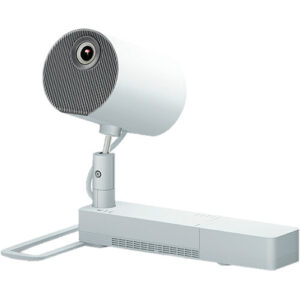

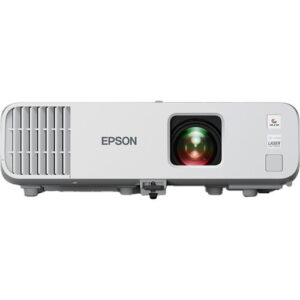
Projector Options from AudioVideoNation
1. Epson Pro L1500U Laser projector
Who should compare it: Buyers whose bid, design, or replacement plan specifically names L1500U and who can verify all required installation specifications before ordering.
Why it belongs here: It is one of the two exact models in the comparison and gives buyers the correct L1500U catalog reference for specification and procurement checks.
SKU: L1500U
Key Features
- Exact L1500U SKU for procurement matching
- Epson Pro L1500U product identity
- Cataloged under Multimedia Projectors, Projectors, and Video
Things to Consider
Confirm brightness, resolution, throw and lens requirements, connections, mounting, power, and control needs. Do not assume interchangeability with L1500UH from the similar model name.
2. Epson Pro L1500UH WUXGA 1080p 3LCD Projector
Who should compare it: Teams evaluating a documented 12,000-lumen WUXGA option and prepared to validate the rest of the projection system before purchase.
Why it belongs here: It is the second exact comparison model, and its supplied data documents two central selection fields: 12,000-lumen brightness and WUXGA resolution.
SKU: L1500UH
Key Features
- 12,000-lumen brightness specification
- WUXGA resolution
- Exact L1500UH SKU for procurement matching
- Cataloged under Multimedia Projectors, Projectors, and Video
Things to Consider
Brightness and resolution do not establish throw geometry, lens choice, signal compatibility, mounting, power, or control support. Verify those requirements for the planned room.
3. Epson LightScene EV-110 2200-Lumen WXGA Laser 3LCD Projector (V11HA22020)
Who should compare it: Buyers evaluating a 2,200-lumen WXGA Epson projector through a separate room and installation plan.
Why it belongs here: It provides a documented Epson reference point at 2,200 lumens and WXGA resolution for projects whose requirements differ from the L1500 comparison.
SKU: EV-110
Key Features
- 2,200-lumen brightness specification
- WXGA resolution
- Exact EV-110 SKU
- Cataloged under Projectors
Things to Consider
Its supplied brightness and resolution differ from the L1500UH figures. Treat it as a separate design choice and verify throw, connections, mounting, control, and other installation needs.
4. Epson Home Cinema 4010 4K PRO-UHD 3-Chip 3LCD Home Theater Video Projector
Who should compare it: Home-theater buyers evaluating documented 2,400-lumen brightness and 4K resolution.
Why it belongs here: It adds a 2,400-lumen, 4K-resolution Epson option for buyers who determine that their brief is centered on home theater rather than an L1500 deployment.
SKU: HC-4010
Key Features
- 2,400-lumen brightness specification
- 4K resolution
- Exact HC-4010 SKU
- Home Cinema 4010 product identity
Things to Consider
Do not treat its resolution or Home Cinema positioning as proof that it fits a church, school, or meeting-room system. Validate the entire installation against the intended space.
5. Epson Powerlite L270F 5200-Lumen Full HD Laser 3LCD Projector (V11HC68020)
Who should compare it: Teams evaluating a 5,200-lumen Full HD projector through a new technical and installation review.
Why it belongs here: It supplies another defined Epson option with 5,200-lumen brightness and Full HD resolution for projects that do not require the L1500UH’s documented figures.
SKU: PL-L270F
Key Features
- 5,200-lumen brightness specification
- Full HD resolution
- Exact PL-L270F SKU
- Cataloged under Projectors
Things to Consider
Its documented brightness and resolution differ from the L1500UH specifications. Verify image geometry, signal path, mounting, power, control, and room requirements before considering a change.
Epson Pro L1500U Laser projector vs Epson Pro L1500UH WUXGA 1080p 3LCD Projector: Main Differences
- Choose Epson Pro L1500U Laser projector if Buyers whose bid, design, or replacement plan specifically names L1500U and who can verify all required installation specifications before ordering..
- Choose Epson Pro L1500UH WUXGA 1080p 3LCD Projector if Teams evaluating a documented 12,000-lumen WUXGA option and prepared to validate the rest of the projection system before purchase..
- Choose Epson LightScene EV-110 2200-Lumen WXGA Laser 3LCD Projector (V11HA22020) if Buyers evaluating a 2,200-lumen WXGA Epson projector through a separate room and installation plan..
- Choose Epson Home Cinema 4010 4K PRO-UHD 3-Chip 3LCD Home Theater Video Projector if Home-theater buyers evaluating documented 2,400-lumen brightness and 4K resolution..
- Choose Epson Powerlite L270F 5200-Lumen Full HD Laser 3LCD Projector (V11HC68020) if Teams evaluating a 5,200-lumen Full HD projector through a new technical and installation review..
Epson Pro L1500U and L1500UH: documented differences
Start with the facts that can support a purchase decision. The L1500UH record specifies 12,000 lumens and WUXGA resolution. Those two fields let a designer compare it with a written brightness requirement and the planned signal resolution. They do not settle the entire design, but they provide a concrete screening point.
The L1500U record confirms the exact L1500U product identity. Before selecting it, obtain its brightness, native resolution, lens information, and other installation specifications from the linked product page or seller. Its similar model number should not be used to fill those gaps. It also does not prove that the two projectors share lenses, mounts, connections, power needs, control options, or physical dimensions.
Choose the L1500UH for further evaluation when 12,000 lumens and WUXGA match the written brief. Keep the L1500U under consideration when that exact SKU is already named in a bid, design, or replacement plan, but verify the complete specification set first. Neither path supports a shortcut. The final choice should come from confirmed requirements and exact product data.
Projector deployment planning for churches, schools, and meeting rooms
Deployment fit begins with the room. For a church, document screen dimensions, ambient light, viewing distance, content type, camera use, mounting position, and operating schedule. The L1500UH’s 12,000-lumen figure can be entered into that evaluation, but a qualified design still needs the screen target and room conditions. Do not select it from the brightness number alone.
Schools should define source resolution, required text legibility, control standards, mounting constraints, and the support process across classrooms or shared spaces. WUXGA is documented for the L1500UH, so teams can compare that resolution with their computers, switchers, and content workflow. The L1500U requires confirmation before the same comparison can be completed.
Conference-room teams should add conferencing sources, presentation switching, control-system needs, startup behavior, and service access to the checklist. Large room capacity or a familiar Epson model name does not establish suitability by itself. Confirm throw geometry, lens choice, inputs, control connections, mounting requirements, power, and ventilation for either projector.
Write these requirements before requesting a quote. That turns the buying process into a pass-or-fail review instead of a debate over similar model names.
How to evaluate a 12,000-lumen WUXGA projector
The L1500UH’s supplied specifications give you two useful anchors: 12,000 lumens and WUXGA. First, compare the brightness figure with a projection calculation based on screen size, screen material, target image brightness, and measured room light. A lumen number cannot account for those variables on its own.
Next, map WUXGA against the complete signal path. Check source devices, presentation switchers, extenders, scalers, conferencing hardware, and the content resolutions your users rely on. Confirm supported connections and signal formats rather than assuming compatibility from the resolution label.
Then check the physical design. Throw distance and lens requirements determine whether the planned mounting location can produce the required image. Verify mounting dimensions, projector weight, service clearance, power requirements, heat management, and acceptable operating noise. None should be inferred from the model family.
Replacement projects need extra care. An existing L1500U installation does not establish that an L1500UH will reuse its lens, mount, cabling, control programming, or electrical provision. Record the current installation details, compare them with confirmed L1500UH documentation, and price any required changes before approving the substitution.
Projector price-to-performance without guesswork
A useful price-to-performance comparison starts after technical qualification. Check the linked product pages for current commerce details on the same day, then compare only the projectors that meet the room’s pass-or-fail requirements. A low purchase cost has little value if the projector needs an unplanned lens, signal-system change, mount change, or control rewrite.
For the performance side, use documented requirements instead of broad labels. The L1500UH record supplies 12,000 lumens and WUXGA resolution. The corresponding L1500U values need verification before they can be placed in the same calculation. Do not assign assumed figures simply because the products share the L1500 name.
Build a short evaluation sheet covering brightness, resolution, throw geometry, lens choice, signal compatibility, control, mounting, power, ventilation, and service access. Add total installed cost after every technical field has passed. This approach also exposes false savings. A projector with a higher current purchase price may reduce installation changes, while a less expensive option may still win when it fits existing infrastructure. The confirmed design determines which result applies.
Stock and availability checks before scheduling installation
Treat stock and availability as live commerce information. Open each linked AudioVideoNation product page when you are ready to buy and verify the exact SKU, required quantity, ordering status, and expected timing. Recheck before locking an installation date.
Coordinate projector and accessory timing as one package. If the design calls for a particular lens, mount, cable path, signal extender, or control component, confirm that each required item can meet the same project schedule. A projector arriving by itself does not make the room ready.
Keep substitutions controlled. If a specification names L1500U, do not replace it with L1500UH based only on the similar name. The reverse is also true. Revalidate resolution, brightness, image geometry, infrastructure, and control requirements before accepting either change. Schools with multiple rooms should also confirm quantity at the project level. Churches and conference-room teams should leave time for configuration, testing, and user handoff after the equipment arrives.
Three Epson alternatives worth defining separately
The other supplied Epson listings can help clarify the project’s real requirement, but the provided facts do not establish them as direct L1500U or L1500UH replacements.
The Epson LightScene EV-110 2200-Lumen WXGA Laser 3LCD Projector (V11HA22020) has documented brightness of 2,200 lumens and WXGA resolution. Those figures describe a different evaluation point from the L1500UH’s 12,000 lumens and WUXGA. Consider it only through a fresh room and system design.
The Epson Home Cinema 4010 4K PRO-UHD 3-Chip 3LCD Home Theater Video Projector has documented brightness of 2,400 lumens and 4K resolution. Its Home Cinema positioning makes it relevant when the brief is actually centered on home theater. It should not be inserted into a church, school, or conference-room plan without checking every deployment requirement.
The Epson Powerlite L270F 5200-Lumen Full HD Laser 3LCD Projector (V11HC68020) supplies a 5,200-lumen brightness figure and Full HD resolution. It gives buyers another defined combination to evaluate when the project does not require the L1500UH’s documented figures.
Brightness and resolution alone cannot make these alternatives interchangeable. Run each one through the same lens, throw, signal, control, mounting, power, and operating-environment checks.
A clear Epson L1500U vs L1500UH decision rule
Select the L1500UH for the final design review when the project calls for its documented 12,000-lumen brightness and WUXGA resolution. Confirm the remaining installation details before purchase. This route gives procurement teams two concrete specifications they can place against the brief immediately.
Select the L1500U for further review when the exact L1500U SKU matters, such as an existing design reference or controlled replacement request. Pause before approval and verify its brightness, resolution, lens requirements, connections, physical requirements, and control provisions. Exact model continuity can be valuable, but the supplied data does not establish installation compatibility.
If neither model passes the room requirements, revise the product shortlist instead of forcing a close model number into the design. The EV-110, Home Cinema 4010, and Powerlite L270F provide other documented brightness and resolution combinations, though each needs an independent design check.
Finish with three records: a signed technical requirements sheet, current commerce details from the linked product page, and a confirmed bill of materials. That gives installers, schools, churches, and conference-room teams a decision they can defend after the equipment reaches the site.
Related AudioVideoNation Links
- Browse Projector at AudioVideoNation
- Epson Pro L1500U Laser projector
- Epson Pro L1500UH WUXGA 1080p 3LCD Projector
- Epson LightScene EV-110 projector
- Epson Home Cinema 4010 projector
Product Information Sources
- Epson Pro L1500U Laser projector product information
- Epson Pro L1500UH WUXGA 1080p 3LCD Projector product information
- Epson LightScene EV-110 2200-Lumen WXGA Laser 3LCD Projector (V11HA22020) product information
- Epson Home Cinema 4010 4K PRO-UHD 3-Chip 3LCD Home Theater Video Projector product information
- Epson Powerlite L270F 5200-Lumen Full HD Laser 3LCD Projector (V11HC68020) product information
FAQ
What is the main documented difference between the Epson L1500U and L1500UH?
The L1500UH has supplied specifications of 12,000 lumens and WUXGA resolution, while the corresponding L1500U fields should be verified before comparison. Similar model names do not establish equal performance, components, or installation requirements.
Can the Epson L1500UH directly replace an L1500U?
The provided data does not establish the L1500UH as a direct replacement for the L1500U. Confirm the lens, throw geometry, mount, connections, control, power, physical requirements, and planned signal resolution before approving a substitution.
Which projector is better for a church, school, or conference room?
Neither projector can be declared the better fit from the supplied data alone. Match the room’s brightness target, screen geometry, resolution, signal path, mounting, control, and operating requirements against confirmed product documentation.
How should buyers compare L1500U and L1500UH price-to-performance?
Compare current product-page pricing only after both projectors have been checked against the same technical requirements. Include any necessary lens, mounting, signal, control, electrical, and installation changes in the total project cost.
Are the EV-110, Home Cinema 4010, or Powerlite L270F direct substitutes?
No, the supplied facts do not establish any of these three projectors as direct substitutes for the L1500U or L1500UH. Their documented brightness and resolution combinations differ, so each needs its own room and system evaluation.
How can buyers check current stock and availability?
Use each linked AudioVideoNation product page for current ordering details and confirm the exact SKU and required quantity before scheduling installation. Recheck the projector and every required accessory close to the purchase date.
Conclusion
Use this Epson L1500U vs L1500UH: Which Projector Should You Choose? comparison to match documented specifications to the room and installation requirements. Review the linked product pages for current purchase details before ordering.
Products Used
| SKU | Product Name | URL |
|---|---|---|
| L1500U | Epson Pro L1500U Laser projector | View product |
| L1500UH | Epson Pro L1500UH WUXGA 1080p 3LCD Projector | View product |
| EV-110 | Epson LightScene EV-110 2200-Lumen WXGA Laser 3LCD Projector (V11HA22020) | View product |
| HC-4010 | Epson Home Cinema 4010 4K PRO-UHD 3-Chip 3LCD Home Theater Video Projector | View product |
| PL-L270F | Epson Powerlite L270F 5200-Lumen Full HD Laser 3LCD Projector (V11HC68020) | View product |