

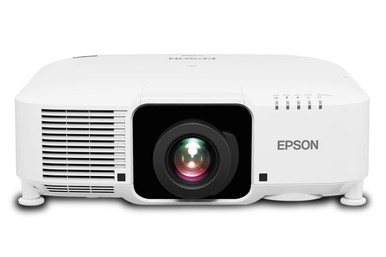
The question behind “Epson L1060WNL vs L1070W: Which Projector Should You Choose?” starts with one clear difference. The Epson Pro L1060WNL is listed at 6,000 lumens, while the Epson Pro L1070W is listed at 7,000 lumens. Both have WXGA resolution. That makes brightness the first dividing line, but it shouldn’t be the only item on your specification sheet. Churches, schools, conference rooms, and installed AV systems also need the right placement, signal, control, mounting, and purchasing plan. This comparison explains what the supplied specifications establish, where the extra 1,000 lumens may matter, and what your installer should confirm before an order is approved. It also covers three Epson alternatives for buyers whose requirements point beyond these two models.
Products at a Glance
- Option 1: Epson Pro L1060WNL WXGA 1080p 3LCD Projector 6000 Lumens White
- For installations whose approved specification calls…: Epson Pro L1070W WXGA 1080p 3LCD Projector 7000 Lumens White
- For buyers with an 8,000-lumen, WUXGA requirement who…: Epson PowerLite L895U Laser Golf Simulator Projector – 8,000 Lumens, WUXGA Professional Grade, 3LCD Tech [USED]
- For projects whose documented design specifically ali…: Epson LightScene EV-110 2200-Lumen WXGA Laser 3LCD Projector (V11HA22020)
- For buyers prioritizing a 4K resolution requirement a…: Epson LS9000 Pro Cinema 4K HDR 3LCD Laser Projector
Quick Comparison Table
| Feature | Epson Pro L1060WNL WXGA 1080p 3LCD Projector 6000 Lumens White | Epson Pro L1070W WXGA 1080p 3LCD Projector 7000 Lumens White | Epson PowerLite L895U Laser Golf Simulator Projector – 8,000 Lumens, WUXGA Professional Grade, 3LCD Tech [USED] | Epson LightScene EV-110 2200-Lumen WXGA Laser 3LCD Projector (V11HA22020) | Epson LS9000 Pro Cinema 4K HDR 3LCD Laser Projector |
|---|---|---|---|---|---|
| Brightness | 6000 Lumens | 7000 Lumens | 8,000 Lumens | 2200 lumens | |
| Resolution | WXGA | WXGA | WUXGA | WXGA | 4K |
| Best For | Teams whose documented room design calls for WXGA resolution and 6,000 lumens. | Installations whose approved specification calls for WXGA resolution and 7,000 lumens. | Buyers with an 8,000-lumen, WUXGA requirement who are prepared to assess a used listing. | Projects whose documented design specifically aligns with a 2,200-lumen WXGA projector. | Buyers prioritizing a 4K resolution requirement and evaluating the Pro Cinema product context. |
| Recommended Buyer | Teams whose documented room design calls for WXGA resolution and 6,000 lumens. | Installations whose approved specification calls for WXGA resolution and 7,000 lumens. | Buyers with an 8,000-lumen, WUXGA requirement who are prepared to assess a used listing. | Projects whose documented design specifically aligns with a 2,200-lumen WXGA projector. | Buyers prioritizing a 4K resolution requirement and evaluating the Pro Cinema product context. |
Product Images
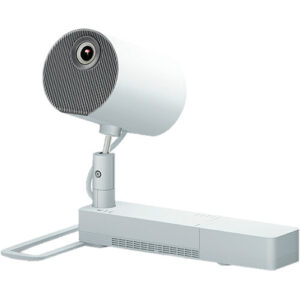
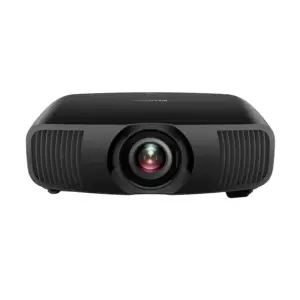
Projector Options from AudioVideoNation
1. Epson Pro L1060WNL WXGA 1080p 3LCD Projector 6000 Lumens White
Who should compare it: Teams whose documented room design calls for WXGA resolution and 6,000 lumens.
Why it belongs here: It is one of the two projectors under direct comparison and combines a listed 6,000-lumen output with WXGA resolution.
SKU: L1060WNL
Key Features
- Listed brightness of 6,000 lumens
- Listed WXGA resolution
- Exact model SKU L1060WNL
Things to Consider
Confirm the optical configuration, throw requirements, mounting plan, connections, controls, included items, and current commerce details before ordering.
2. Epson Pro L1070W WXGA 1080p 3LCD Projector 7000 Lumens White
Who should compare it: Installations whose approved specification calls for WXGA resolution and 7,000 lumens.
Why it belongs here: It is the brighter member of the direct comparison, with a listed 7,000-lumen output and the same stated WXGA resolution as the L1060WNL.
SKU: L1070W
Key Features
- Listed brightness of 7,000 lumens
- Listed WXGA resolution
- Exact model SKU L1070W
Things to Consider
Decide whether the additional 1,000 lumens answers a documented need, then confirm optics, placement, connectivity, controls, included items, and live purchase details.
3. Epson PowerLite L895U Laser Golf Simulator Projector – 8,000 Lumens, WUXGA Professional Grade, 3LCD Tech [USED]
Who should compare it: Buyers with an 8,000-lumen, WUXGA requirement who are prepared to assess a used listing.
Why it belongs here: This supplied alternative raises the listed brightness to 8,000 lumens and changes the stated resolution from WXGA to WUXGA.
SKU: PL-L895U-USED
Key Features
- Listed brightness of 8,000 lumens
- Listed WUXGA resolution
- Product name and SKU identify the listing as used
Things to Consider
Confirm condition, included items, operating history, support terms, return terms, installation requirements, and current commerce details before purchase.
4. Epson LightScene EV-110 2200-Lumen WXGA Laser 3LCD Projector (V11HA22020)
Who should compare it: Projects whose documented design specifically aligns with a 2,200-lumen WXGA projector.
Why it belongs here: It provides a lower-output WXGA reference within the supplied Epson lineup, with a listed brightness of 2,200 lumens.
SKU: EV-110
Key Features
- Listed brightness of 2,200 lumens
- Listed WXGA resolution
- Exact model SKU EV-110
Things to Consider
Its listed output differs sharply from the two comparison models, so validate brightness, optics, placement, connectivity, and intended use before treating it as an alternative.
5. Epson LS9000 Pro Cinema 4K HDR 3LCD Laser Projector
Who should compare it: Buyers prioritizing a 4K resolution requirement and evaluating the Pro Cinema product context.
Why it belongs here: It gives buyers a supplied Epson option with listed 4K resolution instead of the WXGA resolution shared by the L1060WNL and L1070W.
SKU: LS9000
Key Features
- Listed 4K resolution
- Exact model SKU LS9000
- Product name identifies the Pro Cinema line
Things to Consider
Confirm brightness, room fit, placement, connectivity, mounting needs, included items, and current commerce details before comparing it with the WXGA models.
Epson Pro L1060WNL WXGA 1080p 3LCD Projector 6000 Lumens White vs Epson Pro L1070W WXGA 1080p 3LCD Projector 7000 Lumens White: Main Differences
- Choose Epson Pro L1060WNL WXGA 1080p 3LCD Projector 6000 Lumens White if Teams whose documented room design calls for WXGA resolution and 6,000 lumens..
- Choose Epson Pro L1070W WXGA 1080p 3LCD Projector 7000 Lumens White if Installations whose approved specification calls for WXGA resolution and 7,000 lumens..
- Choose Epson PowerLite L895U Laser Golf Simulator Projector – 8,000 Lumens, WUXGA Professional Grade, 3LCD Tech [USED] if Buyers with an 8,000-lumen, WUXGA requirement who are prepared to assess a used listing..
- Choose Epson LightScene EV-110 2200-Lumen WXGA Laser 3LCD Projector (V11HA22020) if Projects whose documented design specifically aligns with a 2,200-lumen WXGA projector..
- Choose Epson LS9000 Pro Cinema 4K HDR 3LCD Laser Projector if Buyers prioritizing a 4K resolution requirement and evaluating the Pro Cinema product context..
Epson L1060WNL vs L1070W at a glance
The L1060WNL combines a listed 6,000-lumen output with WXGA resolution. The L1070W keeps the same listed resolution and raises brightness to 7,000 lumens. Based on those specifications, resolution doesn’t decide this comparison. The practical question is whether your design needs the L1070W’s additional 1,000 lumens.
Start with the approved room plan. Record the intended image size, ambient-light conditions, viewing positions, and content type. Then match that plan to a measured brightness requirement instead of selecting the larger number automatically. If 6,000 lumens satisfies the design with an appropriate margin, the L1060WNL remains a direct fit. If the plan calls for 7,000 lumens, the L1070W is the relevant option. Neither conclusion should be extended to an unverified room configuration.
6,000 vs 7,000 lumens: planning the brightness margin
The numerical gap is straightforward: the L1070W adds 1,000 lumens over the L1060WNL’s listed output. That is about a 16.7% increase relative to 6,000 lumens. It is useful planning data, but it doesn’t guarantee a specific result in every space.
Screen size, room light, presentation content, and the required visual standard all belong in the calculation. A sanctuary with controlled lighting may have a different requirement from a multipurpose hall with windows. A classroom displaying large presentation slides poses a different task from a conference room showing dense spreadsheets. Use the listed lumen figures to narrow the choice, then validate the selection against the actual design.
The extra margin can also matter when an organization wants one projector specification for several rooms with different conditions. That decision should come from the most demanding approved room, not a generic label such as classroom or church projector.
WXGA projector comparison and source planning
Both supplied listings identify WXGA resolution, so moving from the L1060WNL to the L1070W doesn’t change the stated resolution. Buyers seeking a resolution upgrade should look beyond this pair rather than expecting the brighter model to add pixels.
Review the material people will display. Slides, videos, worship lyrics, dashboards, and fine text can place different demands on a system. Confirm the output formats of computers, media players, conferencing systems, and switchers, along with the scaling and aspect-ratio plan. This matters in new installations and replacements alike. An existing cable path or source standard shouldn’t be assumed compatible from the model name alone. Ask the integrator to document the complete signal path before specifying either SKU.
Deployment fit for churches, schools, and conference rooms
For a church, begin with the largest intended image and the lighting used during services. If the calculated requirement lands at 6,000 lumens, the L1060WNL is the closer specification. If it calls for 7,000 lumens, evaluate the L1070W. Also confirm sightlines and placement before treating either one as an installation-ready choice.
Schools should assess each room type separately. A standard classroom, lecture space, and multipurpose room may not share the same brightness requirement. Technology teams should also document source connections, control expectations, mounting details, and the content resolution they plan to support. Standardization is useful only after those requirements align.
Conference room teams should focus on intended image size and the readability of their real content. Fine text and shared documents make resolution planning important, while windows and room lighting affect the brightness target. Both projectors are listed as WXGA, so the L1070W’s differentiator within this comparison remains its additional 1,000 lumens.
Installer checks before specifying either Epson projector
Match the quote and installation documents to the exact SKU: L1060WNL or L1070W. Similar model names aren’t enough. Confirm the required lens or optical configuration, throw range, image position, mounting method, physical clearance, power, ventilation, and service access for the planned location.
Next, verify every source connection and control requirement. Include switchers, extenders, room-control systems, and any equipment that must send or receive a signal. Record the required cable distances and source formats so the projector isn’t evaluated in isolation.
The purchase review should identify everything included with the selected listing and everything the installation still needs. Confirm accessories, documentation, condition, support terms, and return requirements on the linked product page or through the seller before authorizing the order. These checks protect the schedule and make the L1060WNL versus L1070W decision repeatable for stakeholders.
Live stock, availability, and projector price-to-performance
Availability and commerce details can change, so use each linked AudioVideoNation product page for the current purchasing picture. If the projector is tied to a construction, classroom, or event deadline, confirm the expected fulfillment timing before scheduling installation labor. Also make sure the exact SKU on the order matches the approved design.
Price-to-performance should be assessed with live pricing and the complete project cost. Compare any current price difference between the two models with the documented value of the additional 1,000 lumens. Then include the lens or optical configuration, mount, cabling, signal equipment, control work, and installation labor required by your plan. A lower projector price can lose its advantage if the selection forces a redesign. A higher price isn’t automatically justified by a larger lumen figure either.
Use a simple decision rule: pay for the 7,000-lumen specification when the room design requires it. If the 6,000-lumen L1060WNL meets the approved requirement and both options satisfy the remaining checks, compare the live total project costs.
Other Epson projectors to compare
Three supplied Epson listings address requirements outside the central 6,000-versus-7,000-lumen choice. The Epson PowerLite L895U listing specifies 8,000 lumens and WUXGA resolution. Its name and SKU identify it as used, so condition, included items, support terms, and return terms need careful confirmation. It is the most direct alternative here for a buyer whose specification exceeds both comparison models in listed brightness or calls for WUXGA.
The Epson LightScene EV-110 is listed at 2,200 lumens with WXGA resolution. That is a very different brightness target. Consider it only when a documented design supports that output and the exact installation requirements have been checked.
The Epson LS9000 listing specifies 4K resolution and carries the Pro Cinema name. It gives resolution-focused buyers a separate path from the two WXGA projectors. Confirm its brightness, placement, connectivity, and other installation details against the intended room before comparing total project costs. These alternatives aren’t automatic substitutes. They are useful checkpoints when WXGA resolution or the 6,000-to-7,000-lumen range doesn’t match the requirement.
Final choice: follow the approved requirement
Choose the Epson L1060WNL when the design calls for WXGA resolution and 6,000 lumens. Choose the Epson L1070W when the same resolution fits but the plan requires 7,000 lumens. That is the defensible distinction supported by the supplied specifications.
Before committing, have the installer sign off on placement, optics, signal compatibility, control, mounting, and required accessories. Then review live commerce details and the full installed cost. A short requirement sheet makes the decision clearer and gives purchasing, facilities, and AV teams the same basis for approval.
Related AudioVideoNation Links
- Browse Projector at AudioVideoNation
- Epson Pro L1060WNL product page
- Epson Pro L1070W product page
- Epson PowerLite L895U used product page
- Epson LightScene EV-110 product page
Product Information Sources
- Epson Pro L1060WNL WXGA 1080p 3LCD Projector 6000 Lumens White product information
- Epson Pro L1070W WXGA 1080p 3LCD Projector 7000 Lumens White product information
- Epson PowerLite L895U Laser Golf Simulator Projector – 8,000 Lumens, WUXGA Professional Grade, 3LCD Tech [USED] product information
- Epson LightScene EV-110 2200-Lumen WXGA Laser 3LCD Projector (V11HA22020) product information
- Epson LS9000 Pro Cinema 4K HDR 3LCD Laser Projector product information
FAQ
What is the main difference between the Epson L1060WNL and L1070W?
The main listed difference is brightness: the L1060WNL is rated at 6,000 lumens, while the L1070W is rated at 7,000 lumens. Both supplied listings identify WXGA resolution, so the decision centers on whether the installation requires the extra 1,000 lumens.
Which projector should I choose for a room that needs more brightness?
Choose the L1070W when the documented room design calls for 7,000 lumens rather than 6,000 lumens. Screen size, ambient light, content, and the required visual standard should be evaluated before turning that specification into a purchase.
Do the Epson L1060WNL and L1070W have the same listed resolution?
Yes, both projectors have WXGA resolution in the supplied product facts. Moving to the L1070W increases the listed brightness, not the stated resolution.
Is the L1070W worth paying more for than the L1060WNL?
If the L1070W costs more at purchase time, the premium is justified only when its additional 1,000 lumens addresses a documented installation requirement. Compare current pricing and total installed cost after confirming optics, mounting, signal equipment, and labor needs.
What should an installer verify before either projector is ordered?
An installer should verify optics, throw range, image position, mounting, clearance, power, ventilation, source formats, connections, control requirements, accessories, and the exact SKU before ordering. Those checks should be recorded against the actual room design and complete signal path.
How should buyers confirm stock and availability?
Buyers should use each linked AudioVideoNation product page for current availability and purchasing details. For deadline-driven projects, confirm expected fulfillment timing before installation labor is scheduled.
Conclusion
Use this Epson L1060WNL vs L1070W: Which Projector Should You Choose? comparison to match documented specifications to the room and installation requirements. Review the linked product pages for current purchase details before ordering.
Products Used
| SKU | Product Name | URL |
|---|---|---|
| L1060WNL | Epson Pro L1060WNL WXGA 1080p 3LCD Projector 6000 Lumens White | View product |
| L1070W | Epson Pro L1070W WXGA 1080p 3LCD Projector 7000 Lumens White | View product |
| PL-L895U-USED | Epson PowerLite L895U Laser Golf Simulator Projector – 8,000 Lumens, WUXGA Professional Grade, 3LCD Tech [USED] | View product |
| EV-110 | Epson LightScene EV-110 2200-Lumen WXGA Laser 3LCD Projector (V11HA22020) | View product |
| LS9000 | Epson LS9000 Pro Cinema 4K HDR 3LCD Laser Projector | View product |