

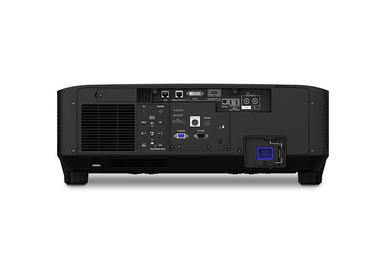
Large-venue projector purchases can go wrong before the box arrives. The optical plan may be incomplete, the signal chain unverified, or the exact package unclear. This Epson EB-PU2216B Setup Guide and Buying Considerations article turns those risks into a practical buying and installation checklist.
The EB-PU2216B is listed with 4K, while its supplied name describes 4K Enhancement and positions it for large-venue use. That is a starting point. It does not prove that the projector fits a particular sanctuary, auditorium, lecture hall, or conference space. Buyers still need to validate screen size, throw geometry, optical requirements, mounting, power, signal transport, control, and service access against current product documentation.
This guide also places the EB-PU2216B beside four Epson options from the supplied catalog. Three are documented as ultra short throw with 4K. The LightScene EV-110 is documented at 2,200 lumens and WXGA. The goal is simple: match each product to an approved deployment brief, then check the linked product page for current commerce details before committing.
Products at a Glance
- Option 1: Epson EB-PU2216B 16,000-Lumen 3LCD Large Venue Laser Projector with 4K Enhancement
- For rooms whose approved design requires an ultra sho…: Epson PowerLite 875E 5 Ultra Short Throw Display with 4K Enhancement (V11HC04120)
- For teams evaluating an interactive display named in…: Epson BrightLink 870Ei Ultra Short Throw Interactive Display with 4K Enhancement (V11HC03020)
- For projects that specifically name BL-780Ei and requ…: Epson BrightLink 780Ei Ultra Short Throw Interactive Display with 4K Enhancement (V11HC10020)
- For deployments whose approved image brief accepts 2,…: Epson LightScene EV-110 2200-Lumen WXGA Laser 3LCD Projector (V11HA22020)
Quick Comparison Table
| Feature | Epson EB-PU2216B 16,000-Lumen 3LCD Large Venue Laser Projector with 4K Enhancement | Epson PowerLite 875E 5 Ultra Short Throw Display with 4K Enhancement (V11HC04120) | Epson BrightLink 870Ei Ultra Short Throw Interactive Display with 4K Enhancement (V11HC03020) | Epson BrightLink 780Ei Ultra Short Throw Interactive Display with 4K Enhancement (V11HC10020) | Epson LightScene EV-110 2200-Lumen WXGA Laser 3LCD Projector (V11HA22020) |
|---|---|---|---|---|---|
| Brightness | 2200 lumens | ||||
| Resolution | 4K | 4K | 4K | 4K | WXGA |
| Best For | Projects whose approved brief specifically calls for EB-PU2216B and whose team can validate the optical, mounting, power, and signal design before purchase. | Rooms whose approved design requires an ultra short throw display with a documented 4K entry, after image geometry and mounting are confirmed. | Teams evaluating an interactive display named in their design and requiring ultra short throw placement, subject to verification of the complete interaction package. | Projects that specifically name BL-780Ei and require an ultra short throw interactive-display path, after every interaction and installation requirement is confirmed. | Deployments whose approved image brief accepts 2,200 lumens and WXGA and does not make ultra short throw a stated requirement. |
| Throw Type | Ultra short throw | Ultra short throw | Ultra short throw | ||
| Recommended Buyer | Projects whose approved brief specifically calls for EB-PU2216B and whose team can validate the optical, mounting, power, and signal design before purchase. | Rooms whose approved design requires an ultra short throw display with a documented 4K entry, after image geometry and mounting are confirmed. | Teams evaluating an interactive display named in their design and requiring ultra short throw placement, subject to verification of the complete interaction package. | Projects that specifically name BL-780Ei and require an ultra short throw interactive-display path, after every interaction and installation requirement is confirmed. | Deployments whose approved image brief accepts 2,200 lumens and WXGA and does not make ultra short throw a stated requirement. |
Product Images
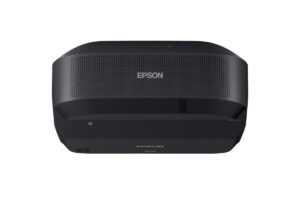
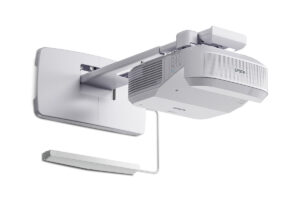
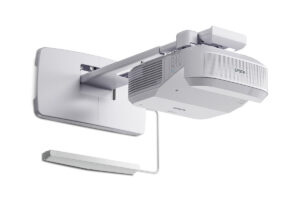
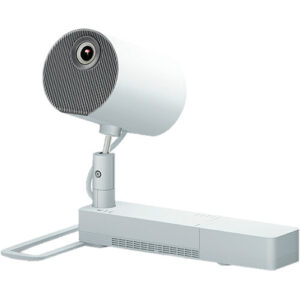
Projector Options from AudioVideoNation
1. Epson EB-PU2216B 16,000-Lumen 3LCD Large Venue Laser Projector with 4K Enhancement
Who should compare it: Projects whose approved brief specifically calls for EB-PU2216B and whose team can validate the optical, mounting, power, and signal design before purchase.
Why it belongs here: This is the exact product addressed by the guide. Its documented 4K detail and large-venue positioning make room geometry, optical planning, infrastructure, and package verification the central buying tasks.
SKU: EB-PU2216B
Key Features
- 4K is the provided resolution detail; retain the product name's 4K Enhancement wording in project documents.
- Large-venue positioning is explicit in the supplied product name.
- SKU EB-PU2216B gives procurement and installation teams one exact reference for quotes and submittals.
Things to Consider
Confirm the optical package, throw range, screen fit, dimensions, weight, mount requirements, power, signal inputs, control needs, clearances, and package contents. Use the linked page for current commerce details.
2. Epson PowerLite 875E 5 Ultra Short Throw Display with 4K Enhancement (V11HC04120)
Who should compare it: Rooms whose approved design requires an ultra short throw display with a documented 4K entry, after image geometry and mounting are confirmed.
Why it belongs here: It offers a different installation path within the supplied Epson set: documented ultra short throw placement and 4K. Review it when room geometry makes throw type a primary requirement.
SKU: PL-875E
Key Features
- Ultra short throw is the documented throw type.
- 4K is the provided resolution detail.
- SKU PL-875E keeps quotes, drawings, and approvals tied to the exact listing.
Things to Consider
Confirm the intended image size, placement tolerances, mounting, screen requirements, inputs, control method, package contents, and the exact meaning of 4K Enhancement for the planned source chain.
3. Epson BrightLink 870Ei Ultra Short Throw Interactive Display with 4K Enhancement (V11HC03020)
Who should compare it: Teams evaluating an interactive display named in their design and requiring ultra short throw placement, subject to verification of the complete interaction package.
Why it belongs here: The documented ultra short throw and 4K details make the BL-870Ei relevant when a project brief names this BrightLink interactive display and requires that placement approach.
SKU: BL-870Ei
Key Features
- Ultra short throw is the documented throw type.
- 4K is the provided resolution detail.
- SKU BL-870Ei provides an exact reference for procurement and design review.
Things to Consider
Verify the interaction method, included components, software requirements, supported sources, mounting, optical geometry, inputs, control, and screen needs. Do not infer package contents from the BrightLink name.
4. Epson BrightLink 780Ei Ultra Short Throw Interactive Display with 4K Enhancement (V11HC10020)
Who should compare it: Projects that specifically name BL-780Ei and require an ultra short throw interactive-display path, after every interaction and installation requirement is confirmed.
Why it belongs here: It is another exact Epson BrightLink listing with documented ultra short throw and 4K details. Keeping it separate prevents the 780Ei and 870Ei from being treated as interchangeable without review.
SKU: BL-780Ei
Key Features
- Ultra short throw is the documented throw type.
- 4K is the provided resolution detail.
- SKU BL-780Ei distinguishes it from the other BrightLink listing during quotes and approvals.
Things to Consider
Treat it as a separate model. Verify interactive functions, included components, optical geometry, mounting, connectivity, control requirements, and package scope before approving it or substituting it for another BrightLink product.
5. Epson LightScene EV-110 2200-Lumen WXGA Laser 3LCD Projector (V11HA22020)
Who should compare it: Deployments whose approved image brief accepts 2,200 lumens and WXGA and does not make ultra short throw a stated requirement.
Why it belongs here: Its documented 2,200-lumen brightness and WXGA resolution create a clear comparison boundary. It gives buyers another Epson brief to evaluate without treating every deployment as a 4K or ultra short throw project.
SKU: EV-110
Key Features
- The documented brightness is 2,200 lumens.
- WXGA is the provided resolution detail.
- SKU EV-110 gives buyers an exact reference for documentation and quotes.
Things to Consider
Its documented brightness and resolution differ from the 4K-listed options. Confirm throw geometry, image size, placement, optical requirements, mounting, inputs, control, and package contents rather than treating it as a direct EB-PU2216B substitute.
Epson EB-PU2216B 16,000-Lumen 3LCD Large Venue Laser Projector with 4K Enhancement vs Epson PowerLite 875E 5 Ultra Short Throw Display with 4K Enhancement (V11HC04120): Main Differences
- Choose Epson EB-PU2216B 16,000-Lumen 3LCD Large Venue Laser Projector with 4K Enhancement if Projects whose approved brief specifically calls for EB-PU2216B and whose team can validate the optical, mounting, power, and signal design before purchase..
- Choose Epson PowerLite 875E 5 Ultra Short Throw Display with 4K Enhancement (V11HC04120) if Rooms whose approved design requires an ultra short throw display with a documented 4K entry, after image geometry and mounting are confirmed..
- Choose Epson BrightLink 870Ei Ultra Short Throw Interactive Display with 4K Enhancement (V11HC03020) if Teams evaluating an interactive display named in their design and requiring ultra short throw placement, subject to verification of the complete interaction package..
- Choose Epson BrightLink 780Ei Ultra Short Throw Interactive Display with 4K Enhancement (V11HC10020) if Projects that specifically name BL-780Ei and require an ultra short throw interactive-display path, after every interaction and installation requirement is confirmed..
- Choose Epson LightScene EV-110 2200-Lumen WXGA Laser 3LCD Projector (V11HA22020) if Deployments whose approved image brief accepts 2,200 lumens and WXGA and does not make ultra short throw a stated requirement..
Deployment fit starts with the room and audience
Start with the room. Record the screen location, usable screen dimensions, audience area, longest viewing distance, projector placement zones, ambient light, and any sightline obstructions. Measure rather than estimate. Photos help, but a scaled plan and elevation make optical discussions far more precise.
Next, document what people will watch. A church may combine presentation slides, cameras, and prerecorded video. A school may need readable text from several seating positions and support for different instructor sources. A conference technology team may prioritize laptop switching and predictable operation. These workflows shape the signal design and acceptance test even when the projector remains the same.
Separate firm requirements from preferences. Resolution, image size, throw location, installation orientation, available power, control method, and operating schedule may be fixed. Finish color or control-panel placement may allow more flexibility. Assign one person to approve every change.
The large-venue wording in the EB-PU2216B name does not replace this work. Nor should an ultra short throw product be treated as an automatic substitute. Those listings address different placement briefs. Define the room first, then decide which projector deserves a full design review.
Epson EB-PU2216B setup: verify the optical plan
Create a scaled drawing before selecting installation hardware. Mark the screen, intended image area, throw path, projector location, audience sightlines, structural attachment point, and service route. The drawing should use finished-site measurements, including any ceiling changes, architectural obstacles, or screen offsets.
Request current optical documentation for the exact EB-PU2216B configuration. Confirm the required throw-ratio range, supported image size at the proposed distance, and the exact optical package. If a lens or another optical component must be selected separately, make it an approved line item rather than an assumption. Any design that depends on zoom, image shift, or geometric correction needs written confirmation that the proposed configuration supports it.
Mounting deserves the same discipline. Verify dimensions, weight, approved orientation, attachment pattern, structural load, airflow clearances, and service access before choosing a mount or finalizing construction. Coordinate structural questions with the qualified installer or project engineer. Confirm the power connection, circuit planning, cable entry, and signal route as well.
Do not base the installation on a drawing for a related product family. Tie every submittal, quote, drawing, and change order to SKU EB-PU2216B. One exact reference prevents expensive ambiguity.
Plan the 4K Enhancement signal path end to end
The supplied product name uses 4K Enhancement, and the documented resolution entry is 4K. Do not rewrite that wording as a native-4K claim. If imaging method, pixel structure, or source handling affects the project, obtain the current manufacturer documentation and make it part of the approval package.
Map the complete signal route: source, switcher, processor, transmitter, cable or network transport, receiver, and projector. Verify that every component carries the intended resolution, frame rate, color format, copy-protection requirement, and cable distance. Confirm HDR handling only if HDR is part of the content brief. A projector specification cannot correct a limitation elsewhere in the chain.
Test representative sources before final commissioning. Use the laptops, media players, cameras, presentation systems, and switching paths expected in daily operation. For schools and conference rooms, include fine text and spreadsheets. For worship or event spaces, include presentation graphics and motion content. View them from the planned seating area.
Keep a documented fallback format for unexpected sources, but do not let that fallback become the untested default. The acceptance plan should identify the intended signal format and the exact content used to approve it.
Compare Epson projector options by deployment fit
The EB-PU2216B is the focal large-venue listing and carries a documented 4K entry. Its selection should follow a completed optical and infrastructure review. The other supplied Epson products create useful comparison points, but they are not interchangeable.
The PowerLite 875E, BrightLink 870Ei, and BrightLink 780Ei are documented as ultra short throw with 4K. Put them on the shortlist when ultra short throw is a firm placement requirement. The two BrightLink product names also identify interactive displays. If interaction drives the purchase, require a written submittal covering the interaction method, included components, software requirements, supported sources, and installation tolerances. A product-family name alone is not enough.
The LightScene EV-110 has a documented brightness of 2,200 lumens and WXGA resolution. That creates a different image brief from the 4K-listed products. Compare it only when the planned image size, room conditions, and content can be approved around those stated figures.
Avoid a brightness comparison until equivalent numeric documentation is available for every shortlisted product. The supplied information gives a numeric lumen figure only for the EV-110. Ask for like-for-like specifications, then evaluate them against the measured room. A useful shortlist follows the deployment constraint: large-venue optical planning, ultra short throw placement, verified interaction needs, or an accepted 2,200-lumen WXGA brief.
Stock and availability planning protects the schedule
Availability can change between design approval and purchase. Check the linked product page when building the budget, again when requesting a quote, and once more before placing the order. Obtain confirmation for the exact SKU and complete package. Do not transfer a status from a related Epson product to the selected model.
Project availability covers more than the projector. Confirm timing for every separately specified optical component, mount, cable, signal extender, control accessory, and screen item. One missing piece can delay installation even if the projector itself is ready to ship. Record the date of each confirmation and the person or document supporting it.
For phased deployments, confirm timing by phase and define who may approve a substitution. Keep model changes under formal change control. A replacement product needs a fresh review of throw geometry, mounting, power, signal handling, control, and acceptance criteria. Similar naming is not proof of installation compatibility.
Price-to-performance means pricing the complete design
Use current product pages or matched quotes for live commerce details. Then compare each product against the work it must perform. The useful number is the complete installed scope, which may include optical components, mounting, screen work, signal transport, control changes, structural work, electrical work, installation labor, and commissioning.
Build one worksheet for every candidate. Include the approved image requirement, room geometry, resolution wording, documented brightness, required interaction, infrastructure changes, operating workflow, and unresolved verification items. Use identical project boundaries for each quote. Otherwise, an omitted accessory or labor task can make one option look less costly without delivering the same deployment.
The EB-PU2216B deserves consideration when the approved design specifically calls for its large-venue positioning and documented 4K detail. The three ultra short throw products deserve consideration when that throw type is a room requirement. The EV-110 belongs in a brief that accepts 2,200 lumens and WXGA. None wins through its label alone.
Good price-to-performance comes from buying capabilities the room will use and funding the work needed to install them correctly. Reject false savings that depend on unverified optics, assumed package contents, or infrastructure left outside the quote.
Commissioning and handoff checklist for AV teams
Commissioning closes the gap between a valid design and a usable room. Before final placement, compare the delivered SKU and package contents with the approved documents. Inspect the shipment, record product identifiers, and resolve discrepancies before installation work makes a return or correction harder.
Test the planned signal chain under safe conditions. Use production sources and representative cable paths where practical. After installation, verify image position, size, focus, and geometry against the approved drawing and current setup instructions. Test every source, switching route, control command, and operating mode included in the project scope. If the system must run for a defined event length, include that duration in the acceptance plan.
Review the image from key seating positions with real content. Check small text, presentation graphics, video motion, and dark and bright scenes selected by the customer. Record the final source formats and settings. Save configuration files only where the system supports that process, and keep a written record that another technician can follow.
Finish with operator training. Cover startup, source selection, normal shutdown, basic fault checks, and the escalation path. Churches, schools, and shared conference spaces often have several operators, so concise instructions near the control point help protect the approved setup. Obtain formal acceptance against written criteria, not a quick visual impression.
Related AudioVideoNation Links
- Browse Projector at AudioVideoNation
- Epson EB-PU2216B product page
- Epson PowerLite 875E product page
- Epson BrightLink 870Ei product page
- Epson BrightLink 780Ei product page
Product Information Sources
- Epson EB-PU2216B 16,000-Lumen 3LCD Large Venue Laser Projector with 4K Enhancement product information
- Epson PowerLite 875E 5 Ultra Short Throw Display with 4K Enhancement (V11HC04120) product information
- Epson BrightLink 870Ei Ultra Short Throw Interactive Display with 4K Enhancement (V11HC03020) product information
- Epson BrightLink 780Ei Ultra Short Throw Interactive Display with 4K Enhancement (V11HC10020) product information
- Epson LightScene EV-110 2200-Lumen WXGA Laser 3LCD Projector (V11HA22020) product information
FAQ
What should be confirmed before buying the Epson EB-PU2216B?
Confirm the screen and throw geometry, optical package, mounting, structural support, power, signal path, control requirements, clearances, and package contents before buying the Epson EB-PU2216B. Tie every document and quote to SKU EB-PU2216B, then test the proposed design against current product documentation.
Does the Epson EB-PU2216B have native 4K resolution?
The provided information does not support a native-4K claim; it identifies 4K while the product name specifically says 4K Enhancement. Confirm the imaging method and accepted source formats in current manufacturer documentation if that distinction affects the project.
Which supplied Epson alternatives are ultra short throw?
The Epson PowerLite 875E, BrightLink 870Ei, and BrightLink 780Ei are the supplied alternatives documented as ultra short throw. Each also has a provided 4K resolution entry, but buyers should verify its exact optical, mounting, and package requirements.
How should buyers check projector stock and availability?
Check the linked product page and obtain current confirmation for the exact SKU and complete package before placing an order. Confirm separately specified optics, mounting, signal, control, and screen items as well because the project schedule depends on the entire installation scope.
How should price-to-performance be compared for these projectors?
Compare current complete installed costs against the room's required image, throw, interaction, infrastructure, and operating outcomes. Use the same project scope for every candidate so omitted accessories or labor do not create a misleading comparison.
Can the Epson LightScene EV-110 replace the EB-PU2216B?
The supplied facts do not establish the EV-110 as a direct replacement for the EB-PU2216B. The EV-110 is documented at 2,200 lumens and WXGA, while the EB-PU2216B has a 4K entry and large-venue positioning, so a new room and optical review is required.
Conclusion
Use this Epson EB-PU2216B Setup Guide and Buying Considerations comparison to match documented specifications to the room and installation requirements. Review the linked product pages for current purchase details before ordering.
Products Used
| SKU | Product Name | URL |
|---|---|---|
| EB-PU2216B | Epson EB-PU2216B 16,000-Lumen 3LCD Large Venue Laser Projector with 4K Enhancement | View product |
| PL-875E | Epson PowerLite 875E 5 Ultra Short Throw Display with 4K Enhancement (V11HC04120) | View product |
| BL-870Ei | Epson BrightLink 870Ei Ultra Short Throw Interactive Display with 4K Enhancement (V11HC03020) | View product |
| BL-780Ei | Epson BrightLink 780Ei Ultra Short Throw Interactive Display with 4K Enhancement (V11HC10020) | View product |
| EV-110 | Epson LightScene EV-110 2200-Lumen WXGA Laser 3LCD Projector (V11HA22020) | View product |