

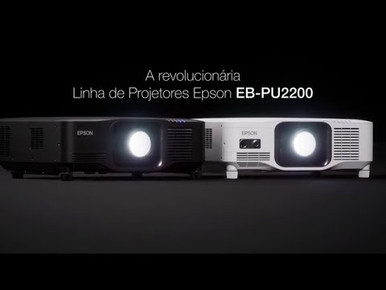
A projector purchase can go off course before installation begins. Room geometry, image size, mounting, signal distribution, control, and service access all affect the final design. This Epson EB-PU2213B Setup Guide and Buying Considerations article helps AV buyers turn those variables into a practical plan. The EB-PU2213B has a listed 4K resolution, but resolution alone cannot establish deployment fit. You still need to verify its projection geometry and system requirements against the room. We also compare it with Epson PowerLite and BrightLink ultra short throw options, plus the 2,200-lumen WXGA LightScene EV-110. The goal is simple: identify the right product path, prepare useful questions for the product page or sales team, and avoid approving a projector before the full installation has been checked.
Products at a Glance
- Option 1: Epson EB-PU2213B 13,000-Lumen 3LCD Laser Projector with 4K Enhancement
- For spaces where verified ultra short throw geometry…: Epson PowerLite 875E 5 Ultra Short Throw Display with 4K Enhancement (V11HC04120)
- For schools and meeting spaces evaluating a 4K ultra…: Epson BrightLink 870Ei Ultra Short Throw Interactive Display with 4K Enhancement (V11HC03020)
- For education or collaboration projects that call for…: Epson BrightLink 780Ei Ultra Short Throw Interactive Display with 4K Enhancement (V11HC10020)
- For projects whose written brief matches a 2,200-lume…: Epson LightScene EV-110 2200-Lumen WXGA Laser 3LCD Projector (V11HA22020)
Quick Comparison Table
| Feature | Epson EB-PU2213B 13,000-Lumen 3LCD Laser Projector with 4K Enhancement | Epson PowerLite 875E 5 Ultra Short Throw Display with 4K Enhancement (V11HC04120) | Epson BrightLink 870Ei Ultra Short Throw Interactive Display with 4K Enhancement (V11HC03020) | Epson BrightLink 780Ei Ultra Short Throw Interactive Display with 4K Enhancement (V11HC10020) | Epson LightScene EV-110 2200-Lumen WXGA Laser 3LCD Projector (V11HA22020) |
|---|---|---|---|---|---|
| Brightness | 2200 lumens | ||||
| Resolution | 4K | 4K | 4K | 4K | WXGA |
| Best For | AV teams evaluating the EB-PU2213B for a fixed 4K projection project and prepared to validate geometry and system requirements before purchase. | Spaces where verified ultra short throw geometry and 4K resolution align with the planned mounting position and image size. | Schools and meeting spaces evaluating a 4K ultra short throw interactive display against a documented interaction plan. | Education or collaboration projects that call for verified ultra short throw placement, 4K resolution, and an interactive workflow. | Projects whose written brief matches a 2,200-lumen WXGA projector and the verified installation requirements of the EV-110. |
| Throw Type | Ultra short throw | Ultra short throw | Ultra short throw | ||
| Recommended Buyer | AV teams evaluating the EB-PU2213B for a fixed 4K projection project and prepared to validate geometry and system requirements before purchase. | Spaces where verified ultra short throw geometry and 4K resolution align with the planned mounting position and image size. | Schools and meeting spaces evaluating a 4K ultra short throw interactive display against a documented interaction plan. | Education or collaboration projects that call for verified ultra short throw placement, 4K resolution, and an interactive workflow. | Projects whose written brief matches a 2,200-lumen WXGA projector and the verified installation requirements of the EV-110. |
Product Images
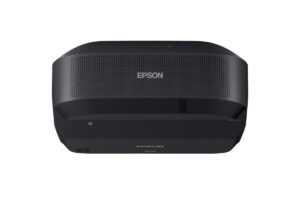
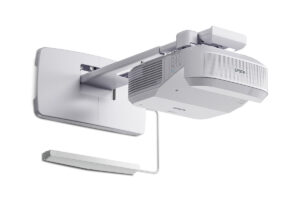
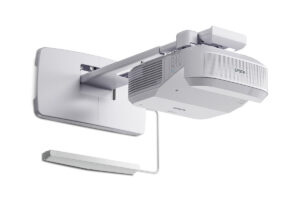
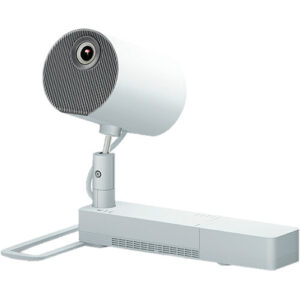
Projector Options from AudioVideoNation
1. Epson EB-PU2213B 13,000-Lumen 3LCD Laser Projector with 4K Enhancement
Who should compare it: AV teams evaluating the EB-PU2213B for a fixed 4K projection project and prepared to validate geometry and system requirements before purchase.
Why it belongs here: This is the focus of the guide and the exact model buyers should evaluate against the room survey, image plan, signal chain, and installation scope.
SKU: EB-PU2213B
Key Features
- Listed 4K resolution
- Exact EB-PU2213B model identity
- Epson product in the Projectors category
Things to Consider
Confirm throw geometry, lens planning, image-size range, mounting, connectivity, control, power, and required supporting components for the actual room.
2. Epson PowerLite 875E 5 Ultra Short Throw Display with 4K Enhancement (V11HC04120)
Who should compare it: Spaces where verified ultra short throw geometry and 4K resolution align with the planned mounting position and image size.
Why it belongs here: The PowerLite 875E gives buyers a listed 4K option with ultra short throw geometry when the room plan calls for placement close to the image area.
SKU: PL-875E
Key Features
- Ultra short throw
- Listed 4K resolution
- PowerLite 875E model identity
Things to Consider
Verify the image surface, mount, placement tolerances, image size, inputs, audio plan, control method, and supporting components before treating it as an alternative.
3. Epson BrightLink 870Ei Ultra Short Throw Interactive Display with 4K Enhancement (V11HC03020)
Who should compare it: Schools and meeting spaces evaluating a 4K ultra short throw interactive display against a documented interaction plan.
Why it belongs here: The BrightLink 870Ei combines listed 4K resolution and ultra short throw geometry with an interactive-display product identity for a different classroom or meeting-room workflow.
SKU: BL-870Ei
Key Features
- Ultra short throw
- Listed 4K resolution
- BrightLink 870Ei interactive-display identity
Things to Consider
Confirm the required interaction hardware, software, accessories, image surface, mounting plan, source connections, and control workflow before specifying it.
4. Epson BrightLink 780Ei Ultra Short Throw Interactive Display with 4K Enhancement (V11HC10020)
Who should compare it: Education or collaboration projects that call for verified ultra short throw placement, 4K resolution, and an interactive workflow.
Why it belongs here: The BrightLink 780Ei adds another listed 4K ultra short throw interactive-display path for buyers comparing installation and instructional requirements.
SKU: BL-780Ei
Key Features
- Ultra short throw
- Listed 4K resolution
- BrightLink 780Ei interactive-display identity
Things to Consider
Validate image dimensions, mounting, surface requirements, interaction components, connectivity, control, and user workflow for this exact SKU.
5. Epson LightScene EV-110 2200-Lumen WXGA Laser 3LCD Projector (V11HA22020)
Who should compare it: Projects whose written brief matches a 2,200-lumen WXGA projector and the verified installation requirements of the EV-110.
Why it belongs here: The EV-110 provides a clearly different reference point with listed 2,200-lumen brightness and WXGA resolution instead of the 4K resolution shown for the other products.
SKU: EV-110
Key Features
- 2,200-lumen listed brightness
- WXGA resolution
- LightScene EV-110 model identity
Things to Consider
WXGA and 4K are different resolution requirements, and brightness alone does not establish room fit. Verify geometry, image size, ambient conditions, mounting, and connectivity.
Epson EB-PU2213B 13,000-Lumen 3LCD Laser Projector with 4K Enhancement vs Epson PowerLite 875E 5 Ultra Short Throw Display with 4K Enhancement (V11HC04120): Main Differences
- Choose Epson EB-PU2213B 13,000-Lumen 3LCD Laser Projector with 4K Enhancement if AV teams evaluating the EB-PU2213B for a fixed 4K projection project and prepared to validate geometry and system requirements before purchase..
- Choose Epson PowerLite 875E 5 Ultra Short Throw Display with 4K Enhancement (V11HC04120) if Spaces where verified ultra short throw geometry and 4K resolution align with the planned mounting position and image size..
- Choose Epson BrightLink 870Ei Ultra Short Throw Interactive Display with 4K Enhancement (V11HC03020) if Schools and meeting spaces evaluating a 4K ultra short throw interactive display against a documented interaction plan..
- Choose Epson BrightLink 780Ei Ultra Short Throw Interactive Display with 4K Enhancement (V11HC10020) if Education or collaboration projects that call for verified ultra short throw placement, 4K resolution, and an interactive workflow..
- Choose Epson LightScene EV-110 2200-Lumen WXGA Laser 3LCD Projector (V11HA22020) if Projects whose written brief matches a 2,200-lumen WXGA projector and the verified installation requirements of the EV-110..
Start with projector deployment fit
Deployment fit begins with the room and the job the projector must perform. Write down the required image size, viewing positions, content types, operating hours, installation location, and who will run the system. A church may prioritize clear presentation material and simple volunteer operation. A school may need a layout suited to instruction. A conference room team may care most about repeatable source switching and straightforward support. Those goals create different requirements even when each buyer wants 4K.
Next, document ambient light, available projection distance, mounting restrictions, and the proposed image surface. Do not use resolution as a substitute for this survey. The EB-PU2213B has a listed 4K resolution, while its throw and lens requirements should be confirmed for the planned image. That distinction matters. A projector can meet the requested resolution and still be wrong for the available mounting position.
Define acceptance criteria before selecting hardware. Include the desired image dimensions, sources that must be displayed, control expectations, power location, cable routes, and access for future service. This gives installers a measurable target and gives buyers a cleaner basis for comparing products.
Epson EB-PU2213B setup: survey the room first
Start the Epson EB-PU2213B setup with a measured room drawing. Record the proposed screen or display area, ceiling height, possible mounting points, structural restrictions, seating area, and any obstruction between the projector and image. Note where equipment racks, source devices, control stations, and electrical connections will sit. Photos help, but measurements drive the design.
Use that survey to verify the full image path before ordering. Key checks include:
- Required image width and height
- Available distance between the mounting position and image surface
- Lens and throw requirements for that distance
- Mounting orientation and adjustment needs
- Clearance around the planned installation point
- Access for alignment, inspection, and later service
The supplied product facts identify 4K resolution for the EB-PU2213B. Confirm the remaining installation details through the linked product page and applicable product documentation. Ask for an image-size and throw calculation tied to your actual measurements. If a separate lens, mount, bracket, or other installation component is needed, place it on the project bill of materials rather than assuming it accompanies the projector.
Finish the survey with responsibility assignments. The AV integrator can own geometry and signal design, facilities can confirm structure and power, and the technology team can approve sources and control behavior. Clear ownership prevents small unanswered questions from appearing during installation.
Plan signal, control, power, and mounting
A projector is one part of the AV chain. Map every source to its destination, including presentation computers, media players, cameras, switchers, and any room-control equipment in scope. Then verify the EB-PU2213B connections and supported signal formats against that map. Port names alone are not enough. The complete path must carry the required content across the planned cable distance.
Document cable type, route, approximate length, termination location, and any transmitter, receiver, switcher, or converter under consideration. Each added component creates another compatibility check. Confirm that the source, distribution equipment, cabling, and projector agree on the intended resolution and operating workflow.
Power and mounting deserve their own sign-off. Have the responsible trades confirm the electrical location, circuit requirements, supporting structure, mount selection, attachment method, and safe access. Do the same for control. If the room must start from a touch panel, wall control, or central management system, verify the required commands and connection method before programming begins.
Build an installation drawing that shows these relationships. It should be detailed enough for the installer to locate the projector, route cables, identify supporting components, and understand where final configuration will happen.
Compare 4K and WXGA Epson projector options
The listed Epson products lead to three distinct planning paths. The EB-PU2213B has a listed 4K resolution, but its throw geometry must be verified. The PowerLite 875E, BrightLink 870Ei, and BrightLink 780Ei combine listed 4K resolution with ultra short throw geometry. The LightScene EV-110 has a listed 2,200-lumen brightness and WXGA resolution.
Ultra short throw matters when the room plan calls for projector placement close to the image area. It does not make the PowerLite or BrightLink products automatic replacements for the EB-PU2213B. Confirm the required image size, mounting position, surface, sources, control, and operating workflow for each option. The BrightLink product names also identify them as interactive displays, so buyers considering those models should verify the interaction hardware, software, and accessories required by their teaching or meeting workflow.
Resolution creates another branch in the decision. Keep the EB-PU2213B and listed ultra short throw options on the 4K path when 4K is a stated requirement. Consider the WXGA EV-110 only when its 2,200-lumen rating, WXGA resolution, and installation requirements match the written brief. Do not treat it as a like-for-like substitute.
Choose by application first. The cleanest shortlist is the one in which every product can satisfy the same documented room, image, source, and operational requirements.
Check projector stock and availability at the right time
Check current stock and availability on the linked AudioVideoNation product page when the design is ready for purchasing. Live commerce details can change, so avoid building the installation calendar around an earlier page view or an assumed lead time. Confirm the exact SKU as part of that check. Similar Epson names do not establish that two products share the same geometry or system requirements.
Availability should be reviewed for the complete bill of materials, not the projector alone. Identify every required lens, mount, cable, signal component, control item, and installation accessory after the design is verified. Then confirm the purchasing path and timing for the whole system.
If the preferred product cannot meet the project schedule, return to the approved requirements before considering an alternative. Recheck resolution, throw geometry, image size, mounting, connectivity, control, and workflow. A product that can be purchased sooner still has to fit the design.
Evaluate projector price-to-performance by project cost
Price-to-performance starts with the required outcome, not a single product figure. Establish the image, resolution, geometry, source, control, and operational requirements first. Then compare the complete project cost for every product that passes those checks. Use the linked product pages for current commerce details.
Include the supporting system in the comparison. Depending on the verified design, the budget may need allowances for a lens plan, mounting hardware, signal distribution, cabling, control work, electrical work, installation labor, access equipment, configuration, training, and future service. Do not assume those costs are equal across the EB-PU2213B, ultra short throw options, and the EV-110. Their listed resolution, brightness, and throw facts already show that they belong to different planning paths.
Score each viable design against the same criteria: required content resolution, image placement, room constraints, operating simplicity, installation scope, and support plan. Remove any option that misses a mandatory requirement. The remaining comparison will be more useful than judging products by purchase price alone.
Keep assumptions visible. If a cost depends on an unverified mount, lens, accessory, or integration detail, mark it for confirmation before approval. That protects the budget from late design changes.
Commission the projector and document the handoff
Commissioning proves that the installed system matches the approved design. Test every intended source through the complete signal chain. Confirm that users can select sources, start and stop the room, and recover from common operating mistakes using the agreed workflow. Check the image against the approved size and placement criteria from the site survey.
Record the final installation details. Useful handoff material includes the exact product SKU, mounting location, cable destinations, source settings, control configuration, supporting equipment, and the product documentation used during setup. Store that information where the organization’s AV support team can reach it.
Training should match the audience. Volunteers, teachers, presenters, and support technicians may need different instructions. Give everyday users a short operating sequence and a clear support contact. Give technical staff the system drawing, configuration record, and service-access notes.
Schedule a follow-up after the room has been used. Gather specific issues, document any approved adjustments, and update the handoff record. That final step turns the installation into a supportable AV system instead of a collection of undocumented settings.
Related AudioVideoNation Links
- Browse Projector at AudioVideoNation
- View the Epson EB-PU2213B product page
- Explore the Epson PowerLite 875E
- View the Epson BrightLink 870Ei
- View the Epson BrightLink 780Ei
Product Information Sources
- Epson EB-PU2213B 13,000-Lumen 3LCD Laser Projector with 4K Enhancement product information
- Epson PowerLite 875E 5 Ultra Short Throw Display with 4K Enhancement (V11HC04120) product information
- Epson BrightLink 870Ei Ultra Short Throw Interactive Display with 4K Enhancement (V11HC03020) product information
- Epson BrightLink 780Ei Ultra Short Throw Interactive Display with 4K Enhancement (V11HC10020) product information
- Epson LightScene EV-110 2200-Lumen WXGA Laser 3LCD Projector (V11HA22020) product information
FAQ
What should I verify before installing the Epson EB-PU2213B?
Before installation, verify image size, projection geometry, lens planning, mounting, power, signal connections, control requirements, cable routes, and service access. Use measured room dimensions and confirm each item for the exact EB-PU2213B SKU before finalizing the bill of materials.
Is the Epson EB-PU2213B suitable for a church, school, or conference room?
The Epson EB-PU2213B is suitable only when its verified installation requirements match the room, image, content, control, and operating plan. Its listed 4K resolution addresses one requirement, but a site survey is still needed to establish full deployment fit.
How does the EB-PU2213B compare with the listed Epson ultra short throw models?
The PowerLite 875E, BrightLink 870Ei, and BrightLink 780Ei have listed ultra short throw geometry and 4K resolution, while the EB-PU2213B throw requirements must be verified. Compare image placement, mounting, surface, workflow, connectivity, and control rather than treating the products as direct substitutes.
Does 4K resolution guarantee the right projector image?
No, 4K resolution does not guarantee that a projector will fit the room or meet the complete image requirement. Throw geometry, image size, ambient conditions, mounting, source compatibility, and the full signal path also need verification.
How should buyers check EB-PU2213B stock, availability, and price?
Buyers should use the linked AudioVideoNation product page to check current EB-PU2213B commerce details. Confirm the exact SKU and review availability for every required supporting component before setting the installation schedule.
How should I judge projector price-to-performance?
Judge projector price-to-performance by comparing total project cost against the same documented room, image, workflow, and support requirements. Include verified supporting hardware, signal distribution, mounting, installation, configuration, training, and service needs in the comparison.
Conclusion
Use this Epson EB-PU2213B Setup Guide and Buying Considerations comparison to match documented specifications to the room and installation requirements. Review the linked product pages for current purchase details before ordering.
Products Used
| SKU | Product Name | URL |
|---|---|---|
| EB-PU2213B | Epson EB-PU2213B 13,000-Lumen 3LCD Laser Projector with 4K Enhancement | View product |
| PL-875E | Epson PowerLite 875E 5 Ultra Short Throw Display with 4K Enhancement (V11HC04120) | View product |
| BL-870Ei | Epson BrightLink 870Ei Ultra Short Throw Interactive Display with 4K Enhancement (V11HC03020) | View product |
| BL-780Ei | Epson BrightLink 780Ei Ultra Short Throw Interactive Display with 4K Enhancement (V11HC10020) | View product |
| EV-110 | Epson LightScene EV-110 2200-Lumen WXGA Laser 3LCD Projector (V11HA22020) | View product |