

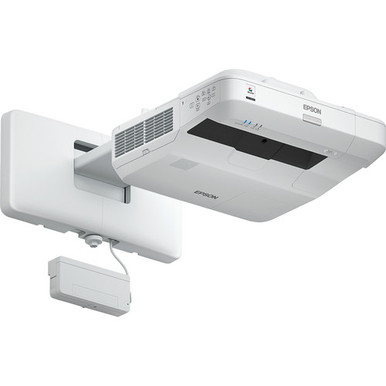
A projector can match a specification list and still miss the room if throw distance, mounting, cabling, or workflow gets decided too late. This Epson BL-697UI Setup Guide and Buying Considerations article puts those decisions first. The supplied facts for the Epson BrightLink 697Ui list 4,400 lumens, Full HD resolution, and Wi-Fi. Those are useful starting points, but they do not settle installation fit by themselves. This guide explains how schools, churches, conference-room teams, AV buyers, and installers can evaluate the room, plan commissioning, and compare the 697Ui with Epson PowerLite 875E, BrightLink 870Ei, and BrightLink 780Ei alternatives. It also covers price-to-performance and live availability checks without relying on temporary pricing or inventory claims.
Products at a Glance
- Option 1: Epson V11H823022 Bright Link 697Ui Interactive WUXGA 1080p 3LCD Projector with Speaker 4400 lumens Wi-Fi
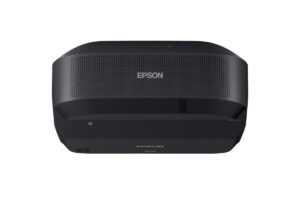
- For rooms planned around ultra-short-throw placement…: Epson PowerLite 875E 5 Ultra Short Throw Display with 4K Enhancement (V11HC04120)
- For aV teams that require a 4K, ultra-short-throw lay…: Epson BrightLink 870Ei Ultra Short Throw Interactive Display with 4K Enhancement (V11HC03020)
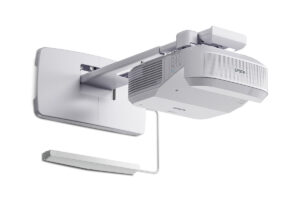
- For buyers comparing BrightLink ultra-short-throw con…: Epson BrightLink 780Ei Ultra Short Throw Interactive Display with 4K Enhancement (V11HC10020)
Quick Comparison Table
| Feature | Epson V11H823022 Bright Link 697Ui Interactive WUXGA 1080p 3LCD Projector with Speaker 4400 lumens Wi-Fi | Epson PowerLite 875E 5 Ultra Short Throw Display with 4K Enhancement (V11HC04120) | Epson BrightLink 870Ei Ultra Short Throw Interactive Display with 4K Enhancement (V11HC03020) | Epson BrightLink 780Ei Ultra Short Throw Interactive Display with 4K Enhancement (V11HC10020) |
|---|---|---|---|---|
| Brightness | 4400 lumens | |||
| Resolution | Full HD | 4K | 4K | 4K |
| Best For | Schools, churches, and conference-room teams seeking Full HD, Wi-Fi, and a stated 4,400 lumens, subject to room and installation verification. | Rooms planned around ultra-short-throw placement and 4K resolution, after the exact installation geometry and workflow are confirmed. | AV teams that require a 4K, ultra-short-throw layout and want to evaluate the BrightLink 870Ei’s exact interaction and installation workflow. | Buyers comparing BrightLink ultra-short-throw configurations for a 4K room design. |
| Throw Type | Ultra short throw | Ultra short throw | Ultra short throw | |
| Smart Features | Wi-Fi | |||
| Recommended Buyer | Schools, churches, and conference-room teams seeking Full HD, Wi-Fi, and a stated 4,400 lumens, subject to room and installation verification. | Rooms planned around ultra-short-throw placement and 4K resolution, after the exact installation geometry and workflow are confirmed. | AV teams that require a 4K, ultra-short-throw layout and want to evaluate the BrightLink 870Ei’s exact interaction and installation workflow. | Buyers comparing BrightLink ultra-short-throw configurations for a 4K room design. |
Product Images
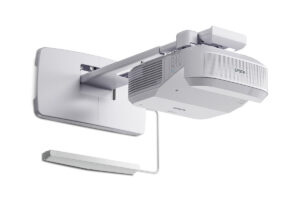
Projector Options from AudioVideoNation
1. Epson V11H823022 Bright Link 697Ui Interactive WUXGA 1080p 3LCD Projector with Speaker 4400 lumens Wi-Fi
Who should compare it: Schools, churches, and conference-room teams seeking Full HD, Wi-Fi, and a stated 4,400 lumens, subject to room and installation verification.
Why it belongs here: It is the reference product for this guide because its supplied facts combine 4,400 lumens, Full HD resolution, and Wi-Fi. Those facts give buyers clear starting points for room, content, and network planning.
SKU: BL-697Ui
Key Features
- 4,400-lumen stated brightness
- Full HD resolution
- Wi-Fi
Things to Consider
Confirm throw geometry, supported image size, mounting hardware, wired connections, audio routing, interaction workflow, and included accessories before ordering. Check the linked page for live commerce details.
2. Epson PowerLite 875E 5 Ultra Short Throw Display with 4K Enhancement (V11HC04120)
Who should compare it: Rooms planned around ultra-short-throw placement and 4K resolution, after the exact installation geometry and workflow are confirmed.
Why it belongs here: It gives buyers a 4K, ultra-short-throw Epson option for projects where near-surface placement is part of the design.
SKU: PL-875E
Key Features
- 4K resolution
- Ultra-short-throw design
- PowerLite 875E configuration identified by SKU PL-875E
Things to Consider
Verify brightness, image-size range, mounting requirements, connections, network capabilities, audio plan, and included accessories. Use the product page for current purchasing details.
3. Epson BrightLink 870Ei Ultra Short Throw Interactive Display with 4K Enhancement (V11HC03020)
Who should compare it: AV teams that require a 4K, ultra-short-throw layout and want to evaluate the BrightLink 870Ei’s exact interaction and installation workflow.
Why it belongs here: It adds a BrightLink-family choice with 4K resolution and ultra-short-throw placement for buyers comparing current room designs.
SKU: BL-870Ei
Key Features
- 4K resolution
- Ultra-short-throw design
- BrightLink 870Ei configuration identified by SKU BL-870Ei
Things to Consider
Confirm brightness, supported image sizes, interaction method, source compatibility, mounting hardware, network requirements, and included components before selection.
4. Epson BrightLink 780Ei Ultra Short Throw Interactive Display with 4K Enhancement (V11HC10020)
Who should compare it: Buyers comparing BrightLink ultra-short-throw configurations for a 4K room design.
Why it belongs here: It provides another BrightLink option documented with 4K resolution and ultra-short-throw placement. It belongs in a direct requirements check with the 870Ei.
SKU: BL-780Ei
Key Features
- 4K resolution
- Ultra-short-throw design
- BrightLink 780Ei configuration identified by SKU BL-780Ei
Things to Consider
Compare its brightness, geometry, connections, interaction workflow, accessories, and network requirements with the 870Ei and the room brief. Check the linked page for live commerce details.
Epson V11H823022 Bright Link 697Ui Interactive WUXGA 1080p 3LCD Projector with Speaker 4400 lumens Wi-Fi vs Epson PowerLite 875E 5 Ultra Short Throw Display with 4K Enhancement (V11HC04120): Main Differences
- Choose Epson V11H823022 Bright Link 697Ui Interactive WUXGA 1080p 3LCD Projector with Speaker 4400 lumens Wi-Fi if Schools, churches, and conference-room teams seeking Full HD, Wi-Fi, and a stated 4,400 lumens, subject to room and installation verification..
- Choose Epson PowerLite 875E 5 Ultra Short Throw Display with 4K Enhancement (V11HC04120) if Rooms planned around ultra-short-throw placement and 4K resolution, after the exact installation geometry and workflow are confirmed..
- Choose Epson BrightLink 870Ei Ultra Short Throw Interactive Display with 4K Enhancement (V11HC03020) if AV teams that require a 4K, ultra-short-throw layout and want to evaluate the BrightLink 870Ei’s exact interaction and installation workflow..
- Choose Epson BrightLink 780Ei Ultra Short Throw Interactive Display with 4K Enhancement (V11HC10020) if Buyers comparing BrightLink ultra-short-throw configurations for a 4K room design..
Epson BrightLink 697Ui deployment fit
Start with the room and the content people will display. The BrightLink 697Ui has a stated brightness of 4,400 lumens, Full HD resolution, and Wi-Fi. Brightness matters, but the final image also depends on image size, ambient light, the projection surface, and installation geometry. Record those conditions before treating the lumen figure as a go-ahead.
Full HD should be assessed against the material used in the room. A conference team may prioritize readable spreadsheets and shared presentations. A school may need legible lesson material from the rear seats. A church may combine lyrics, slides, and video. Test representative files at the planned image size whenever possible, since the content and viewing distance shape the resolution decision.
Wi-Fi is another planning input, not an automatic compatibility promise. Confirm the approved network, source devices, connection method, security rules, and user permissions. Keep a planned wired signal route in the design until the wireless workflow has been verified with the organization’s real equipment.
Deployment fit also includes ownership. Decide who starts the system, changes sources, handles support calls, and restores settings after an event or class. A projector that works during commissioning can still create friction if daily controls and support responsibilities remain unclear.
Epson BrightLink 697Ui setup checklist
Build a room worksheet before ordering mounts or pulling cable. Record the desired image dimensions, viewing positions, possible projector location, outlet location, source location, cable route, network access, and audio destination. Then confirm the model-specific throw calculations and installation requirements against those measurements. The provided product facts do not supply the geometry needed for a safe mounting decision, so verify it through the linked product page and applicable Epson installation documentation.
Check the mounting plan next. Confirm the approved hardware, attachment surface, service access, and all documented clearance requirements. Coordinate the work with the people responsible for the wall or ceiling, electrical service, network, and room scheduling. This catches conflicts before equipment arrives.
Map every signal path from source to image. Identify the computers, presentation systems, or other sources that must be used, then verify their connections and supported workflows. Cable type, extension method, switching, adapters, and control arrangements should all be decided from documented compatibility. Do the same for audio. Choose the intended audio destination and confirm how the source signal reaches it instead of assuming the projector will satisfy the room’s sound requirements.
If interactive operation is part of the project, document the exact user actions the room must support. Confirm the interaction method, required software, supported source devices, included components, calibration process, and instructor or presenter workflow before purchase. Product-family language alone cannot replace that check.
Mounting, image alignment, and Wi-Fi commissioning
Install in a controlled order. First, confirm the measured room still matches the design. Construction changes, furniture movement, and a revised image surface can invalidate earlier assumptions. Attach the specified mounting hardware according to its documentation and applicable site requirements, while preserving the required access and ventilation clearances.
Set physical placement before relying on electronic image correction. Establish the intended image position, make the projector physically square to the surface, and adjust the installation using the model’s documented controls. Check focus and alignment across the full image. Electronic correction may be available, but no capability or adjustment range should be assumed without model-specific documentation.
Commission the planned wired path and Wi-Fi workflow separately. For Wi-Fi, use the production network rules and the actual source devices rather than a temporary installer network. Test connection, reconnection, source changes, and the handoff between users. Record any app, permission, or network steps that room users must follow.
Finish with real content. Display small text, presentation slides, video, dark scenes, bright screens, and any material central to the room. Check the nearest and farthest viewing positions under normal lighting. Save approved settings where the documented controls permit it, then create a short room guide covering startup, source selection, shutdown, and support contacts. Capture the installed model, SKU, cabling route, network configuration, and acceptance results for future service.
Epson ultra short throw projector alternatives
The Epson PowerLite 875E, BrightLink 870Ei, and BrightLink 780Ei are all identified in the supplied facts as 4K, ultra-short-throw options. That combination changes the initial comparison. Ultra-short-throw placement is relevant when the design calls for the projector to sit close to the image surface, but the exact distance and supported image range still require model-specific calculations.
The PowerLite 875E gives buyers a PowerLite-family option with 4K resolution and ultra-short-throw placement. The BrightLink 870Ei and BrightLink 780Ei carry the same two high-level facts in the supplied data. Compare their product pages for brightness, image-size range, inputs, mounting requirements, interaction workflow, included accessories, and network capabilities. Those details determine whether one fits the room better than another.
The BrightLink 697Ui takes a different documented starting point: 4,400 lumens, Full HD resolution, and Wi-Fi. Do not infer that the three 4K alternatives share its brightness or wireless capability. Likewise, the 697Ui’s supplied facts do not establish an ultra-short-throw classification. Treat each unconfirmed requirement as a pre-purchase verification item.
Use the installation constraint to narrow the list. If near-surface placement is mandatory, start with the three ultra-short-throw choices and validate their exact geometry. If the 697Ui’s stated brightness, resolution, and Wi-Fi align with the brief, keep it on the shortlist while confirming throw distance and the complete workflow.
Price-to-performance, stock, and availability checks
Judge price-to-performance against the completed room, not the projector specification sheet alone. Build an installed-cost worksheet that accounts for the projector, approved mount, projection surface, signal transport, adapters, switching, electrical work, network work, audio routing, installation labor, commissioning, training, and support. Include only the items the design requires, and confirm what comes with each product before finalizing the comparison.
Then assign value to the requirements that prevent rework. Ultra-short-throw placement may carry value where geometry is tight. Wi-Fi may matter where the approved presentation workflow calls for it. Full HD or 4K should be tied to content and viewing needs. A higher specification has little purchasing value if the room cannot use it, while an omitted accessory or installation task can change the real project cost.
Treat stock and availability as live purchasing variables. Visit each linked AudioVideoNation product page for current commerce details, then confirm fulfillment timing for the required quantity before scheduling installers or closing rooms. For a multi-room deployment, verify that the quoted SKU and configuration remain consistent across the order.
Ask for a dated quote that identifies the exact projector, required accessories, shipping assumptions, and any services. Confirm return terms, warranty terms, and support arrangements from current seller or manufacturer documentation. This creates an accountable comparison without relying on a price or inventory snapshot that may change.
A practical selection path for AV teams
Keep the BrightLink 697Ui on the shortlist if 4,400 lumens, Full HD resolution, and Wi-Fi match the written brief. The next gate is physical fit. Confirm the required image size, throw geometry, mounting method, signal path, network workflow, audio plan, and interaction requirements. If any critical item remains unverified, pause the purchase decision until documentation resolves it.
Move to the PowerLite 875E, BrightLink 870Ei, or BrightLink 780Ei comparison if ultra-short-throw placement and 4K resolution are firm requirements. Do not choose between those three from their shared facts alone. Compare the exact installation and workflow details on their linked pages, then request confirmation for every must-have capability.
For repeated classroom, worship, or meeting-room deployments, test the chosen configuration in one representative room before scaling it. Use the real image surface, normal lighting, production network, intended source devices, and standard user accounts. Document acceptance criteria such as readable content, reliable source changes, usable controls, and a support procedure. The pilot should answer operational questions before they multiply across several rooms.
Finish with a sign-off sheet. Record the selected productId and SKU, approved accessories, room measurements, configuration, training owner, and live purchasing confirmation. That record gives buyers, installers, and support staff the same reference point from ordering through handoff.
Related AudioVideoNation Links
- Browse Projector at AudioVideoNation
- View the Epson BrightLink 697Ui product page
- Explore the Epson PowerLite 875E
- Review the Epson BrightLink 870Ei
- Review the Epson BrightLink 780Ei
Product Information Sources
- Epson V11H823022 Bright Link 697Ui Interactive WUXGA 1080p 3LCD Projector with Speaker 4400 lumens Wi-Fi product information
- Epson PowerLite 875E 5 Ultra Short Throw Display with 4K Enhancement (V11HC04120) product information
- Epson BrightLink 870Ei Ultra Short Throw Interactive Display with 4K Enhancement (V11HC03020) product information
- Epson BrightLink 780Ei Ultra Short Throw Interactive Display with 4K Enhancement (V11HC10020) product information
FAQ
Does the Epson BL-697Ui have Wi-Fi?
Yes, Wi-Fi is included in the supplied facts for the Epson BL-697Ui. Confirm the supported connection method, source-device compatibility, network permissions, and required software before making wireless presentation part of the room standard.
Is 4,400 lumens enough for a classroom, church, or conference room?
Whether 4,400 lumens is enough depends on image size, ambient light, the projection surface, and the room’s acceptance target. Evaluate those conditions together and test representative content at the planned size when possible.
What should be measured before installing the Epson BrightLink 697Ui?
Measure the intended image area, possible projector location, viewing positions, outlet and source locations, and cable route before installation. Use those measurements with model-specific throw and mounting documentation rather than estimating placement.
When should I consider an Epson ultra short throw projector instead?
Consider an ultra-short-throw option when near-surface projector placement is a firm room requirement. The PowerLite 875E, BrightLink 870Ei, and BrightLink 780Ei are identified here as 4K ultra-short-throw choices, but their exact geometry and workflows still need verification.
How should buyers compare price-to-performance without relying on a temporary price?
Compare price-to-performance by matching each product to required outcomes and calculating the complete installed system cost. Include necessary mounting, signal transport, network work, audio routing, labor, commissioning, training, and support in the quote.
Where should I verify current stock, availability, and purchasing details?
Verify current stock, availability, and purchasing details on the linked AudioVideoNation product page and through a dated seller quote. Confirm the exact SKU, quantity, required accessories, and fulfillment timing before scheduling installation.
Conclusion
Use this Epson BL-697UI Setup Guide and Buying Considerations comparison to match documented specifications to the room and installation requirements. Review the linked product pages for current purchase details before ordering.
Products Used
| SKU | Product Name | URL |
|---|---|---|
| BL-697Ui | Epson V11H823022 Bright Link 697Ui Interactive WUXGA 1080p 3LCD Projector with Speaker 4400 lumens Wi-Fi | View product |
| PL-875E | Epson PowerLite 875E 5 Ultra Short Throw Display with 4K Enhancement (V11HC04120) | View product |
| BL-870Ei | Epson BrightLink 870Ei Ultra Short Throw Interactive Display with 4K Enhancement (V11HC03020) | View product |
| BL-780Ei | Epson BrightLink 780Ei Ultra Short Throw Interactive Display with 4K Enhancement (V11HC10020) | View product |