Summer SpecialEnds in --
ACCESSORIES SKU TS-DPD6N

USB Docking Station for DrivePro Body 30/60

Shipping Options at Checkout Warranty Terms Vary

Product Overview

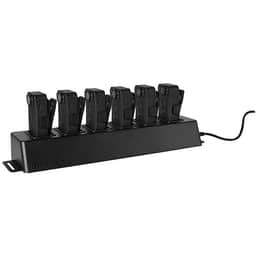
Multi-bay USB docking station for DrivePro Body 30 and DrivePro Body 60 cameras. Ideal for public safety, security, transportation, and campus teams that need a centralized place for charging, connection, and end-of-shift device handling.

$489.02

Shipping charges and warranty coverage vary by product and order. Review the applicable terms before purchase.

Available to Order

Available to order; contact us to confirm lead time

Shipping Options

Rates and available methods are shown at checkout

Available to order

Key Features

Public safety departments managing camera return at the end of a shift
Security teams that issue and collect multiple body cameras daily
Transportation operations that need orderly device staging
Campus patrol and institutional safety programs with shared equipment
Back-office, evidence-room, or supervisor-managed camera handling areas
Assigning the dock to a fixed return point for all compatible cameras
Using it in a supervisor office, records area, or equipment room
Labeling bays or surrounding storage areas to support asset tracking

Ideal Use Cases

The USB Docking Station for DrivePro Body 30/60 is designed for organizations that need a consistent, centralized way to handle compatible body-worn cameras between shifts. Instead of relying on separate cables and scattered charging points, this multi-bay dock creates a single location for routine charging, connection, and day-to-day device management.

It is a practical fit for teams using DrivePro Body 30 or DrivePro Body 60 cameras in structured workflows, including:

  • Public safety departments managing camera return at the end of a shift
  • Security teams that issue and collect multiple body cameras daily
  • Transportation operations that need orderly device staging
  • Campus patrol and institutional safety programs with shared equipment
  • Back-office, evidence-room, or supervisor-managed camera handling areas

Where several cameras must be maintained in one place, a dedicated dock helps create a more repeatable process. It supports cleaner handoff routines, more organized device storage during charging, and a more professional equipment-management setup overall.

Why Choose This Model

This model is purpose-built for compatibility with DrivePro Body 30 and DrivePro Body 60 cameras, making it a focused accessory for organizations already using those devices. Rather than adapting a generic charging approach, buyers can add a docking solution that aligns with the needs of shared-camera environments.

Its value is especially clear in operations where multiple users rotate equipment. A centralized USB docking station helps reduce desk clutter, simplifies end-of-shift return procedures, and gives staff one dependable place to connect and charge devices. That kind of consistency can make daily workflows easier to manage, especially when camera readiness matters for the next deployment.

For buyers looking to improve organization without changing their camera platform, this accessory offers a straightforward way to make handling more efficient and standardized.

Installation and Integration

The docking station is well suited for placement on a stable desktop, equipment counter, shelf, or other designated return area. Because it uses USB connectivity, it can be integrated into a workflow where staff regularly connect compatible cameras for routine handling and support tasks.

For best results, organizations can build the dock into existing closeout and issue procedures. Common deployment approaches include:

  • Assigning the dock to a fixed return point for all compatible cameras
  • Using it in a supervisor office, records area, or equipment room
  • Labeling bays or surrounding storage areas to support asset tracking
  • Including dock checks in end-of-shift charging and maintenance routines

In smaller deployments, it can serve as a dedicated charging and connection station for a limited number of assigned users. In larger operations, it supports a more repeatable fleet-management process by giving teams a central place to return and prepare devices.

Performance Highlights

The key strength of this accessory is workflow efficiency. By combining charging, connection, and centralized handling in one organized location, it helps reduce the friction that often comes with managing multiple body cameras individually.

  • USB connectivity for compatible device connection
  • Multi-bay design for managing more than one camera in a shared station
  • Compatibility with DrivePro Body 30 and DrivePro Body 60
  • Supports organized end-of-shift return and staging routines
  • Helps reduce cable clutter compared with dispersed individual charging setups

These practical advantages matter most in environments where cameras are regularly issued, returned, and prepared for the next user. A dedicated dock can help staff maintain a cleaner workspace and a more consistent process without adding unnecessary complexity.

What Makes It Different

What sets this docking station apart is its focused role in operational discipline. It is not simply a charging accessory; it is a workflow tool for teams that need a predictable place to manage compatible body cameras every day. That makes it particularly useful for organizations with shared devices, rotating shifts, or centralized oversight of body-worn video equipment.

It also stands out because it is built specifically for DrivePro Body 30 and 60 compatibility. Buyers do not need to evaluate broad, generic use cases. Instead, they can choose an accessory intended for the exact camera family they already use, which helps simplify purchasing decisions and deployment planning.

For departments that value consistency, organization, and easier device handling, that focused compatibility is a meaningful advantage.

Final Assessment

The USB Docking Station for DrivePro Body 30/60 is a practical accessory for organizations that want a more organized and repeatable way to manage compatible body cameras. It brings charging, USB connection, and centralized handling together in one multi-bay station, helping teams streamline end-of-shift routines and keep equipment areas more orderly.

If your operation uses DrivePro Body 30 or DrivePro Body 60 cameras and needs a dedicated return, charging, and management point, this dock is a strong fit. It is especially well suited for public safety, security, transportation, and campus environments where multiple cameras must be handled consistently and efficiently.

Payment Options

All major credit cards
PayPal at checkout
Apple Pay at checkout
Google Pay at checkout
Supports recurring payments
Wire transfer for business

Why Buy from AVN

Warranty Information

Coverage varies; confirm the terms before purchase

Returns on Most Items

30-day window; conditions and exclusions apply

Product Details

Condition and specifications are shown per listing

Secure Connection
HTTPS/TLS protected
30-Day Returns
Most eligible items
Quote Support
Pricing confirmed in quote
Warranty Information
Terms vary by product
Shipping Options
Rates shown at checkout