

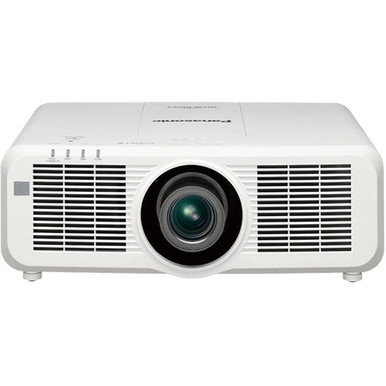
“Panasonic PT-MZ670LU vs PT-MZ780WU: Which Projector Should You Choose?” is the question facing teams that need WUXGA projection but cannot treat two nearby model numbers as interchangeable. The supplied facts confirm WUXGA for both models and a 6,500-lumen brightness figure for the PT-MZ670LU. They do not provide a brightness figure or throw data for the PT-MZ780WU. That gap matters. A church, classroom, or conference room needs a projector that fits its image size, ambient light, mounting position, signal path, and control plan. This comparison separates confirmed facts from details you should verify, then shows how to weigh deployment fit, live availability, and price-to-performance before requesting approval or placing an order.
Products at a Glance
- Option 1: Panasonic PT-MZ670LU WUXGA 1080p LCD Projector with Speaker
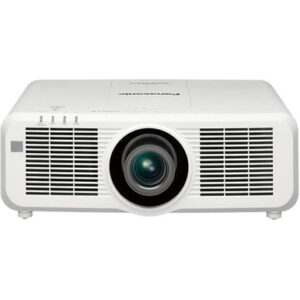
- For teams evaluating the exact PT-MZ780WU and prepare…: Panasonic PT-MZ780WU 7000-Lumen WUXGA Laser 3LCD Projector
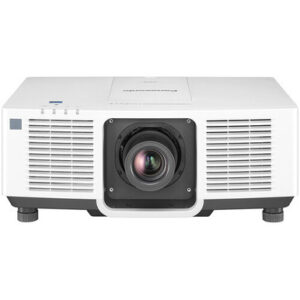
- For projects where ultra-short-throw placement is a f…: Panasonic PT-CMZ50 WUXGA Ultra-Short Throw Laser Projector – Professional Golf Simulator Display
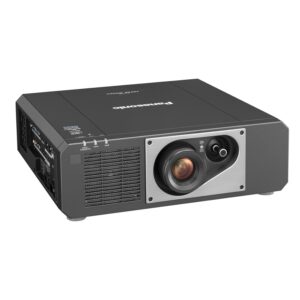
- For golf simulator buyers considering used equipment…: Panasonic PT-FRZ50BU7 5200 Lumen WUXGA Laser Projector for Golf Simulators [USED]
Quick Comparison Table
| Feature | Panasonic PT-MZ670LU WUXGA 1080p LCD Projector with Speaker | Panasonic PT-MZ780WU 7000-Lumen WUXGA Laser 3LCD Projector | Panasonic PT-CMZ50 WUXGA Ultra-Short Throw Laser Projector – Professional Golf Simulator Display | Panasonic PT-FRZ50BU7 5200 Lumen WUXGA Laser Projector for Golf Simulators [USED] |
|---|---|---|---|---|
| Brightness | 6500 lumens | 5200 lumens | 5200 Lumen | |
| Resolution | WUXGA | WUXGA | WUXGA | WUXGA |
| Best For | Projects that require WUXGA and need a documented 6,500-lumen input for design and procurement review. | Teams evaluating the exact PT-MZ780WU and prepared to verify its brightness, placement, connection, and control details against the room design. | Projects where ultra-short-throw placement is a firm design requirement and a documented 5,200-lumen WUXGA option fits the room plan. | Golf simulator buyers considering used equipment and willing to validate condition, placement, included components, and seller terms. |
| Throw Type | Ultra short throw | |||
| Recommended Buyer | Projects that require WUXGA and need a documented 6,500-lumen input for design and procurement review. | Teams evaluating the exact PT-MZ780WU and prepared to verify its brightness, placement, connection, and control details against the room design. | Projects where ultra-short-throw placement is a firm design requirement and a documented 5,200-lumen WUXGA option fits the room plan. | Golf simulator buyers considering used equipment and willing to validate condition, placement, included components, and seller terms. |
Product Images

Projector Options from AudioVideoNation
1. Panasonic PT-MZ670LU WUXGA 1080p LCD Projector with Speaker
Who should compare it: Projects that require WUXGA and need a documented 6,500-lumen input for design and procurement review.
Why it belongs here: It is one of the two compared models, and the supplied facts document WUXGA resolution and 6,500-lumen brightness. That gives design teams a concrete brightness value to check against the room plan.
SKU: PT-MZ670LU
Key Features
- 6,500-lumen brightness in the supplied product facts
- WUXGA resolution
- Exact procurement SKU: PT-MZ670LU
Things to Consider
Throw type and other installation details are not supplied. Confirm placement geometry, connections, control requirements, audio planning, physical dimensions, and included items before ordering.
2. Panasonic PT-MZ780WU 7000-Lumen WUXGA Laser 3LCD Projector
Who should compare it: Teams evaluating the exact PT-MZ780WU and prepared to verify its brightness, placement, connection, and control details against the room design.
Why it belongs here: It is the second model in the comparison, and its supplied facts confirm WUXGA resolution. Include it in the quote and verification process when a design or procurement request names the PT-MZ780WU.
SKU: PT-MZ780WU
Key Features
- WUXGA resolution in the supplied product facts
- Multimedia projector category
- Exact procurement SKU: PT-MZ780WU
Things to Consider
The supplied specification fields do not provide brightness or throw details. Obtain current documentation and validate every installation requirement before making a performance or value comparison.
3. Panasonic PT-CMZ50 WUXGA Ultra-Short Throw Laser Projector – Professional Golf Simulator Display
Who should compare it: Projects where ultra-short-throw placement is a firm design requirement and a documented 5,200-lumen WUXGA option fits the room plan.
Why it belongs here: It adds a documented ultra-short-throw option to the buying set. Its supplied facts also identify WUXGA resolution and 5,200-lumen brightness.
SKU: PT-CMZ50U
Key Features
- 5,200-lumen brightness
- WUXGA resolution
- Ultra-short-throw classification
- Exact procurement SKU: PT-CMZ50U
Things to Consider
This is a different projector, not an established drop-in replacement for either compared model. Verify mounting, image geometry, connections, controls, audio planning, and application fit.
4. Panasonic PT-FRZ50BU7 5200 Lumen WUXGA Laser Projector for Golf Simulators [USED]
Who should compare it: Golf simulator buyers considering used equipment and willing to validate condition, placement, included components, and seller terms.
Why it belongs here: It provides a used WUXGA alternative with a documented 5,200-lumen figure and a listing in the Golf Simulator Projectors category.
SKU: PT-FRZ50BU7-USED
Key Features
- 5,200-lumen brightness
- WUXGA resolution
- Listed in the Golf Simulator Projectors category
- Used designation in the name and SKU
Things to Consider
Confirm product condition, operating history, included components, throw requirements, and seller terms. Matching resolution does not establish installation compatibility with the PT-MZ670LU or PT-MZ780WU.
Panasonic PT-MZ670LU WUXGA 1080p LCD Projector with Speaker vs Panasonic PT-MZ780WU 7000-Lumen WUXGA Laser 3LCD Projector: Main Differences
- Choose Panasonic PT-MZ670LU WUXGA 1080p LCD Projector with Speaker if Projects that require WUXGA and need a documented 6,500-lumen input for design and procurement review..
- Choose Panasonic PT-MZ780WU 7000-Lumen WUXGA Laser 3LCD Projector if Teams evaluating the exact PT-MZ780WU and prepared to verify its brightness, placement, connection, and control details against the room design..
- Choose Panasonic PT-CMZ50 WUXGA Ultra-Short Throw Laser Projector – Professional Golf Simulator Display if Projects where ultra-short-throw placement is a firm design requirement and a documented 5,200-lumen WUXGA option fits the room plan..
- Choose Panasonic PT-FRZ50BU7 5200 Lumen WUXGA Laser Projector for Golf Simulators [USED] if Golf simulator buyers considering used equipment and willing to validate condition, placement, included components, and seller terms..
Panasonic PT-MZ670LU vs PT-MZ780WU: the short answer
Choose the PT-MZ670LU when your written requirement calls for WUXGA resolution and you need a documented 6,500-lumen figure for planning. The supplied data makes those two points clear, so an AV team can compare them directly with its room specification.
Keep the PT-MZ780WU under consideration when the exact model appears in a design, bid, or replacement request. Its supplied facts confirm WUXGA, but its brightness and throw details need verification before approval. The available information does not support declaring either model universally better.
Resolution alone does not separate them. Both are listed as WUXGA. Brightness cannot be compared responsibly because the provided facts contain a figure for only one model. A missing figure does not mean lower brightness. It means the project team needs current documentation before making that part of the decision.
The practical choice is the model that clears every requirement on your room worksheet: resolution, verified brightness, placement geometry, signal connections, control method, audio plan, installation scope, and current commercial terms.
WUXGA resolution and documented brightness
Both compared models are listed with WUXGA resolution. That makes them candidates for projects whose source and display standards call for WUXGA, but the shared resolution label does not settle the purchase. It says nothing in the supplied data about throw distance, lens options, control connections, physical size, or the room’s audio path.
The PT-MZ670LU has a documented brightness of 6,500 lumens. Use that number as an input to the room design, not as a stand-alone buying verdict. Screen size, ambient light, surface choice, and the visual material shown in the room all influence the required brightness target.
The supplied PT-MZ780WU facts do not include a brightness number. Ask for current product documentation and confirm the figure before comparing it with the PT-MZ670LU. Use the same documented measurement basis for both models, and have the installer validate the target against the planned image size and room conditions.
This disciplined check prevents a familiar procurement problem: selecting from model names first, then discovering that the approved projector does not match the design assumptions used for the room.
Projector deployment fit for churches, schools, and conference rooms
Deployment fit starts with the room, not the venue label. Two churches can have different screen sizes, window exposure, mounting locations, and service access. The same is true for classrooms and meeting spaces.
For a church, document the largest planned image, the available mounting distance, the amount of controllable light, and the type of content shown during services. Confirm how the projector will connect to the presentation system and where audio is handled. The PT-MZ670LU’s 6,500-lumen figure gives the designer one confirmed input, while the remaining installation details still require validation.
For a school, compare each model with the district’s room standard. Check required source connections, control method, mounting constraints, cable path, and staff operating workflow. WUXGA is confirmed for both models, but the supplied facts do not establish whether either one matches an existing control or mounting system.
Conference room teams should start with text readability requirements, planned image size, table-to-screen sightlines, and the conferencing signal path. Confirm control and connection details before treating either projector as a drop-in replacement.
Installers can turn these questions into a pass-or-fail matrix. Put confirmed facts in one column, requested verification in another, and project requirements in a third. A model moves to purchasing only after every critical row is resolved.
Installation planning and throw-distance checks
Neither compared model has a throw type in the supplied facts, so do not approve placement from the model number alone. Record the screen width, lens-to-screen distance, mounting height, lens centerline, ceiling obstructions, and service clearance. Then confirm the supported projection geometry in current documentation.
The same caution applies to a retrofit. Check the existing mount, physical clearance, cable terminations, power location, control wiring, and access for installation work. A shared resolution does not establish physical or electrical interchangeability.
Build the signal plan before ordering. List every source, the required connection path, the control method, and the separate room-audio plan. Confirm whether the chosen model supports those requirements. If the project depends on a projector’s internal audio, verify that capability and its suitability directly rather than assuming it from a product title.
Rooms with very shallow placement deserve a separate branch in the comparison. The PT-CMZ50U alternative has a documented ultra-short-throw classification, while no throw type is supplied for the PT-MZ670LU or PT-MZ780WU. It is a different model, so it still needs a full compatibility and integration review.
How to judge projector price-to-performance
Price-to-performance should measure the cost of meeting the room requirement. Pull live pricing from the linked product pages at the same point in the buying cycle, then compare equal project scopes. Include any required mounting hardware, lens or placement accessories, cabling, control work, source equipment, installation labor, and support provisions.
The PT-MZ670LU’s documented 6,500-lumen figure can reduce uncertainty during early design because it can be checked against a written brightness target. The PT-MZ780WU needs a verified brightness figure and installation details before its value can be assessed on the same basis. That is a documentation distinction, not a performance ranking.
A higher verified brightness figure earns its cost only when the room needs it. Placement can carry equal weight. A projector that requires changes to the mount, cable route, or room layout may alter the full project cost even if its live product-page price looks attractive.
Create a one-page comparison using current quotes and verified specifications. Mark every required accessory and labor item. This gives finance teams a defensible project total and gives installers a chance to flag missing scope before the purchase order is issued.
Stock and availability: verify live details
Use each linked product page for current price and availability details immediately before approval. This article does not declare inventory, and purchase conditions can change after an AV design is prepared.
Match the exact SKU on the quote, product page, design document, and purchase order. Confirm lead time, included items, delivery timing, product condition, and seller terms with the retailer. Record the date of that check so the project team knows which information supported its decision.
If a schedule depends on a specific installation date, resolve availability before booking labor or removing existing equipment. Recheck it when the order is released, especially if approvals have taken several weeks.
WUXGA alternatives for different placement needs
The PT-CMZ50U is the clearest alternative in the supplied list when ultra-short-throw placement is a firm requirement. Its facts identify WUXGA resolution, 5,200-lumen brightness, and an ultra-short-throw design. That combination may suit a shallow installation plan, but it does not establish compatibility with the mounts, connections, controls, or accessories specified for either primary model.
The PT-FRZ50BU7-USED is another WUXGA option with a documented 5,200-lumen figure. It is listed in the Golf Simulator Projectors category and is explicitly identified as used. Buyers considering it should confirm condition, operating history, included components, placement requirements, and seller terms before comparing its project cost with new equipment.
These alternatives solve different buying questions. The PT-CMZ50U adds confirmed throw information. The PT-FRZ50BU7-USED adds a used-equipment path for an applicable project. Neither should replace the PT-MZ670LU or PT-MZ780WU solely because the resolution label matches.
A final decision checklist for AV teams
Start with the non-negotiable requirements and let them remove unsuitable choices.
1. Confirm that WUXGA meets the source and room standard.
2. Set a documented brightness target for the planned screen and light conditions.
3. Verify the PT-MZ780WU brightness figure before comparing it with the PT-MZ670LU’s documented 6,500 lumens.
4. Validate throw distance, mounting geometry, physical clearance, and service access.
5. Confirm every required signal, control, power, and audio connection.
6. Gather live product-page details and quotes for the exact SKUs.
7. Compare the full installed scope, including required accessories and labor.
8. Recheck availability before scheduling the installation.
Select the PT-MZ670LU if its confirmed facts and verified installation details clear that list. Select the PT-MZ780WU if its verified documentation, deployment fit, and current commercial terms make it the better match for the written project requirements. If shallow placement drives the design, evaluate the PT-CMZ50U as a separate ultra-short-throw option.
Related AudioVideoNation Links
- Browse Projector at AudioVideoNation
- View the Panasonic PT-MZ670LU
- View the Panasonic PT-MZ780WU
- Explore the Panasonic PT-CMZ50U ultra-short-throw projector
- Review the used Panasonic PT-FRZ50BU7
Product Information Sources
- Panasonic PT-MZ670LU WUXGA 1080p LCD Projector with Speaker product information
- Panasonic PT-MZ780WU 7000-Lumen WUXGA Laser 3LCD Projector product information
- Panasonic PT-CMZ50 WUXGA Ultra-Short Throw Laser Projector – Professional Golf Simulator Display product information
- Panasonic PT-FRZ50BU7 5200 Lumen WUXGA Laser Projector for Golf Simulators [USED] product information
FAQ
Which is brighter, the Panasonic PT-MZ670LU or PT-MZ780WU?
The supplied facts document the PT-MZ670LU at 6,500 lumens but do not provide a PT-MZ780WU brightness figure, so a verified brightness comparison is not possible from this data. Obtain current documentation for the PT-MZ780WU and compare both figures on the same stated measurement basis.
Do the PT-MZ670LU and PT-MZ780WU both support WUXGA resolution?
Yes, both the PT-MZ670LU and PT-MZ780WU are listed with WUXGA resolution in the supplied product facts. Resolution therefore does not separate them, so placement, verified brightness, connections, controls, and project cost need to drive the decision.
Which model is better for a church, school, or conference room?
Choose the model whose verified brightness, placement geometry, connections, and control requirements match the specific room rather than selecting by venue type alone. The PT-MZ670LU has a documented 6,500-lumen figure, while both models have WUXGA resolution and require further installation checks.
How can buyers compare price-to-performance without prices in the article?
Compare live product-page pricing against the full cost of meeting the room specification. Include required accessories, mounting, cabling, integration labor, and source or control work so both project totals cover the same scope.
How should buyers check stock and availability?
Use the linked AudioVideoNation product page and confirm current details for the exact SKU before approving the purchase. Recheck availability when the order is released if design, budgeting, or internal approvals created a delay.
Is the PT-CMZ50U a direct replacement for either compared model?
No, the supplied data does not establish the PT-CMZ50U as a direct replacement for the PT-MZ670LU or PT-MZ780WU. It is a 5,200-lumen WUXGA ultra-short-throw alternative that needs its own geometry, mounting, connection, and control review.
Conclusion
Use this Panasonic PT-MZ670LU vs PT-MZ780WU: Which Projector Should You Choose? comparison to match documented specifications to the room and installation requirements. Review the linked product pages for current purchase details before ordering.
Products Used
| SKU | Product Name | URL |
|---|---|---|
| PT-MZ670LU | Panasonic PT-MZ670LU WUXGA 1080p LCD Projector with Speaker | View product |
| PT-MZ780WU | Panasonic PT-MZ780WU 7000-Lumen WUXGA Laser 3LCD Projector | View product |
| PT-CMZ50U | Panasonic PT-CMZ50 WUXGA Ultra-Short Throw Laser Projector – Professional Golf Simulator Display | View product |
| PT-FRZ50BU7-USED | Panasonic PT-FRZ50BU7 5200 Lumen WUXGA Laser Projector for Golf Simulators [USED] | View product |