

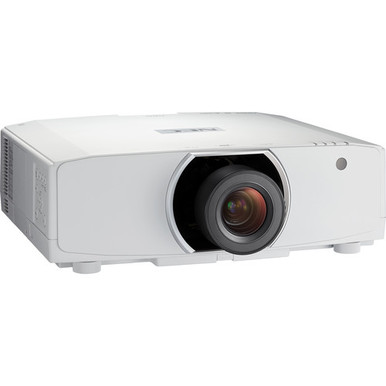
The NEC NP-PA653U Setup Guide and Buying Considerations starts with a choice that affects every later step: buy the NP-PA653U no-lens configuration or evaluate the NP-PA653U-41ZL projector-and-lens bundle. Both product paths list WUXGA resolution, but the purchasing and installation plans differ.
Room measurements come first. Then the lens, signal chain, mounting plan, and total installed cost need to agree. This guide walks AV buyers and installers through those decisions without assuming unverified brightness, connectivity, compatibility, or optical specifications.
You will also see where the 8500-lumen WXGA NP-PA853W-41ZL belongs in the conversation and how to approach the separately listed NP41ZL and NP40ZL lenses. The goal is simple: tie an exact SKU to a measured room and a documented AV design before placing the order.
Products at a Glance
- Option 1: NEC NP-PA653U 3D WUXGA 1080p LCD Projector (No Lens)
- For teams that want a lens-inclusive NP-PA653U purcha…: NEC NP-PA653U-41ZL Projector and Lens Bundle
- For deployments with a documented need for an 8500-lu…: NEC NP-PA853W-41ZL 8500-Lumen HDR WXGA Projector and Lens Bundle
- For quotes that separate projector and lens after exa…: NEC NP41ZL 1.30 – 3.08:1 Zoom Lens for NEC PA Series Projectors
- For installers comparing lens candidates after an exa…: NEC NP40ZL Short-throw Zoom Lens – 13.3mm-18.6mm – F/2.0-2.43
Quick Comparison Table
| Feature | NEC NP-PA653U 3D WUXGA 1080p LCD Projector (No Lens) | NEC NP-PA653U-41ZL Projector and Lens Bundle | NEC NP-PA853W-41ZL 8500-Lumen HDR WXGA Projector and Lens Bundle | NEC NP41ZL 1.30 – 3.08:1 Zoom Lens for NEC PA Series Projectors | NEC NP40ZL Short-throw Zoom Lens – 13.3mm-18.6mm – F/2.0-2.43 |
|---|---|---|---|---|---|
| Brightness | 8500 lumens | ||||
| Resolution | WUXGA | WUXGA | WXGA | ||
| Best For | Installers with measured room geometry and a confirmed compatible-lens plan. | Teams that want a lens-inclusive NP-PA653U purchasing path after confirming room geometry. | Deployments with a documented need for an 8500-lumen WXGA projector-and-lens bundle. | Quotes that separate projector and lens after exact compatibility and room geometry have been verified. | Installers comparing lens candidates after an exact projector-compatibility review. |
| Recommended Buyer | Installers with measured room geometry and a confirmed compatible-lens plan. | Teams that want a lens-inclusive NP-PA653U purchasing path after confirming room geometry. | Deployments with a documented need for an 8500-lumen WXGA projector-and-lens bundle. | Quotes that separate projector and lens after exact compatibility and room geometry have been verified. | Installers comparing lens candidates after an exact projector-compatibility review. |
Product Images
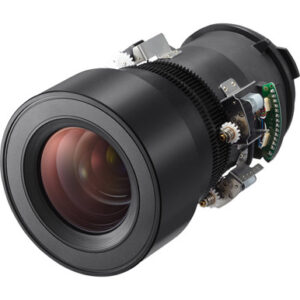
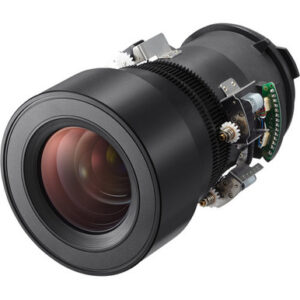
Projector Options from AudioVideoNation
1. NEC NP-PA653U 3D WUXGA 1080p LCD Projector (No Lens)
Who should compare it: Installers with measured room geometry and a confirmed compatible-lens plan.
Why it belongs here: This is the core NP-PA653U listing for buyers who require WUXGA and plan to select a validated lens separately.
SKU: NP-PA653U
Key Features
- WUXGA resolution
- No-lens configuration identified in the product name
- Exact NP-PA653U base SKU
Things to Consider
A compatible lens must be added. Verify brightness, lens geometry, connections, control options, mounting requirements, and other installation details in current documentation.
2. NEC NP-PA653U-41ZL Projector and Lens Bundle
Who should compare it: Teams that want a lens-inclusive NP-PA653U purchasing path after confirming room geometry.
Why it belongs here: It keeps the supplied WUXGA resolution while packaging the projector and a lens under one bundle configuration.
SKU: NP-PA653U-41ZL
Key Features
- WUXGA resolution
- Projector-and-lens bundle configuration
- Exact NP-PA653U-41ZL SKU
Things to Consider
Confirm that the lens covers the measured throw requirement and review the current bundle contents. Budget for any mounting, signal, control, and cabling items required by the design.
3. NEC NP-PA853W-41ZL 8500-Lumen HDR WXGA Projector and Lens Bundle
Who should compare it: Deployments with a documented need for an 8500-lumen WXGA projector-and-lens bundle.
Why it belongs here: It provides a separately specified brightness and resolution path for buyers whose project calls for 8500 lumens and WXGA.
SKU: NP-PA853W-41ZL
Key Features
- 8500-lumen brightness
- WXGA resolution
- Projector-and-lens bundle configuration
- Exact NP-PA853W-41ZL SKU
Things to Consider
WXGA differs from the WUXGA resolution listed for the NP-PA653U options. Revalidate content requirements, lens geometry, mounting, connectivity, and control before treating it as an alternative.
4. NEC NP41ZL 1.30 – 3.08:1 Zoom Lens for NEC PA Series Projectors
Who should compare it: Quotes that separate projector and lens after exact compatibility and room geometry have been verified.
Why it belongs here: It gives buyers a separately listed NP41ZL lens path to evaluate alongside the NP-PA653U-41ZL bundle.
SKU: NP41ZL
Key Features
- Exact NP41ZL lens SKU
- Standalone lens product listing
- Separate lens path alongside the NP-PA653U-41ZL bundle
Things to Consider
Confirm exact NP-PA653U compatibility and current optical data before adding this lens to the design. The room calculation and quoted part number must agree.
5. NEC NP40ZL Short-throw Zoom Lens – 13.3mm-18.6mm – F/2.0-2.43
Who should compare it: Installers comparing lens candidates after an exact projector-compatibility review.
Why it belongs here: It adds a second separately listed lens SKU for installers evaluating a different optical path for the measured room.
SKU: NP40ZL
Key Features
- Exact NP40ZL lens SKU
- Standalone lens product listing
- Listed in the Lenses and Projectors categories
Things to Consider
Confirm its throw data and NP-PA653U compatibility before including it in a design or quote. Do not infer compatibility from the NEC name or a similar SKU.
NEC NP-PA653U 3D WUXGA 1080p LCD Projector (No Lens) vs NEC NP-PA653U-41ZL Projector and Lens Bundle: Main Differences
- Choose NEC NP-PA653U 3D WUXGA 1080p LCD Projector (No Lens) if Installers with measured room geometry and a confirmed compatible-lens plan..
- Choose NEC NP-PA653U-41ZL Projector and Lens Bundle if Teams that want a lens-inclusive NP-PA653U purchasing path after confirming room geometry..
- Choose NEC NP-PA853W-41ZL 8500-Lumen HDR WXGA Projector and Lens Bundle if Deployments with a documented need for an 8500-lumen WXGA projector-and-lens bundle..
- Choose NEC NP41ZL 1.30 – 3.08:1 Zoom Lens for NEC PA Series Projectors if Quotes that separate projector and lens after exact compatibility and room geometry have been verified..
- Choose NEC NP40ZL Short-throw Zoom Lens – 13.3mm-18.6mm – F/2.0-2.43 if Installers comparing lens candidates after an exact projector-compatibility review..
NEC NP-PA653U installation starts with room geometry
Start with the visible image width, desired image height, and proposed projector position. Record the lens-to-screen distance from the planned lens location rather than from an arbitrary point on the mount. Keep every measurement in the same unit.
Throw ratio connects those measurements. Use `required throw ratio = lens-to-screen distance ÷ image width` as the initial planning calculation. Then check current lens documentation to confirm that the exact lens SKU covers the result. A calculated ratio is a screening tool, not final approval.
Document vertical and horizontal offsets as well. Do not count on lens shift, zoom, or a particular mounting orientation until those capabilities have been verified for the selected projector-and-lens combination. Ceiling beams, lights, fans, sprinklers, audience sightlines, and service access can all eliminate an otherwise workable mounting point.
Build in placement tolerance. A design that works only at an unverified optical limit leaves little room for field conditions. Have the installer confirm the final lens position and image size before the mount location is drilled or reinforced.
No-lens NP-PA653U or NEC NP-PA653U-41ZL bundle?
The NEC NP-PA653U listing explicitly identifies a no-lens configuration. That path makes sense when the installer has already selected a compatible lens from current documentation and wants the projector and lens quoted as separate line items. Do not assume an existing NEC lens will fit because its branding or model number looks similar.
The NEC NP-PA653U-41ZL is listed as a projector-and-lens bundle. It closes one purchasing gap, but the room geometry still needs validation. Confirm that the lens associated with the exact bundle covers the calculated throw requirement and that the current product-page description matches the quote.
Keep the SKU visible on the room drawing, bill of materials, purchase order, and commissioning checklist. NP-PA653U and NP-PA653U-41ZL are different procurement paths even though both supplied listings identify WUXGA resolution. That suffix matters.
Also check which mounting, signal, control, and cabling items the design requires. A lens bundle should not be treated as a complete installed system without reviewing its current contents.
Lens geometry: evaluating the NEC NP41ZL and NP40ZL
The provided product set includes separate listings for the NEC NP41ZL and NEC NP40ZL. Treat them as distinct lens SKUs. Shared branding does not establish interchangeability or compatibility with the NP-PA653U.
For each candidate, verify the current throw-ratio range, supported image-size range, exact projector compatibility, adjustment limits, permitted orientation, and installation clearances. Enter the approved information in the design documents. The lens part number on the quote should match the one used in the throw calculation.
Run the geometry in both directions. First, divide the measured lens-to-screen distance by the desired image width and compare that result with verified lens data. Next, calculate the image-width range available from the fixed mounting location. This catches plans that work for one proposed screen size but fail after a small field adjustment.
The NP-PA653U-41ZL bundle provides a lens-inclusive purchasing path, while the NP41ZL has its own product page. The NP40ZL should remain a candidate only after its compatibility and optical data have been confirmed for the exact installation. Bundle naming and similar SKU patterns do not replace that check.
WUXGA projector setup: signal and content checks
Both NP-PA653U product paths list WUXGA resolution. Build the signal plan around that confirmed requirement and the actual output of every source.
Check the source device, switcher or scaler, wall plates, extenders, adapters, and cable run as one chain. Confirm connector types, supported signal formats, control requirements, and cable-distance limits in current product documentation. A single unverified endpoint can disrupt the room even when the projector resolution is correct.
Create an acceptance file with fine text, presentation slides, grids, and representative video. Test it through the installed signal path at the intended image size. Look for cropping, scaling errors, unreadable text, and inconsistent source switching.
Control teams should verify the supported command method, power commands, status feedback, and required integration hardware before programming begins. Record the chosen source resolution and aspect-ratio behavior so future service calls do not depend on guesswork.
Deployment fit for churches, schools, and conference rooms
Church installations need measurements taken from the real mounting position, especially when the projector sits near a booth, balcony, lighting position, or architectural obstruction. Stage and house lighting make brightness planning essential. A WUXGA label does not answer that question, so verify rated brightness against the room's measured light conditions before approval. Check sightlines and the full cable route too.
Schools benefit from repeatable room standards. Record the exact projector configuration, approved lens, source format, mounting position, control method, and service-access plan. If several classrooms differ in screen width or throw distance, validate each room instead of copying one lens choice across the entire project.
Conference room teams should test presentation text, videoconferencing output, room-control behavior, and guest-device switching. Readability depends on content, image size, and viewing distance. Validate all three with representative material.
The NEC NP-PA853W-41ZL is a separate option in the provided set. Its extracted facts identify 8500 lumens and WXGA resolution. Evaluate it when a documented 8500-lumen requirement and WXGA both fit the project. Do not treat it as an automatic substitute for either WUXGA NP-PA653U configuration. Resolution, lens geometry, signal design, and mounting requirements need a fresh review.
Projector price-to-performance, stock, and availability
Judge price-to-performance at the installed-system level. Include the projector, approved lens, mount, signal distribution, cabling, control work, installation labor, access equipment, and commissioning. Comparing a no-lens projector line item with a lens bundle without accounting for the missing system pieces creates a distorted result.
Use the linked product pages for current pricing. Compare the NP-PA653U plus its validated lens against the NP-PA653U-41ZL bundle using the same room design and accessory assumptions. The useful question is whether each complete option meets the required resolution, geometry, installation, and support plan at an acceptable total cost.
Stock and availability are live commerce details. Review the exact product page close to the order date, confirm the SKU and bundle description, and secure all required components before scheduling installation labor. Recheck the design if procurement proposes a different lens or projector. A substitution can change throw geometry, resolution, mounting, and signal requirements.
Pre-purchase and commissioning checklist
Use one checklist for the buyer, installer, and technology owner:
1. Freeze the visible screen width, image position, and proposed lens location.
2. Calculate the required throw ratio from measured lens-to-screen distance and image width.
3. Choose the exact NP-PA653U no-lens or NP-PA653U-41ZL bundle SKU.
4. Confirm lens compatibility and optical limits in current documentation.
5. Verify WUXGA against the source, switching, scaling, and content requirements.
6. Confirm rated brightness, power, mounting, connector, control, clearance, and service requirements.
7. Compare total installed costs using live product-page details.
8. Check current availability for every required component before scheduling the work.
9. Define acceptance tests for image size, focus, alignment, source switching, content scaling, and control operation.
The purchase is ready when the exact projector and lens SKUs are tied to a room drawing, signal plan, installation scope, and current quote. If one of those pieces remains open, resolve it before ordering.
Related AudioVideoNation Links
- Browse Projector at AudioVideoNation
- NEC NP-PA653U no-lens projector
- NEC NP-PA653U-41ZL bundle
- NEC NP-PA853W-41ZL 8500-lumen WXGA bundle
- NEC NP41ZL lens
Product Information Sources
- NEC NP-PA653U 3D WUXGA 1080p LCD Projector (No Lens) product information
- NEC NP-PA653U-41ZL Projector and Lens Bundle product information
- NEC NP-PA853W-41ZL 8500-Lumen HDR WXGA Projector and Lens Bundle product information
- NEC NP41ZL 1.30 – 3.08:1 Zoom Lens for NEC PA Series Projectors product information
- NEC NP40ZL Short-throw Zoom Lens – 13.3mm-18.6mm – F/2.0-2.43 product information
FAQ
Does the NEC NP-PA653U include a lens?
The NP-PA653U is a no-lens listing, while the NP-PA653U-41ZL is the projector-and-lens bundle path. Match the exact SKU on the quote to the configuration used in the room design.
What resolution does the NEC NP-PA653U use?
The supplied product data lists WUXGA resolution for both NP-PA653U configurations. Confirm that WUXGA fits the source, switching, content, and screen plan before purchase.
How should an installer choose a lens for the NP-PA653U?
Choose only a lens whose current compatibility and optical data match the measured room geometry. Calculate the required throw ratio from lens-to-screen distance and image width, then validate the exact lens SKU in current documentation.
Can the NEC NP40ZL be used with the NP-PA653U?
Use the NEC NP40ZL with an NP-PA653U only after exact compatibility is confirmed for the current product configuration. Its separate product listing alone does not establish that it fits this projector or the planned room geometry.
When should buyers evaluate the NP-PA853W-41ZL instead?
Evaluate the NP-PA853W-41ZL when the project calls for its stated 8500-lumen brightness and WXGA resolution. It is a separate design path, so recheck content, geometry, mounting, connectivity, and control requirements.
How should buyers compare pricing and availability?
Check each exact linked product page for current pricing and availability immediately before ordering. Compare the complete installed cost of the no-lens configuration plus an approved lens with the bundle path using identical labor and accessory assumptions.
Conclusion
Use this NEC NP-PA653U Setup Guide and Buying Considerations comparison to match documented specifications to the room and installation requirements. Review the linked product pages for current purchase details before ordering.
Products Used
| SKU | Product Name | URL |
|---|---|---|
| NP-PA653U | NEC NP-PA653U 3D WUXGA 1080p LCD Projector (No Lens) | View product |
| NP-PA653U-41ZL | NEC NP-PA653U-41ZL Projector and Lens Bundle | View product |
| NP-PA853W-41ZL | NEC NP-PA853W-41ZL 8500-Lumen HDR WXGA Projector and Lens Bundle | View product |
| NP41ZL | NEC NP41ZL 1.30 – 3.08:1 Zoom Lens for NEC PA Series Projectors | View product |
| NP40ZL | NEC NP40ZL Short-throw Zoom Lens – 13.3mm-18.6mm – F/2.0-2.43 | View product |