Summer SpecialEnds in --
CHARGERS & INVERTERS SKU CSC16AC

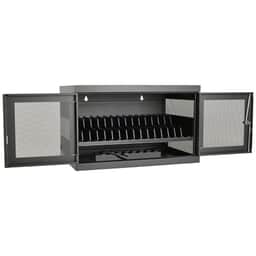
16-Port AC Charging Sync Station Cart Chromebook Laptop Tablet

Shipping Options at Checkout Warranty Terms Vary

Product Overview

The CSC16AC is a 16-port AC charging sync station cart for Chromebooks, laptops, and tablets in shared-device environments. It is a practical fit for classrooms, training rooms, libraries, and offices that need centralized charging, organized storage, and a consistent device return point.

$1,395.03

Shipping charges and warranty coverage vary by product and order. Review the applicable terms before purchase.

Available to Order

Available to order; contact us to confirm lead time

Shipping Options

Rates and available methods are shown at checkout

Available to order

Key Features

Classrooms: Support daily charging and storage for student Chromebooks or tablets between class periods.
Training spaces: Keep devices ready for workshops, onboarding sessions, and lab-based instruction.
Libraries and media centers: Create a consistent return point for shared equipment and circulating device pools.
Office environments: Manage loaner laptops, shared tablets, or department-issued mobile devices.
IT and AV support areas: Centralize charging and syncing for devices that need routine handling and redeployment.
Designed for 16 devices in one centralized station
Compatible with Chromebooks, laptops, and tablets
Built for shared-device environments where organization matters as much as charging

Ideal Use Cases

The CSC16AC is a 16-port AC charging sync station cart built for organizations that manage shared Chromebooks, laptops, and tablets throughout the day. It gives users a centralized place to charge, store, and organize mobile devices instead of relying on scattered power adapters and ad hoc storage locations.

This model is especially well suited for environments where devices are issued, returned, and redeployed on a routine schedule:

  • Classrooms: Support daily charging and storage for student Chromebooks or tablets between class periods.
  • Training spaces: Keep devices ready for workshops, onboarding sessions, and lab-based instruction.
  • Libraries and media centers: Create a consistent return point for shared equipment and circulating device pools.
  • Office environments: Manage loaner laptops, shared tablets, or department-issued mobile devices.
  • IT and AV support areas: Centralize charging and syncing for devices that need routine handling and redeployment.

For buyers responsible for multiple users and multiple devices, a 16-port cart can help simplify everyday workflows while keeping equipment in one designated location.

Why Choose This Model

If your priority is managing a moderate fleet of portable devices in a shared setting, the CSC16AC offers a straightforward fit. Its confirmed value is clear: it combines 16-port AC charging, sync station functionality, and cart-based storage for Chromebooks, laptops, and tablets.

That makes it a practical choice for teams that want to improve organization without overcomplicating deployment. Instead of assigning separate charging points, storage shelves, and sync locations, this type of cart helps consolidate device handling into one system. For schools and workplaces alike, that can support cleaner spaces, more consistent device return habits, and faster turnaround between uses.

  • Designed for 16 devices in one centralized station
  • Compatible with Chromebooks, laptops, and tablets
  • Built for shared-device environments where organization matters as much as charging
  • Useful for buyers seeking a dedicated place for charging, syncing, and storage

Because the source data does not include detailed manufacturer specifications, this listing stays focused on the verified product role and buyer fit rather than unsupported technical claims.

Installation and Integration

The CSC16AC is best deployed where users already follow a shared-device routine. In practice, that means placing it in a classroom corner, media room, training lab, office equipment area, or IT support space where devices can be returned after use and prepared for the next session.

Before deployment, buyers should confirm key implementation details that are not included in the source data, including physical dimensions, device fit, and electrical requirements. This is particularly important if you are working within tight room layouts, standardized furniture plans, or facilities guidelines.

To integrate the cart effectively into daily operations, consider these practical steps:

  • Confirm compatibility with the specific Chromebook, laptop, or tablet models in your fleet
  • Verify power and site requirements before installation
  • Assign devices to consistent positions to streamline check-in and check-out
  • Use the cart as the designated return location to reduce misplaced equipment
  • Place the unit where staff can easily supervise device access and end-of-day charging routines

For organizations managing rotating users, these simple process improvements can make the cart more valuable than a basic charging area alone.

Performance Highlights

The strongest performance advantage of the CSC16AC is operational efficiency. In environments with many users and limited time between sessions, centralized charging and syncing can help keep devices more consistently ready for use. A dedicated cart also supports better cable management and a more orderly storage process than distributing chargers across desks, counters, or wall outlets.

Confirmed highlights from the available source data include:

  • 16-port capacity for charging multiple devices from one cart
  • AC charging design for supported mobile devices
  • Sync station functionality for workflows that require device management in addition to charging
  • Multi-device compatibility with Chromebooks, laptops, and tablets

For schools, libraries, and offices, these fundamentals matter because they support repeatable daily use. When users know exactly where devices belong and staff know where to find them, device readiness becomes easier to maintain.

What Makes It Different

What sets the CSC16AC apart is its combination of buyer-relevant functions in a format intended for real-world shared-device management. It is not simply a place to plug in devices; it is positioned as a charging sync station cart, which makes it particularly relevant for environments that need both organized storage and a consistent handling point for multiple portable systems.

It also stands out as a practical option for mixed-device deployments. If your environment includes a combination of Chromebooks, laptops, and tablets, the CSC16AC aligns with that broader use case based on the confirmed compatibility information provided.

Just as important, this model fits buyers who value clear, functional utility:

  • A single cart for charging, syncing, and storage
  • A 16-port format suited to shared-device programs
  • A practical fit for education, training, library, and office use
  • A centralized approach that can help reduce clutter and improve device return consistency

Final Assessment

The CSC16AC is a strong candidate for buyers who need a centralized 16-port AC charging sync station cart for Chromebooks, laptops, and tablets in a shared-use environment. Its best fit is in classrooms, training spaces, libraries, offices, and support areas where device organization and reliable return routines are part of everyday operations.

While detailed manufacturer specifications were not provided in the source data, the verified facts still make the core purpose of this model clear: it is designed to help manage, charge, sync, and store up to 16 mobile devices in one place. If that matches your workflow, the CSC16AC is a practical option worth considering, with the recommendation that buyers confirm dimensions, compatibility, and electrical requirements before deployment.

Payment Options

All major credit cards
PayPal at checkout
Apple Pay at checkout
Google Pay at checkout
Supports recurring payments
Wire transfer for business

Why Buy from AVN

Warranty Information

Coverage varies; confirm the terms before purchase

Returns on Most Items

30-day window; conditions and exclusions apply

Product Details

Condition and specifications are shown per listing

Secure Connection
HTTPS/TLS protected
30-Day Returns
Most eligible items
Quote Support
Pricing confirmed in quote
Warranty Information
Terms vary by product
Shipping Options
Rates shown at checkout