MIXER ACCESSORIES SKU 41761

ControlSpace CC-16 Zone Controller

Shipping Options at Checkout Warranty Terms Vary

Product Overview

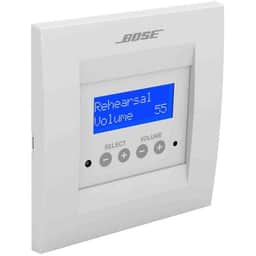
The Bose Professional ControlSpace CC-16 gives end users programmable control of ControlSpace systems. It features a 122 × 32-pixel backlit blue LCD, custom on-screen wording, source and configuration switching, easy-to-select scene recall, DIP-switch addressing, drag-and-drop setup in ControlSpace Designer, and fit for a standard 2-gang electrical wall box.

$351.82

Shipping charges and warranty coverage vary by product and order. Review the applicable terms before purchase.

Available to Order

Available to order; contact us to confirm lead time

Shipping Options

Rates and available methods are shown at checkout

Available to order

Key Features

122 × 32-pixel backlit blue LCD for displaying programmed information.
Programmable control of ControlSpace system elements.
Support for switching audio sources and system configurations.
Easy-to-select scene programming for recalling multiple room-usage scenarios.
Customizable on-screen wording for easier end-user operation.
Simplified drag-and-drop setup through ControlSpace Designer.
Rear-panel DIP switches for unit addressing.
Compatibility with a standard 2-gang electrical wall box.

Ideal Use Cases

The Bose Professional ControlSpace CC-16 is designed to place end-user control of a ControlSpace system at the point of use. It is suited to installations where users need to recall defined room-usage scenarios, switch audio sources, or select system configurations without working directly in ControlSpace Designer. Its support for easy-to-select scenes allows multiple room scenarios to be programmed and recalled from the controller.

Customizable on-screen wording lets programmed selections be labeled for easier system operation. This is useful when source, scene, or configuration names should reflect the terminology understood by the people using the room. Elegant styling and intuitive controls make the CC-16 a focused user interface for the system elements that have been assigned to it.

Why Choose This Model

The CC-16 separates system programming from everyday operation. Simplified drag-and-drop setup is performed in ControlSpace Designer, while the installed controller presents the programmed choices to end users. It can provide control of system elements, including the switching of audio sources and system configurations. Scenes can also be created for multiple room-usage scenarios and presented as easy-to-select choices.

A 122 × 32-pixel backlit blue LCD supplies an on-unit visual interface. The wording shown on that display can be customized, helping users identify available selections without relying on generic or unfamiliar labels. The combination of programmable functions, scene support, and customizable text enables the controller to reflect the specific ControlSpace configuration created for the application.

Installation and Integration

The ControlSpace CC-16 fits into a standard 2-gang electrical wall box, giving the unit a defined wall-box format for installation. Addressing is handled through DIP switches located on the back of the controller. These supplied details establish the core installation requirements: provide the appropriate 2-gang electrical wall box, set the unit address, and incorporate the controller into the programmed ControlSpace system.

ControlSpace Designer is used for configuration and provides simplified drag-and-drop setup. System elements can be assigned for control, including audio-source switching and system configurations. Easy-to-select scenes can then be programmed around the required room-usage scenarios, and the wording displayed by the CC-16 can be customized for end-user operation. Connection types, cabling, electrical requirements, overall dimensions, and operating limits are not specified in the supplied product data.

Performance Highlights

  • 122 × 32-pixel backlit blue LCD for displaying programmed information.
  • Programmable control of ControlSpace system elements.
  • Support for switching audio sources and system configurations.
  • Easy-to-select scene programming for recalling multiple room-usage scenarios.
  • Customizable on-screen wording for easier end-user operation.
  • Simplified drag-and-drop setup through ControlSpace Designer.
  • Rear-panel DIP switches for unit addressing.
  • Compatibility with a standard 2-gang electrical wall box.

These capabilities concentrate the CC-16 on the tasks described for end-user ControlSpace operation. The display communicates customized wording, the controls provide access to programmed selections, and scene support brings multiple system settings into choices that can be recalled directly from the controller.

What Makes It Different

The CC-16 combines installer programming with a deliberately simplified user-facing interface. ControlSpace Designer handles drag-and-drop setup, while the controller exposes only the system elements, configurations, and scenes selected during programming. This arrangement allows the installed interface to be tailored around the intended room scenarios rather than presenting the complete programming environment to the end user.

Customizable display wording is a key part of that approach. Programmed choices can be identified with application-appropriate text on the backlit blue LCD. Scene recall extends the concept by allowing multiple room-usage scenarios to be organized into easy-to-select options. The standard 2-gang wall-box fit and rear DIP-switch addressing provide defined details for incorporating the controller into an installation.

Final Assessment

The Bose Professional ControlSpace CC-16 is a purpose-built zone controller for end-user operation of ControlSpace systems. Its 122 × 32-pixel backlit blue LCD, customizable wording, programmable system-element control, and scene recall provide a direct interface for source choices, configurations, and room-usage scenarios. Simplified setup in ControlSpace Designer, DIP-switch addressing, and compatibility with a standard 2-gang electrical wall box complete the documented integration features.

Payment Options

All major credit cards
PayPal at checkout
Apple Pay at checkout
Google Pay at checkout
Supports recurring payments
Wire transfer for business

Why Buy from AVN

Warranty Information

Coverage varies; confirm the terms before purchase

Returns on Most Items

30-day window; conditions and exclusions apply

Product Details

Condition and specifications are shown per listing

Secure Connection
HTTPS/TLS protected
30-Day Returns
Most eligible items
Quote Support
Pricing confirmed in quote
Warranty Information
Terms vary by product
Shipping Options
Rates shown at checkout