

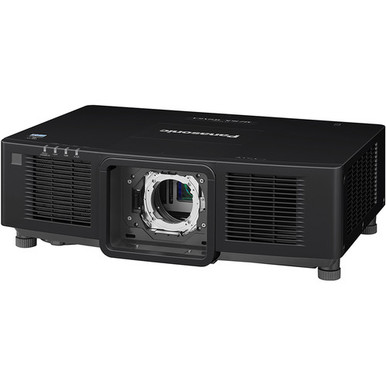
The Panasonic PT-RCQ80LBU vs PT-RCQ80LWU decision starts with one confirmed difference: cabinet color. The PT-RCQ80LBU is black, while the PT-RCQ80LWU is white. Both listings specify 8,000-lumen brightness, WUXGA resolution, laser illumination, DLP imaging, and no included lens.
That makes the finish choice easy. Installation planning takes more work. Throw type, compatible lenses, connections, mounting details, audio, smart functions, and maintenance data aren’t listed in the supplied specifications. You shouldn’t assume those details are identical simply because the projectors share the PT-RCQ80 name.
This comparison separates confirmed facts from open questions. It also explains what churches, schools, conference room teams, and AV installers should verify before ordering either projector. The goal is simple: select the right cabinet color, then prove that the lens and installation plan will work in the room.
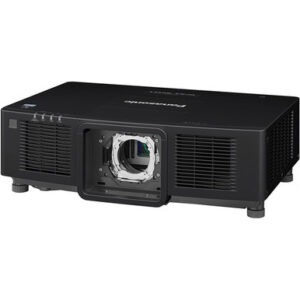
Top pick: The Panasonic PT-RCQ80LBU 8000-Lumen WUXGA Laser DLP Projector (Black, No Lens) is the lead recommendation because This is the black product at the center of the comparison. Its listing confirms 8,000-lumen brightness, WUXGA resolution, laser DLP imaging, and a no-lens configuration.
Quick Picks
- Best overall: Panasonic PT-RCQ80LBU 8000-Lumen WUXGA Laser DLP Projector (Black, No Lens)
- Best for professional AV installations that call for a whi…: Panasonic PT-RCQ80LWU 8000-Lumen WUXGA Laser DLP Projector (White, No Lens)
- Best for installations specifically requiring an ultra-sho…: Panasonic PT-CMZ50 WUXGA Ultra-Short Throw Laser Projector – Professional Golf Simulator Display
Quick Comparison Table
| Feature | Panasonic PT-RCQ80LBU 8000-Lumen WUXGA Laser DLP Projector (Black, No Lens) | Panasonic PT-RCQ80LWU 8000-Lumen WUXGA Laser DLP Projector (White, No Lens) | Panasonic PT-CMZ50 WUXGA Ultra-Short Throw Laser Projector – Professional Golf Simulator Display |
|---|---|---|---|
| Brightness | 8000 lumens | 8000 lumens | 5200 lumens |
| Resolution | WUXGA | WUXGA | WUXGA |
| Best For | Professional AV installations that call for a black projector cabinet and include an installer-led lens plan. | Professional AV installations that call for a white projector cabinet and have a confirmed compatible-lens design. | Installations specifically requiring an ultra-short-throw WUXGA projector, including the professional golf simulator application named in the listing. |
| Throw Type | Not listed | Not listed | Ultra short throw |
| Audio | Not listed | Not listed | Not listed |
| Smart Features | Not listed | Not listed | Not listed |
| Price Range | $11,492.28 | $11,492.28 | $4,190.00 |
| Recommended Buyer | Professional AV installations that call for a black projector cabinet and include an installer-led lens plan. | Professional AV installations that call for a white projector cabinet and have a confirmed compatible-lens design. | Installations specifically requiring an ultra-short-throw WUXGA projector, including the professional golf simulator application named in the listing. |
Product Images

Top Projector Products from AudioVideoNation
1. Panasonic PT-RCQ80LBU 8000-Lumen WUXGA Laser DLP Projector (Black, No Lens)
Best fit: Professional AV installations that call for a black projector cabinet and include an installer-led lens plan.
Why it belongs here: This is the black product at the center of the comparison. Its listing confirms 8,000-lumen brightness, WUXGA resolution, laser DLP imaging, and a no-lens configuration.
Store details: SKU PT-RCQ80LBU | In stock | $11,492.28
Key Features
- 8,000-lumen listed brightness
- WUXGA resolution
- Laser light source with DLP imaging
- Black cabinet
- Sold without a lens
Things to Consider
Throw type, compatible lenses, connectivity, mounting data, audio, smart functions, and maintenance details are not listed. Verify them for this exact SKU before ordering.
2. Panasonic PT-RCQ80LWU 8000-Lumen WUXGA Laser DLP Projector (White, No Lens)
Best fit: Professional AV installations that call for a white projector cabinet and have a confirmed compatible-lens design.
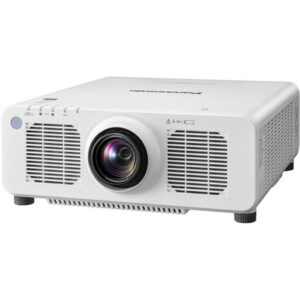
Why it belongs here: This is the white counterpart in the comparison. The provided facts match the black listing on brightness, resolution, laser DLP description, and no-lens configuration.
Store details: SKU PT-RCQ80LWU | In stock | $11,492.28
Key Features
- 8,000-lumen listed brightness
- WUXGA resolution
- Laser light source with DLP imaging
- White cabinet
- Sold without a lens
Things to Consider
The supplied data establishes cabinet color but no other difference from the black product. Confirm lens compatibility, connections, mounting requirements, and maintenance information on the exact product page.
3. Panasonic PT-CMZ50 WUXGA Ultra-Short Throw Laser Projector – Professional Golf Simulator Display
Best fit: Installations specifically requiring an ultra-short-throw WUXGA projector, including the professional golf simulator application named in the listing.
Why it belongs here: This listing provides a confirmed ultra-short-throw alternative for projects where placement is the main constraint. It is listed at 5,200 lumens with WUXGA resolution and a laser light source.
Store details: SKU PT-CMZ50U | In stock | $4,190.00
Key Features
- 5,200-lumen listed brightness
- WUXGA resolution
- Ultra-short-throw classification
- Laser light source
- Listed for professional golf simulator display use
Things to Consider
Its 5,200-lumen brightness and ultra-short-throw format differ from the two 8,000-lumen PT-RCQ80 projectors. Exact screen, placement, connectivity, audio, and maintenance details are not listed.
Panasonic PT-RCQ80LBU 8000-Lumen WUXGA Laser DLP Projector (Black, No Lens) vs Panasonic PT-RCQ80LWU 8000-Lumen WUXGA Laser DLP Projector (White, No Lens): Main Differences
- Choose Panasonic PT-RCQ80LBU 8000-Lumen WUXGA Laser DLP Projector (Black, No Lens) if Professional AV installations that call for a black projector cabinet and include an installer-led lens plan..
- Choose Panasonic PT-RCQ80LWU 8000-Lumen WUXGA Laser DLP Projector (White, No Lens) if Professional AV installations that call for a white projector cabinet and have a confirmed compatible-lens design..
- Choose Panasonic PT-CMZ50 WUXGA Ultra-Short Throw Laser Projector – Professional Golf Simulator Display if Installations specifically requiring an ultra-short-throw WUXGA projector, including the professional golf simulator application named in the listing..
Panasonic PT-RCQ80LBU vs PT-RCQ80LWU at a glance
Start with what the supplied product data establishes. The PT-RCQ80LBU has a black cabinet. The PT-RCQ80LWU has a white cabinet. Each listing specifies 8,000 lumens, WUXGA resolution, a laser light source, DLP imaging, and a no-lens configuration.
Those shared facts make brightness and resolution a tie on paper. They don’t prove that every internal function, connection, mounting specification, or service requirement is identical. The provided data contains no dimensions, weight, compatible-lens list, input panel details, control options, operating noise, optical adjustment ranges, or maintenance intervals.
Treat cabinet color as the only confirmed distinction. Treat everything else as a verification item. Not listed doesn’t mean unavailable. It means the supplied facts can’t support a purchasing claim. An installer should compare the current product documentation for both exact SKUs before specifying either one.
8,000-lumen WUXGA laser DLP image planning
Both projectors are listed at 8,000 lumens and WUXGA resolution, so neither gains a documented brightness or resolution advantage. They also share the same laser DLP description in their product names. If your decision rests only on those three points, cabinet color breaks the tie.
The 8,000-lumen figure is a useful planning input, but it doesn’t determine a suitable screen size by itself. Room lighting, screen dimensions, screen material, viewing distance, content, and the selected lens all affect the finished result. The supplied data includes no room-size recommendation or supported screen-size range.
Image quality also covers details that aren’t listed here. Contrast, color specifications, uniformity, image processing, and supported incoming signal formats all require verification. Don’t infer them from WUXGA or DLP alone. If a project has a defined visual standard, compare that requirement against documentation for the exact SKU rather than relying on the shared family name.
No-lens projector installation: throw and screen requirements
The no-lens configuration is the most consequential purchasing fact after cabinet color. Both product names explicitly say No Lens. Your order and design plan therefore need a separately selected compatible lens, but the supplied data doesn’t identify supported lens models.
Throw type is also Not listed for both projectors. Don’t label either one standard throw, short throw, or long throw without checking its compatible lens options. Begin with a site survey. Record the required image width and height, the available lens-to-screen distance, the proposed projector position, and any obstructions. Then confirm that a supported lens covers the calculated throw requirement.
Lens shift, zoom range, focus method, and adjustment capabilities aren’t provided. Verify each item if the mount can’t sit directly on the screen centerline or if technicians need remote optical adjustment. The same caution applies to retrofits. An existing mount location doesn’t prove that a new projector-and-lens combination can fill the existing screen.
The current facts establish no lens-compatibility advantage for either finish. Don’t assume a lens can move between the black and white variants until the exact compatibility list confirms it.
Connectivity and signal planning: verify before purchase
Connectivity details aren’t included for the PT-RCQ80LBU or PT-RCQ80LWU. No supported claim can be made about their input types, input counts, network functions, control protocols, or accepted source formats from the supplied data. Family resemblance isn’t enough for a bid or system design.
Document the signal path before ordering. List every source, the required physical connection, incoming resolution, cable distance, switching equipment, and control requirement. A conference room may need integration with its switching and room-control system. A church may have a production workflow spanning several locations. A school may need repeatable operation across many rooms. Each requirement should map to a confirmed projector connection or an explicitly planned external component.
If a required interface appears on one product page but not the other, seek confirmation before treating that as a genuine model difference. The current input does not establish one.
Black vs white projector finish and mounting flexibility
Cabinet finish is actionable. The black PT-RCQ80LBU can coordinate with dark ceilings, truss, or other black AV hardware. The white PT-RCQ80LWU can coordinate with light ceilings and brighter interior finishes. This is a visual integration choice, not a documented image-performance difference.
Finish matters most when the projector remains visible. It may matter less inside an enclosure or concealed technical area, though any enclosure still needs approved clearance and ventilation. Those requirements aren’t listed here.
Mounting flexibility can’t be compared from the supplied facts. Dimensions, weight, mounting points, supported orientation, ventilation clearance, and service-access requirements all need confirmation. Check the mount’s rated compatibility rather than assuming an existing bracket will fit. Because the lens is selected separately, finish the lens calculation before locking the projector position. A correct cabinet color won’t rescue a mount location that falls outside the chosen lens range.
Laser projector maintenance questions to settle
The listings confirm a laser light source, but they don’t provide a rated light-source life, filter design, cleaning schedule, dust-protection information, service interval, or warranty terms. No maintenance advantage between the two projectors is established.
Ask who will access the projector, how safely they can reach it, and which routine tasks the manufacturer requires. Confirm clearance for service and lens removal before approving a ceiling position. Churches, schools, and shared conference facilities should also document expected operating hours and available maintenance windows, then compare those needs with the current product documentation.
Keep records for the exact projector SKU and the separately purchased lens. That detail will help future technicians identify the installed configuration without relying on cabinet appearance alone.
Professional AV projector fit by venue
For churches, both projectors present the same confirmed 8,000-lumen WUXGA starting point. Choose black when the installation calls for a dark cabinet and white when a light cabinet fits the room. Then confirm the lens against the sanctuary’s screen size, throw distance, and projector position. Connectivity and control must also match the production system.
For schools, neither listing supplies enough information to approve a standard classroom or auditorium design without further checks. Room dimensions, screen requirements, mounting access, source connections, control needs, and maintenance procedures all belong in the specification. Pick the finish required by the room only after those engineering questions are closed.
For conference rooms, the shared WUXGA resolution provides no documented reason to favor one variant. Screen dimensions, source signals, cable paths, control integration, and cabinet visibility should drive the evaluation. Audio is Not listed for both projectors, so verify the product page or plan the room’s audio separately rather than assuming built-in capability.
Spaces with a strict placement constraint may need a different projector category. The Panasonic PT-CMZ50U listing provides a separate 5,200-lumen WUXGA ultra-short-throw laser option. It deserves consideration when an ultra-short-throw format is required, but its brightness and throw classification differ from the two PT-RCQ80 products. It isn’t a like-for-like substitute.
Final choice: PT-RCQ80LBU or PT-RCQ80LWU?
Choose the PT-RCQ80LBU when the project calls for a black cabinet and its verified lens, connections, mounting specifications, and service requirements meet the design. Choose the PT-RCQ80LWU when the same approval process points to a white cabinet.
If either finish works, the supplied data gives no supported performance reason to prefer one. Both listings state 8,000 lumens, WUXGA resolution, laser DLP imaging, and no included lens. Don’t manufacture a technical distinction that the available specifications don’t show.
Before releasing the purchase, confirm the exact SKU, compatible lens SKU, calculated throw range, required image size, projector position, source connections, control method, mount compatibility, clearances, and maintenance access. That checklist turns a color choice into an installation-ready decision. Skip any one of those checks and the lens-free configuration can create an expensive planning gap.
Related AudioVideoNation Links
- Browse Projector at AudioVideoNation
- Panasonic PT-RCQ80LBU black no-lens projector
- Panasonic PT-RCQ80LWU white no-lens projector
- Panasonic PT-CMZ50 ultra-short-throw projector
FAQ
What is the main difference between the Panasonic PT-RCQ80LBU and PT-RCQ80LWU?
The only confirmed difference in the supplied product data is cabinet color: the PT-RCQ80LBU is black, and the PT-RCQ80LWU is white. Both listings specify 8,000 lumens, WUXGA resolution, laser DLP imaging, and no included lens.
Does either PT-RCQ80 projector include a lens?
No, both the PT-RCQ80LBU and PT-RCQ80LWU are explicitly listed as No Lens. Confirm a compatible lens and calculate its throw range against the screen dimensions and mounting distance before ordering.
Do both projectors have the same brightness and resolution?
Yes, the supplied data lists both projectors at 8,000 lumens with WUXGA resolution. No difference in brightness or resolution is established, but other image specifications are not listed.
Can 8,000 lumens determine the correct screen size?
No, the 8,000-lumen rating alone does not determine screen size or lens choice. Room lighting, screen requirements, projector position, and the supported lens range must be evaluated together.
Which projector is better for a church, school, or conference room?
Neither projector is universally better for a specific venue because the confirmed technical facts are the same and the cabinet colors differ. Choose the required finish, then verify the lens, connections, mount, control needs, and maintenance access for the room.
Are there confirmed connectivity, mounting, or maintenance differences?
No connectivity, mounting, or maintenance differences are confirmed by the supplied product data. Compare current documentation for both exact SKUs and verify every required input, control function, mounting specification, clearance, and service requirement.
Conclusion
Use this Panasonic PT-RCQ80LBU vs PT-RCQ80LWU comparison to match the product to the room, budget, installation requirements, and current AudioVideoNation availability. Review the linked product pages for the latest pricing, stock details, and full product information before ordering.
Products Used
| SKU | Product Name | URL |
|---|---|---|
| PT-RCQ80LBU | Panasonic PT-RCQ80LBU 8000-Lumen WUXGA Laser DLP Projector (Black, No Lens) | View product |
| PT-RCQ80LWU | Panasonic PT-RCQ80LWU 8000-Lumen WUXGA Laser DLP Projector (White, No Lens) | View product |
| PT-CMZ50U | Panasonic PT-CMZ50 WUXGA Ultra-Short Throw Laser Projector – Professional Golf Simulator Display | View product |