Display System -Chip LCD
Native Chip Resolution 1280 x 800 (WXGA)
Supported Resolutions VGA SVGA XGA WXGA WXGA+ SXGA WSXGA+ UXGA
Maximum Brightness 2500 Lumens
Aspect Ratio Native: 16:10 Supported: 16:9 Supported: 4:3
Scan Horizontal: 31.5 to 106 kHz Vertical: 56 to 120 Hz
Lens f/4.1 – 4.1 (f = 4.1 – 4.1 mm)
Throw Distance 1 – 2.3′ / 0.305 – 0.701 m
Projection Size 60 – 100″ / 1524.00 – 2540.00 mm
Keystone Correction Vertical: 5 Horizontal: 5
Ceiling Mountable Yes
Lamp Power 210 W
Expected Lamp Life Medium Brightness: 3000 Hours Low Brightness: 5000 Hours
Fan Noise Medium Brightness: 34 dB Low Brightness: 28 dB
Security Password Protection
Power Consumption Medium Brightness: 310 W
Dimensions (W x H x D) 13.6 x 4.0 x 11.9″ / 34.5 x 10.2 x 30.2 cm
Weight lb 9.04
Package Weight 18.2 lb
Box Dimensions (LxWxH) 19.3 x 17.9 x 7.4″
System Requirements for Software CPU – Intel Core 2 Duo 2.0 GHz or faster Free hard drive space – 2 GB or more Free memory – 1 GB or more, CPU – Intel Core 2 Duo 2.0 GHz or faster
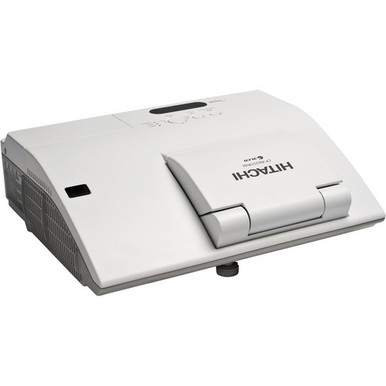
Hitachi CP-AW2519N Overview The Hitachi CP-AW2519N LCD Projector is an all-in-one interactive projector designed with education and corporate users in mind. It combines WXGA resolution with 2500 ANSI lumens white/color output and a 2000:1 contrast ratio. It incorporates 3LCD technology and HDMI, VGA, USB, and audio inputs.
Hitachi CP-AW2519N Overview The projector can be used close to the screen thanks to the built-in mirror that relays the picture from the lens. The CP-AW2519N contains a closed captioning decoder. Hitachi is a Crestron Integrated Partner, and the model is AMX Device Discovery-compatible.
The CP-AW2519N can create a 60″ picture with only 4.7-inches between the projector’s leading edge and the screen. At the back of the projector is a flip-up mirror that relays the picture from the lens, so the distance between mirror and screen in this case is 16.8″. A 100″ size image can be achieved at 15.4″ away from the front of the projector or 27.5-inches factoring in the distance from mirror to screen. Tabletop Presentation
Ultra Short Throw Technology The projector is typically mounted on a ceiling near the screen, but you could also turn any tabletop into a projection screen using the optional tabletop stand. The latter is ideal for a small group environment or in a room with limited space. Display via USB
Ultra Short Throw Technology Simply plug and play using the USB port instead of the 15-pin D-sub VGA cable. Both USB and VGA cables are included.
HDMI Input You’ll want to use the projector’s HDMI input for non-computer sources like Blu-ray Disc and DVD players or cable TV boxes.
Users can name input sources in simple language instead of factory default name. Drawing Function Option
The optional Hitachi TB-1 wireless tablet and pen allows you to engage your audience by annotating over images shown on the projector. For better performance, both an IR sensor and ultra sonic technology are used. This increases reliability as well as eliminating lag time from pen to projection for a more natural writing experience.
Interactive Business and Education Software Hitachi’s interactive software was created with both corporate and education users in mind. It provides easy access to print and email functions.
Free hard drive space 2 GB or more
Interactive Business and Education Software Free memory 1 GB or more Perfect Fit 2
Interactive Business and Education Software Enables the user to adjust individual corners and sides independent of one another. Perfect Fit 2 provides vertical and horizontal digital correction of either barrel or pin cushion distortions. This feature helps correct geometric and complicated distortions. Perfect Fit 2 allows the projected image to fit correctly to the screen quickly and easily.
Interactive Business and Education Software MyButton / MySource Doc Camera
Interactive Business and Education Software Two customizable buttons on the remote control allow users to create a shortcut for any projector command such as: Direct input (RGB1, S-video, etc.), picture mode or filter reset. For connection to a document camera, MySource allows users to add a third document camera source button. PIN Lock / MyScreen / MyText
Interactive Business and Education Software PIN lock protection can limit projector users. MyScreen PIN lock keeps captured images on the startup screen. Users can set any name logo to MyScreen, clearly identifying ownership. MyText provides the ability to write text on the startup screen such as model name, serial number or location.
Transition Detector and Security Bar A security sensor located inside the projector recognizes when the projector has been moved. Moving the projector without using the correct PIN code will disable the projector. Built-in Speaker
A 10-watt speaker is built into the projector along with an RCA jack (L/R) stereo line output for connection to an external sound system. Microphone Input
Transition Detector and Security Bar A microphone can be used via the jack located on the input panel. It allows for more dynamic presentations even in standby mode.
IR Remote Frequency Change To avoid conflict with fluorescent lights or IrDA (IR signal) from a notebook PC, the frequency of the IR remote control can be changed from the menu.
Transition Detector and Security Bar A label is affixed to the front of the projector to more easily access and read the model name and serial number while mounted in ceiling use. This is a convenience for installers, end user and auditors for instant accessibility. In the Box
Transition Detector and Security Bar Hitachi CP-AW2519N LCD Projector Remote Control
Transition Detector and Security Bar Native Chip Resolution 1280 x 800 (WXGA) Supported Resolutions VGA SVGA XGA WXGA WXGA+ SXGA WSXGA+ UXGA Maximum Brightness 2500 Lumens
Aspect Ratio Native 16:10
Aspect Ratio Supported 16:9, 4:3 Scan
Aspect Ratio Horizontal 31.5 to 106 kHz
Aspect Ratio Vertical 56 to 120 Hz Lens Lens
Projection Size 60 100″ / 1524.00 – 2540.00 mm Features Keystone Correction
Projection Size Vertical 5
Projection Size Horizontal 5 Ceiling Mountable Yes General Lamp Power 210 W Expected Lamp Life
Projection Size Medium Brightness 3000 Hours
Projection Size Low Brightness 5000 Hours
Fan Noise Medium Brightness 34 dB
Fan Noise Low Brightness 28 dB Security Password Protection
Power Consumption Medium Brightness 310 W
Power Consumption Dimensions (W x H x D) 13.6 x 4.0 x 11.9″ / 34.5 x 10.2 x 30.2 cm
Power Consumption Weight lb 9.04 Packaging Info Package Weight 18.2 lb
Power Consumption Box Dimensions (LxWxH) 19.3 x 17.9 x 7.4″
SKU CP-AW2519N
Brand Hitachi
MPN CP-AW2519N
GTIN 00050585152762, 50585152762
UPC 50585152762